CRM Automation With AI: Clean Data, Faster Follow-Up, and Better Handoffs
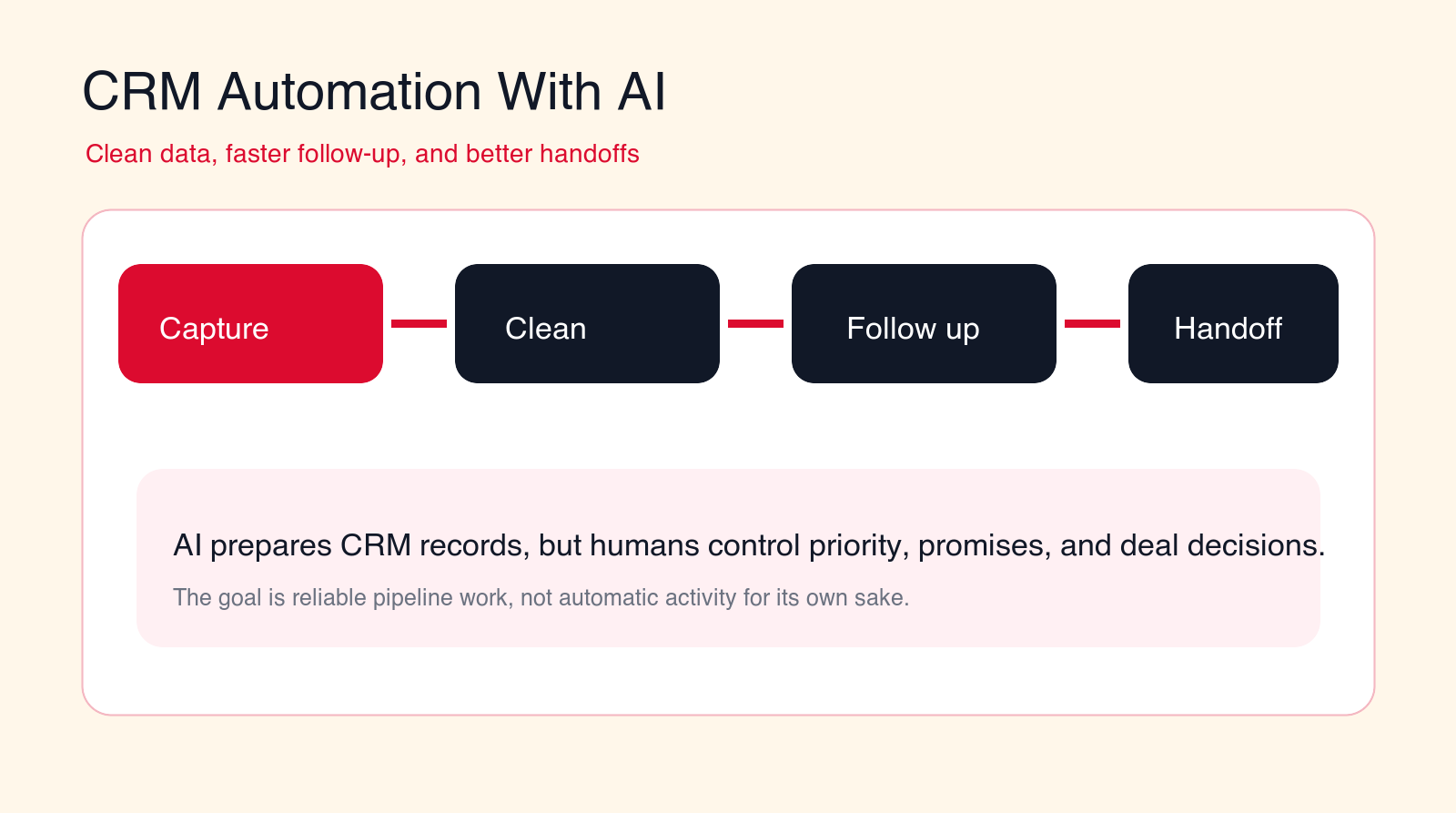
CRM automation with AI should make pipeline work cleaner and easier to trust. The best workflows clean records, surface the next action, draft follow-up, route handoffs, and keep humans responsible for deal judgment.
Best first pilot
Start with CRM cleanup, inbound lead routing, follow-up drafts, or sales-to-customer-success handoffs before automating sensitive sales judgment.
Focus
CRM automation with AI
Best for
Sales operations teams
Best first workflow
CRM cleanup
Main service
AI Automation Agency
TL;DR
CRM automation with AI is most useful when it improves record quality, follow-up speed, routing, and handoff clarity. Start with workflows that prepare work for people: duplicate detection, field cleanup, lead routing, call and meeting summaries, next-step reminders, follow-up drafts, stale deal alerts, sales-to-onboarding handoffs, support-to-account handoffs, renewal signals, pipeline hygiene, and reporting. Do not let AI silently overwrite records, promise pricing, mark deals as lost, or contact customers without review until the workflow has proven accuracy and the team trusts it.
Free CRM workflow check
Find the first CRM automation worth building.
Drop your email and we will send a first-pass recommendation for the safest CRM workflow to automate first.
No spam. We use this to reply with the recommendation.
CRM automation with AI is not about making a sales team look busier. It is about making customer and pipeline work easier to trust. Most CRM problems are not caused by a lack of dashboards. They come from dirty data, missing next steps, duplicate contacts, vague notes, forgotten follow-ups, stale opportunities, and weak handoffs between marketing, sales, onboarding, support, and account management.
When CRM work is manual, everyone feels it. Sales spends time cleaning records instead of selling. Managers do not trust pipeline reports. Support does not know what sales promised. Customer success starts onboarding with missing context. Marketing cannot tell which leads became real opportunities. Leadership asks for forecast confidence and receives a spreadsheet debate.
AI can help, but only when it is attached to a clear workflow. A generic AI assistant that writes notes into the CRM can create more confusion if it updates the wrong field, duplicates a record, invents a next step, or sends a customer a message that should have been reviewed. A useful CRM automation system has rules, permissions, confidence thresholds, source links, and human review for judgment-heavy steps.
This guide explains how to use AI for CRM cleanup, faster follow-up, and better handoffs. It is written for business owners, sales leaders, revenue operations teams, agencies, service companies, B2B teams, and operations managers that want practical automation without breaking sales trust.
Quick Answer: Use AI to Prepare CRM Work, Not Replace Sales Judgment
The best first CRM automation with AI workflows are repeated, data-heavy, and easy to review. Start with duplicate detection, lead enrichment, field normalization, inbound lead routing, follow-up reminders, meeting summaries, next-step drafts, stale deal alerts, and handoff packets. These workflows save time because they prepare clean work for people.
Avoid starting with workflows where AI makes final decisions about pricing, discounting, closing, deal stage, churn risk, refunds, eligibility, or account strategy. The AI can summarize signals and recommend a next action, but a human should approve anything that changes the relationship with a lead, customer, or partner.
A strong CRM automation workflow answers four questions: what happened, what changed, who owns the next step, and what should the system record? If the automation cannot answer those questions clearly, it is not ready for production.
| CRM workflow | Good AI automation | Bad AI automation | Best control |
|---|---|---|---|
| Data cleanup | Flags duplicates, bad fields, missing owners, and stale records. | Overwrites records without source evidence. | Use review queues for risky changes. |
| Follow-up | Drafts contextual next steps and reminders. | Sends generic messages automatically. | Require approval for customer-facing outreach. |
| Handoffs | Creates a complete packet for the next owner. | Forwards vague notes without obligations. | Use required handoff fields. |
| Reporting | Shows data quality, stuck deals, and missing next actions. | Summarizes pipeline from unreliable records. | Measure trust and correction rate. |
What Is CRM Automation With AI?
CRM automation with AI means using AI, rules, integrations, and review workflows to improve the way customer relationship data is captured, cleaned, updated, routed, summarized, and acted on. It is not simply a chatbot inside the CRM. It is a workflow layer around the customer record.
Traditional CRM automation usually follows fixed rules. If a form is submitted, create a lead. If a deal reaches a stage, create a task. If a date arrives, send a reminder. Those rules are still useful. AI adds value when the workflow needs to read unstructured information, interpret context, summarize conversations, classify intent, detect missing details, compare fields, or prepare a better next action.
For example, AI can read a long sales email and identify the company, pain point, requested timeline, budget signal, decision maker, next meeting, and missing qualification questions. It can compare that information to the CRM record and suggest updates. It can draft a follow-up email. It can create a task for the account owner. It can flag that the lead looks urgent because the customer mentioned a deadline.
The practical value appears when those actions fit the CRM rules. Which fields can be updated automatically? Which need approval? Which source should win when records conflict? Which owner should receive the task? Which customer-facing message requires review? Which actions should be logged for audit and training?
AI CRM automation should make the CRM more reliable. If it makes the CRM louder, fuller, and harder to audit, it is the wrong implementation.
Where AI Fits in the CRM Stack
AI fits best around the moments where customer data enters, changes, or moves between teams. Those moments include website forms, inbound calls, email threads, calendar meetings, demo notes, sales research, support tickets, onboarding documents, renewal reminders, account reviews, and reporting requests.
A useful CRM automation architecture has five layers. First, intake captures the signal from a form, email, call, meeting, support ticket, or customer action. Second, AI reads the signal and extracts useful context. Third, validation checks the context against CRM rules, existing records, required fields, and source systems. Fourth, routing creates the right task, owner, message draft, or handoff packet. Fifth, review and reporting show what the automation changed, what it suggested, and what people corrected.
This structure keeps AI from becoming a hidden record editor. The CRM remains the source of truth, but the automation improves the quality of what enters it. A sales rep should know why a lead was routed. A manager should know why a deal was flagged as stale. A customer success manager should know what sales promised before onboarding starts.
The most important design choice is where write access begins. Reading and summarizing CRM data is lower risk than changing records. Creating a suggested update is lower risk than overwriting a field. Drafting a follow-up is lower risk than sending it. A mature rollout expands access only after the team trusts the workflow.
How AI Helps Clean CRM Data
CRM data gets dirty because people are busy and customer information arrives from many places. Names are misspelled. Company domains change. Leads are duplicated. Fields are left blank. Job titles are inconsistent. Deals move stages without notes. Call outcomes are written differently by every rep. Old records remain open long after they are dead.
AI can help by identifying patterns that are difficult to catch with simple rules. It can compare names, domains, phone numbers, email addresses, account relationships, recent activity, and notes to flag likely duplicates. It can normalize company names, detect missing industry or region fields, summarize recent customer activity, and identify records that should be merged or reviewed.
The guardrail is that cleanup should not be invisible. A low-risk field such as capitalization, spacing, or empty metadata may be safe to update automatically after testing. A risky merge, account owner change, lifecycle status change, or revenue field should go to a review queue. The workflow should show the evidence that led to the recommendation.
Good CRM cleanup automation also improves upstream behavior. If the same form creates incomplete leads every week, the answer is not only more AI cleanup. The form may need better fields. If sales repeatedly skips a required close reason, the workflow may need a better stage process. If support tickets never connect to accounts, the integration may need repair.
How AI Speeds Up Follow-Up Without Hurting Quality
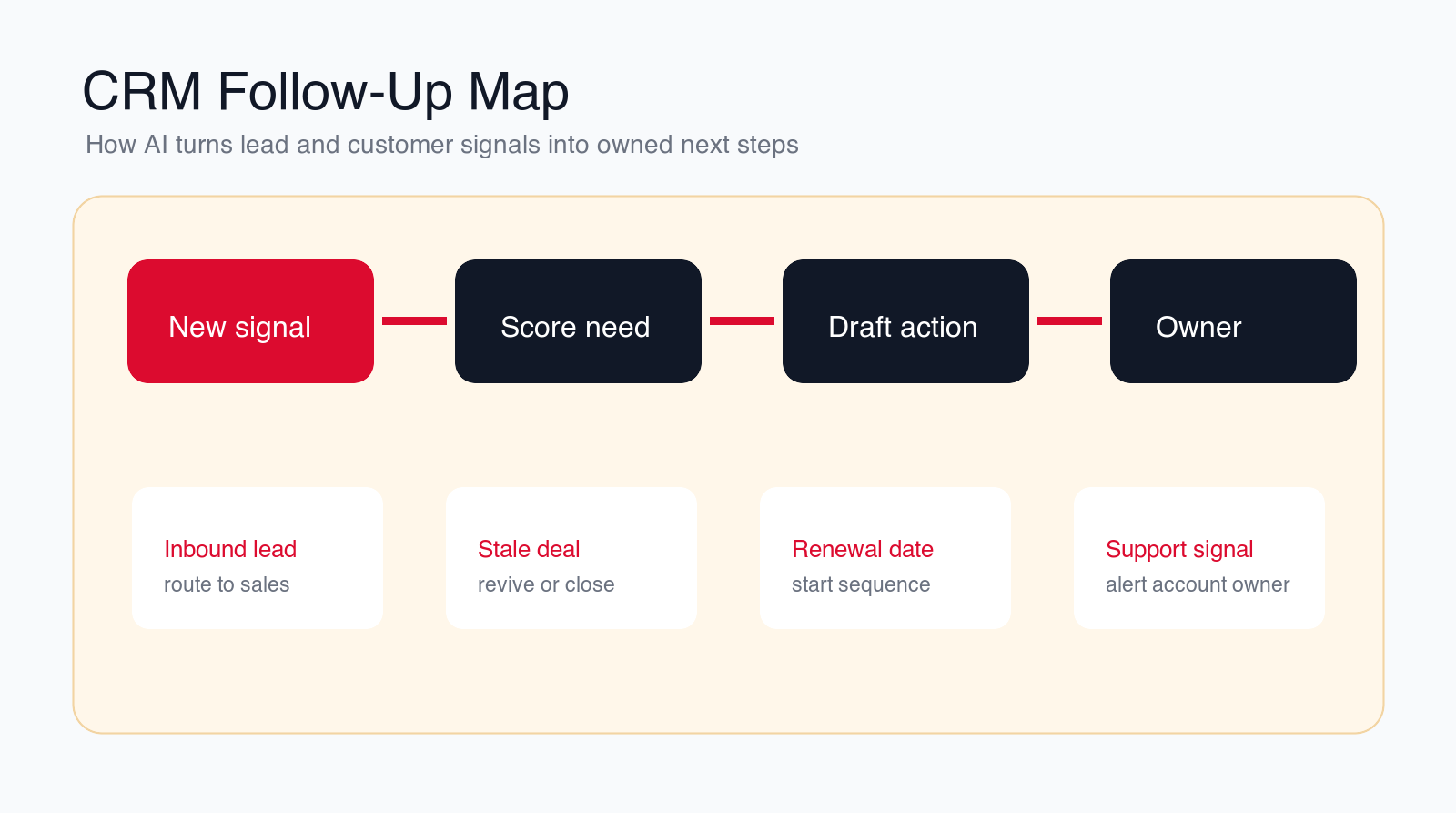
Follow-up is where many CRM systems fail. The lead is captured, the meeting happens, the call ends, or the support ticket closes, but nobody creates the right next action. A rep may know what to do, but the task is not recorded. A manager may see activity, but not the real customer need. A customer may expect a reply, but the owner has moved on to the next urgent thing.
AI can speed follow-up by reading recent context and preparing the next action. It can summarize a call, extract the promised follow-up, identify the decision maker, draft a personalized email, create a task, suggest a due date, and update the CRM with the meeting outcome. The rep still approves the message and owns the relationship.
The difference between useful follow-up automation and bad follow-up automation is context. A generic "just checking in" email does not improve sales quality. A good draft references the actual conversation, the customer's stated problem, the agreed next step, the timeline, and any missing information. It should be easy for the rep to edit, approve, or reject.
Follow-up automation should also understand silence. A stale deal may need a gentle note, a manager review, a close-lost recommendation, or no action at all. AI should surface the signal and prepare options. It should not spam every dormant contact because the CRM has an old opportunity.
How AI Improves Handoffs Between Teams
Handoffs are where CRM data quality becomes customer experience. Marketing hands a lead to sales. Sales hands a new customer to onboarding. Onboarding hands the account to customer success. Support hands an expansion signal to account management. Finance may need billing details. Operations may need delivery notes. If the CRM record is thin, every team asks the customer to repeat information.
AI can prepare handoff packets from CRM records, emails, notes, calls, documents, and support tickets. A good handoff packet includes the customer goal, promised scope, timeline, important stakeholders, risks, open questions, purchased product or service, next meeting, owner, and source links. It should also state what is unknown.
A handoff workflow should not be a free-form AI summary only. It needs required fields. For sales-to-onboarding, the required fields may include plan, start date, success criteria, billing contact, delivery owner, promised integrations, risks, and special commitments. For support-to-account-management, the fields may include issue summary, account value, sentiment, renewal date, escalation history, and suggested owner.
The benefit is speed and trust. The receiving team starts with structured context instead of hunting through notes. The customer experiences a smoother transition. Leadership can see where handoffs fail because missing fields and exceptions are visible.
12 CRM Automation Workflows to Build First
CRM automation with AI becomes easier to plan when you break it into specific workflows. The following 12 workflows are common starting points because they improve data quality, response speed, ownership, or pipeline visibility without asking AI to make final commercial decisions.
1. Duplicate Detection and Merge Review
Duplicate records make every CRM process worse. One contact may have three versions. One company may exist under different names. Activity may be split across records, which makes follow-up and reporting unreliable. AI can compare emails, domains, names, phone numbers, addresses, account notes, and recent activity to flag likely duplicates.
The safest first version creates a merge review queue instead of automatically merging everything. The reviewer sees the possible duplicates, the matching evidence, the conflicts, and the recommended primary record. This gives the team speed without losing control over account history.
2. Field Normalization and Missing Data Repair
CRM fields become inconsistent quickly. Industry names, company size, region, lead source, job title, lifecycle stage, and product interest may be entered differently by different teams. AI can suggest normalized values and identify missing fields from emails, forms, websites, or notes.
This workflow improves segmentation, routing, and reporting. It should keep clear rules around which sources are trusted. A customer form may be more reliable than an old note. A verified domain may be more reliable than a guessed company name. The workflow should show the source used for each suggested field.
3. Inbound Lead Routing and Qualification
Inbound leads need fast ownership. AI can read the form, email, referral note, chat transcript, or call summary, then classify the request by need, urgency, location, company size, role, product interest, and fit. The workflow can route the lead to the right sales owner and prepare a summary.
The automation should not decide strategic fit alone. It can label the lead as strong fit, possible fit, or needs review, then explain why. Sales should still approve important prioritization decisions, especially for high-value, unclear, or sensitive opportunities.
4. Follow-Up Drafts After Calls, Demos, and Meetings
Meeting follow-up is repetitive but important. AI can turn a call transcript, notes, or calendar context into a short summary, agreed next steps, open questions, decision criteria, and a draft email. It can also create a CRM task for the next owner.
The rep should approve customer-facing messages. The AI can prepare the first draft, but the human should confirm tone, promises, pricing, scope, and timing. This keeps speed without losing judgment.
5. Stale Deal Detection and Revival Planning
Stale deals distort forecasts and waste attention. AI can identify opportunities with no recent activity, no next step, old close dates, missing decision criteria, or repeated unanswered follow-ups. It can recommend a revival path, a close-lost review, or a manager check.
The workflow should separate signal from action. A deal being stale is a signal. The right action depends on relationship history, opportunity value, customer timing, and the last real conversation. AI can prepare the options; sales owns the decision.
6. Call and Meeting Summaries Into CRM
Sales calls create valuable context, but notes often stay in a recorder, inbox, or personal document. AI can summarize the meeting, extract customer goals, pain points, stakeholders, objections, risks, next steps, and promised follow-up, then prepare a CRM update.
The summary should distinguish facts from interpretation. "Customer asked for integration timeline" is different from "customer is ready to buy." A good CRM automation workflow labels confidence and source so managers do not confuse an AI interpretation with a customer commitment.
7. Sales-to-Onboarding Handoff Packets
When a deal closes, the onboarding team needs more than a signed contract. They need the customer's goals, timeline, key contacts, purchased scope, promised deliverables, integrations, risks, constraints, and success criteria. AI can gather those details from CRM records, emails, notes, and meeting summaries.
This workflow reduces the risk that onboarding starts blind. The best version requires sales to approve the packet before handoff. If required fields are missing, the workflow creates an exception instead of pretending the handoff is complete.
8. Support-to-Account Handoffs
Support tickets often reveal churn risk, expansion opportunities, product confusion, or urgent account issues. AI can read ticket summaries, sentiment, customer history, severity, renewal date, and account value to alert the right account owner.
This does not mean every support ticket should create a sales task. The workflow needs thresholds. A critical complaint from a renewal account may need account management. A small how-to question may only need support resolution. AI should classify and route with evidence.
9. Renewal and Expansion Signal Tracking
Renewal work depends on timing and context. AI can track renewal dates, usage signals, open tickets, account notes, champion changes, expansion interest, contract terms, and risk indicators. It can prepare a renewal brief and suggest the next account action.
The brief should not become a generic account summary. It should show why the account needs attention now, which owner should act, what the customer has said, and which source data supports the recommendation.
10. Pipeline Hygiene and Forecast Preparation
Forecast calls are often spent arguing about CRM hygiene. AI can flag opportunities with missing next steps, old close dates, weak stage evidence, no decision maker, inconsistent amount, missing competitor notes, or no recent customer activity. It can prepare a manager review list before the meeting.
This workflow helps managers coach instead of inspect. It should not change forecast categories automatically unless the sales process is mature and the rules are clear. The safer first version prepares the review queue and asks the owner to confirm.
11. CRM Task Cleanup and Ownership Review
Old tasks, duplicate reminders, missing owners, and unclear due dates create noise. AI can identify tasks that are outdated, duplicated, assigned to the wrong owner, or disconnected from the current account status. It can suggest closure, reassignment, or a new next step.
This is a useful internal pilot because it improves CRM usability without directly contacting customers. The team can review suggestions and decide which task rules should become automatic later.
12. CRM Quality Reporting and Feedback Loops
CRM automation should report where the system is getting better and where it is still weak. AI can track duplicate rates, missing required fields, stale deals, unresolved handoffs, slow follow-up, correction rates, owner delays, and automation exceptions.
The reporting should drive process improvement. If a team repeatedly misses the same field, the CRM form may need redesign. If one lead source creates bad data, the intake process may need repair. If sales ignores automated tasks, the workflow may be creating the wrong work.
Build a controlled CRM pilot
Want CRM automation that sales will trust?
We can map your CRM workflow, choose the first use case, define review rules, and build an AI automation pilot around clean data and follow-up.
We will reply with a practical first-workflow recommendation.
CRM Automation Risks to Control
The first risk is bad data moving faster. If the CRM already contains duplicates, stale records, missing ownership, and vague fields, AI can spread those problems across workflows. Automation should begin with data quality checks, not blind activity creation.
The second risk is wrong customer communication. AI-generated follow-up can be useful, but it can also create awkward messages, incorrect promises, tone problems, or accidental pressure. Customer-facing messages should start as drafts until quality is proven.
The third risk is sales distrust. If sales reps believe the automation is changing records incorrectly, adding useless tasks, or creating management noise, they will work around it. The first pilot should make the rep's job easier, not just give management another reporting layer.
The fourth risk is permission creep. A CRM automation workflow may touch customer data, deal values, forecasts, support history, contracts, billing contacts, and personal information. Access should be narrow. Read access, suggested updates, and write access should be treated as separate permission levels.
The fifth risk is unclear ownership. AI can identify a task, but a person or team still needs to own it. Every automated follow-up, handoff, exception, and review item should have an owner, due date, source, and completion status.
Guardrails That Keep AI CRM Automation Safe
Start with source evidence. Every suggested CRM update should show where it came from: form submission, email, call transcript, meeting note, support ticket, document, or existing CRM field. If the source is unclear, the update should go to review.
Use confidence thresholds. Low-risk updates can move faster than high-risk updates. A missing job title may be reviewed lightly. A duplicate merge, owner change, lifecycle stage change, deal stage move, or forecast update should require stronger review.
Keep customer-facing messages in draft mode at the start. Let AI prepare follow-up, but require human approval for emails, proposals, discount language, renewal notes, and anything that changes the customer's expectation.
Separate recommendations from decisions. AI can recommend that a deal needs review, a lead should be prioritized, or a handoff is incomplete. The person responsible for the relationship should make the final decision.
Keep an audit trail. The workflow should record what the AI suggested, what it changed, who approved it, what was rejected, and which rules created the action. Auditability is what lets teams improve automation without losing trust.
A Practical 90-Day CRM Automation Plan
In the first thirty days, map the CRM workflow and data problems. Look at where leads enter, how records are created, which fields are missing, how follow-up is assigned, where deals stall, and where handoffs fail. Interview sales, marketing, support, customer success, and operations. The best CRM automation project starts with the people who actually use the CRM.
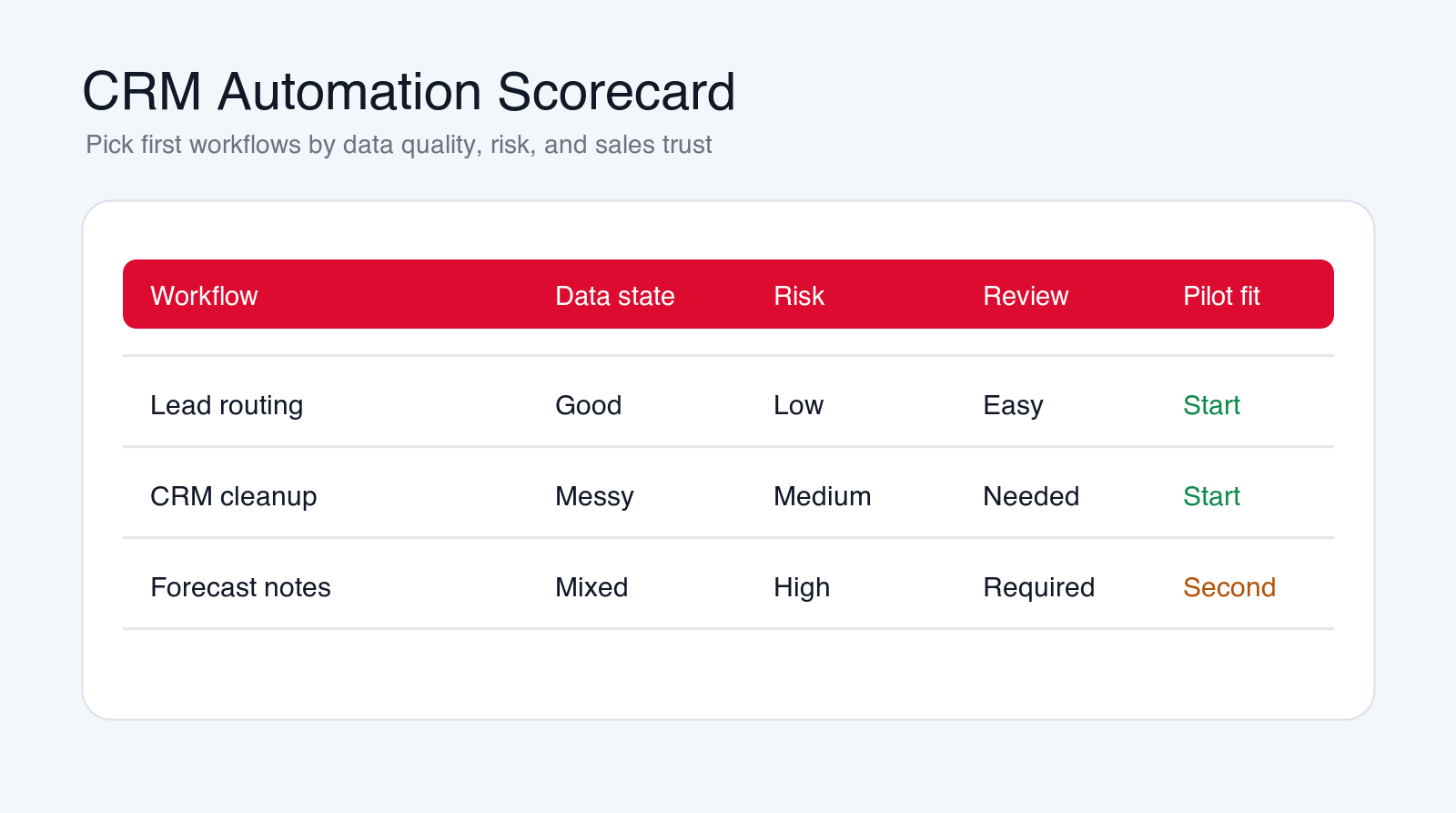
Choose one first workflow. Good first pilots include duplicate review, inbound lead routing, meeting summary updates, follow-up drafts, stale deal review, or sales-to-onboarding handoff packets. Define the trigger, inputs, required fields, owner, review rules, system updates, and success metrics.
In days thirty to sixty, build a controlled pilot. Connect only the CRM objects and sources needed for that workflow. Write the extraction, scoring, routing, and review rules. Keep customer messages in draft mode. Test with real records, including messy records, missing data, duplicate contacts, unclear notes, and edge cases.
In days sixty to ninety, launch to a limited team, pipeline segment, or workflow queue. Measure correction rate, adoption, follow-up speed, owner acceptance, data quality improvement, and exception volume. Expand only when the workflow makes the CRM more trusted and the team actually uses it.
The Minimum Useful CRM Automation Pilot
A minimum useful pilot has one trigger, one owner, one review path, and one measurable outcome. For example, it may take inbound demo requests, enrich the record, detect duplicates, route to the right rep, create a follow-up task, and draft a first reply for review. That is enough to prove value without rebuilding the entire revenue operation.
What to Avoid in the First Build
Avoid broad write access, automatic customer outreach, automatic deal stage changes, automatic close-lost decisions, unsupported lead scores, and hidden record merges. Also avoid automating a broken process before the team agrees on the rules.
Questions to Answer Before Launch
- Which CRM object and workflow will the pilot own?
- Which fields can AI suggest, and which fields can it update?
- Which messages must remain drafts until approved?
- Which records require review before merge, routing, or stage change?
- Which team owns exceptions, corrections, and rejected suggestions?
- How will sales trust, follow-up speed, and data quality be measured?
How to Measure CRM Automation Results
Measure CRM automation with AI by business movement and CRM trust. Useful metrics include duplicate rate, missing field rate, lead response time, routing accuracy, follow-up completion, stale opportunity count, handoff completeness, CRM correction rate, task acceptance, forecast hygiene, and owner adoption.
Sales adoption is one of the strongest signals. If reps use the summaries, accept the tasks, approve the drafts, and trust the recommended updates, the workflow is helping. If they ignore the automation, delete its tasks, or keep side notes outside the CRM, the workflow is not ready to expand.
Track rejected suggestions. Rejections are not failure by themselves. They show where the rules, prompts, sources, or data model need improvement. A mature CRM automation system learns from corrections and makes the next recommendation easier to trust.
Also track customer impact. Faster follow-up is useful only if the follow-up is relevant. More tasks are useful only if they create better ownership. Cleaner data is useful only if reporting, routing, and handoffs improve. The goal is a CRM that helps teams act faster with better context.
When to Hire an AI Automation Agency for CRM Workflows
A simple CRM tool can help with reminders, rules, and basic field automation. An AI automation agency becomes useful when the CRM workflow touches multiple sources, messy data, sales process design, custom integrations, human review, handoffs, reporting, and change management.
A good agency should map the workflow before building. It should identify the first use case, define data rules, design review states, connect the right systems, write safe prompts or agent instructions, test with real CRM records, and measure adoption after launch.
The agency should also protect the team from over-automation. If the CRM is messy, the first project may need cleanup. If sales and customer success disagree on handoff fields, the first project may need process alignment. If customer-facing messages are sensitive, draft mode may be the right starting point.
Final Checklist: Build CRM Automation People Trust
- Start with one high-friction CRM workflow, not every pipeline task.
- Use AI to clean, summarize, route, draft, and prepare work for humans.
- Keep people responsible for pricing, promises, deal judgment, customer communication, and sensitive decisions.
- Show source evidence for every suggested update.
- Use review queues for merges, stage changes, owner changes, and high-impact fields.
- Measure follow-up speed, data quality, handoff completeness, and sales trust.
CRM automation with AI should make the customer record more useful. It should reduce duplicate data, missed follow-up, weak notes, unclear ownership, and messy handoffs. It should not turn the CRM into a place where AI writes more activity than the team can trust.
Start with a practical workflow, make the rules visible, keep humans in control of relationship decisions, and expand only when the team sees that the CRM is cleaner, faster, and easier to use.
Free AI CRM workflow review
Get a first-pass recommendation for your CRM workflow.
Send your email and we will reply with a practical view of which CRM workflow should become your first AI automation pilot.
No spam. We use this to reply with the recommendation.
FAQ: CRM Automation With AI
What is CRM automation with AI?
CRM automation with AI uses AI, rules, integrations, and review workflows to clean CRM data, route leads, draft follow-up, summarize activity, prepare handoffs, and improve pipeline visibility.
What CRM workflow should we automate first?
Start with a frequent workflow that is easy to review, such as duplicate detection, field cleanup, inbound lead routing, meeting summaries, follow-up drafts, stale deal review, or handoff packets.
Can AI update CRM records automatically?
Some low-risk updates can become automatic after testing, but risky changes such as record merges, owner changes, deal stages, forecast fields, and customer-facing messages should start with human review.
How does AI improve CRM handoffs?
AI can prepare structured handoff packets that include customer goals, commitments, stakeholders, risks, next steps, source links, and missing information for the next team.
Can Go Expandia build AI CRM automation?
Yes. Go Expandia can map your CRM workflow, choose the first automation pilot, design guardrails, connect systems, test with real records, and support rollout.
About Bailey Roque
Bailey Roque writes for Go Expandia on AI automation, AI agent development, workflow design, AI consulting, and practical rollout models for business teams.
Related posts and services
Keep planning your AI revenue operations roadmap
Lead guide
AI Lead Generation
See which lead workflows can be automated without damaging sales quality.
Sales guide
AI Sales Agent
Compare sales workflows where AI agents can prepare research, routing, drafts, and CRM updates.
Main service
AI Automation Agency
Build workflow automation with integrations, guardrails, human review, and rollout support.
Ready to Build CRM Automation People Trust?
Go Expandia helps companies choose the right CRM workflow, clean the data path, and launch AI automation with practical human review.