AI Sales Agent: 12 Sales Workflows to Automate First
An AI sales agent should not replace sales judgment. It should remove repeated admin, prepare context, draft next steps, route work, and keep the CRM cleaner so salespeople can spend more time on actual conversations.
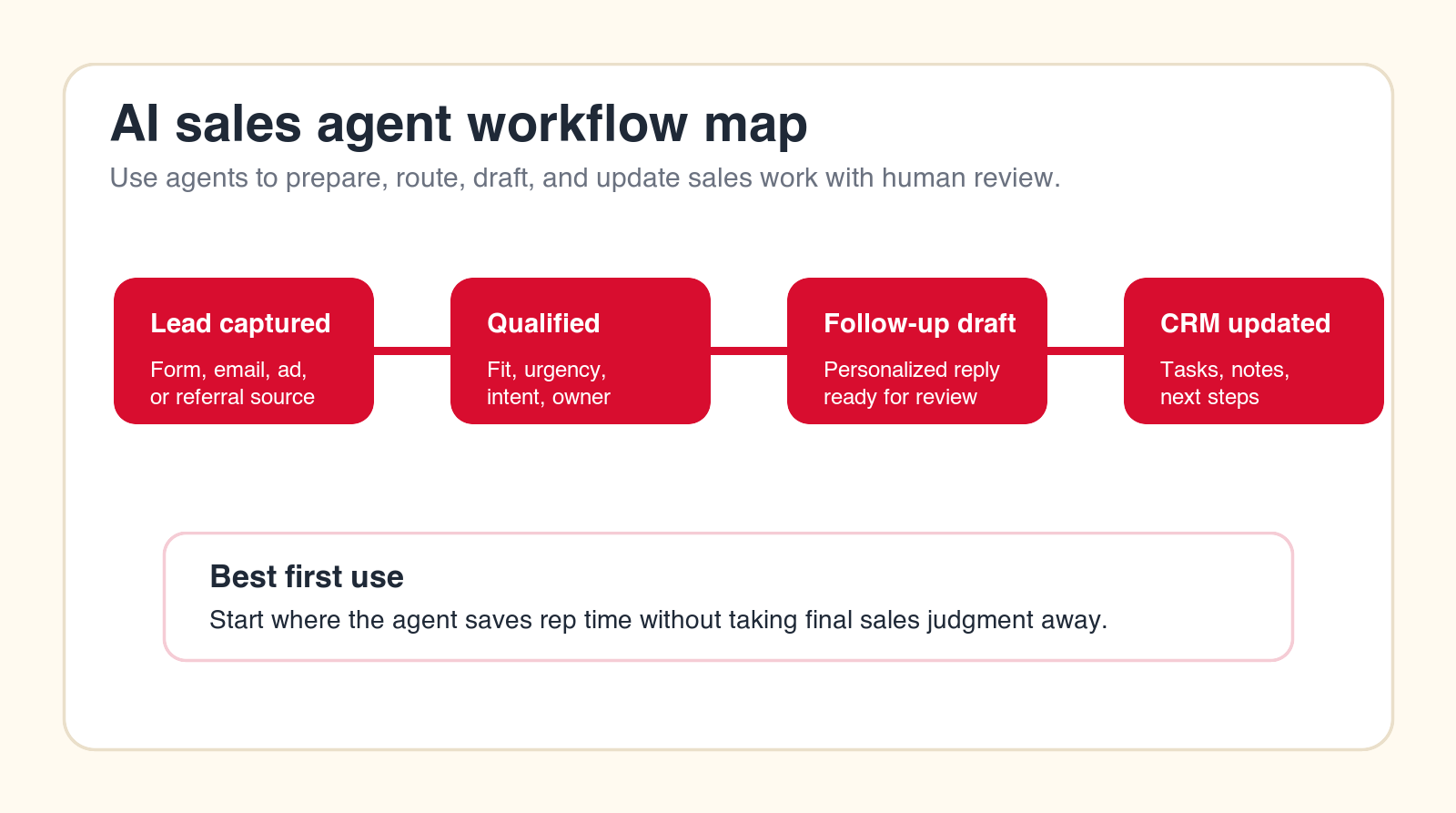
Best first move
Start with sales workflows where the agent prepares the work and a human approves the action.
Focus
AI sales agent
Best for
Sales teams choosing workflows
What it covers
Qualification, follow-up, and CRM
Main service
AI Agent Development
TL;DR
The best first AI sales agent workflows are lead qualification, fast follow-up, account research, meeting prep, call summaries, follow-up task creation, proposal intake, CRM cleanup, renewal monitoring, quote handoff prep, outbound personalization, and pipeline review. Start where the agent saves repeated sales admin without making final commercial decisions on its own. Keep humans in review for pricing, sensitive customer messages, deal strategy, and any action that can affect revenue or trust.
An AI sales agent is useful when it supports the real sales process instead of trying to act like a full salesperson. The strongest early use cases are not vague promises about closing deals automatically. They are specific workflow improvements: faster lead routing, cleaner CRM notes, better meeting prep, more consistent follow-up, and less manual research.
Sales teams often lose time in the spaces between conversations. A rep reads an inbound lead, checks the CRM, searches the company website, scans old notes, writes a first reply, creates a task, updates a field, prepares for a call, writes a recap, and asks a manager for help on a proposal or quote. None of that is useless work, but much of it is repeatable. That is where AI agents can help.
The goal is not to remove the salesperson from the relationship. The goal is to give the salesperson cleaner context, faster drafts, better handoffs, and a CRM that reflects what is actually happening. This guide shows the 12 sales workflows to automate first, what the agent should do, what humans should approve, and how to choose the right pilot.
Quick Answer: Start With Sales Admin, Handoffs, and Preparation
The safest place to start with an AI sales agent is work that prepares a recommendation or draft for review. Lead scoring, routing, research, summaries, CRM updates, and follow-up drafts are strong candidates because they are frequent, measurable, and easy for a sales owner to inspect. Fully autonomous selling should come much later, if at all.
A good first sales agent should have a narrow role. It might qualify inbound leads, prepare account notes, summarize discovery calls, draft follow-up emails, flag missing CRM fields, or prepare a manager review packet for a quote. Each of those workflows has a clear input, clear output, and clear human owner.
Avoid starting with broad goals like "automate sales" or "replace SDR work." Those goals hide too much complexity. Sales is full of judgment: timing, tone, urgency, fit, pricing, objections, buyer politics, and relationship context. AI can assist those decisions, but it should not own them until the business has strong controls, examples, and review paths.
| Workflow | What the AI sales agent does | What a human approves | Why it is a good first pilot |
|---|---|---|---|
| Lead routing | Scores fit, urgency, source, and owner. | Routing rules and exception handling. | Improves response speed and handoff quality. |
| Follow-up drafts | Prepares replies and next-step tasks. | Final message tone and send decision. | Reduces blank-page work after calls. |
| CRM cleanup | Finds missing fields, stale stages, and note gaps. | Field changes that affect reporting. | Improves forecast and pipeline visibility. |
| Pipeline review | Summarizes risks and next actions. | Manager judgment and deal strategy. | Makes sales meetings more operational. |
What Is an AI Sales Agent?
An AI sales agent is an AI system designed to support sales workflows by reading sales context, using approved tools, following instructions, and producing useful outputs. It may summarize calls, qualify leads, prepare account research, draft messages, update CRM records, route requests, flag risks, or prepare pipeline review notes.
The word agent matters because the system does more than generate text in a chat window. A real sales agent workflow may connect to a CRM, email, calendar, meeting notes, enrichment tools, proposal folders, help desk data, or reporting tables. It may take small actions, such as creating a task or preparing a draft, based on rules.
That does not mean every AI sales agent should be fully autonomous. For most businesses, the first agent should be controlled. It should prepare context, make recommendations, and draft actions. A human should review anything that touches pricing, commitments, sensitive customer communication, legal language, or deal strategy.
How to Choose the First Sales Workflow to Automate
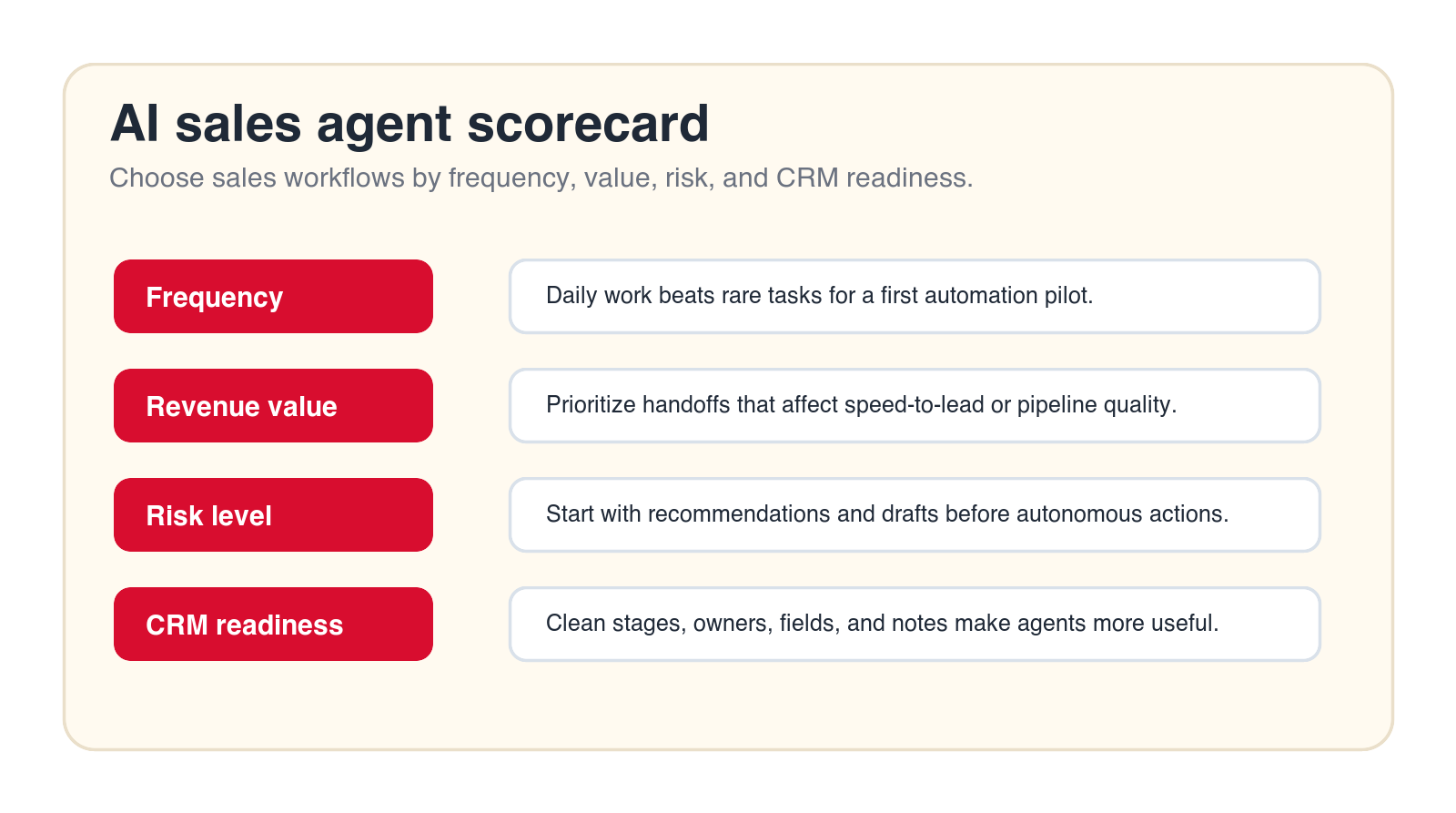
Choose the first workflow by frequency, value, risk, and readiness. A workflow is a strong candidate when it happens often, wastes meaningful time, has a clear owner, has usable data, and can be reviewed by a human without slowing the team down. It is a weak candidate when it is rare, political, poorly documented, or based on judgment that nobody can explain.
Sales teams usually have several tempting options. Inbound lead routing may create faster response times. Meeting summaries may save rep time. CRM cleanup may improve reporting. Proposal intake may reduce manager bottlenecks. The right first workflow is not always the flashiest one. It is the one the team can launch, measure, and trust.
An AI automation agency can help here because the first decision is not only technical. It is operational. The agency should help map the current sales workflow, score use cases, define the pilot, design human review, and connect the agent to the right systems without overbuilding.
Free sales workflow check
Find your first AI sales agent workflow.
Drop your email and we will send a first-pass recommendation for the sales workflow that is safest and most useful to automate first.
No spam. We use this to reply with the recommendation.
1. Inbound Lead Qualification and Routing
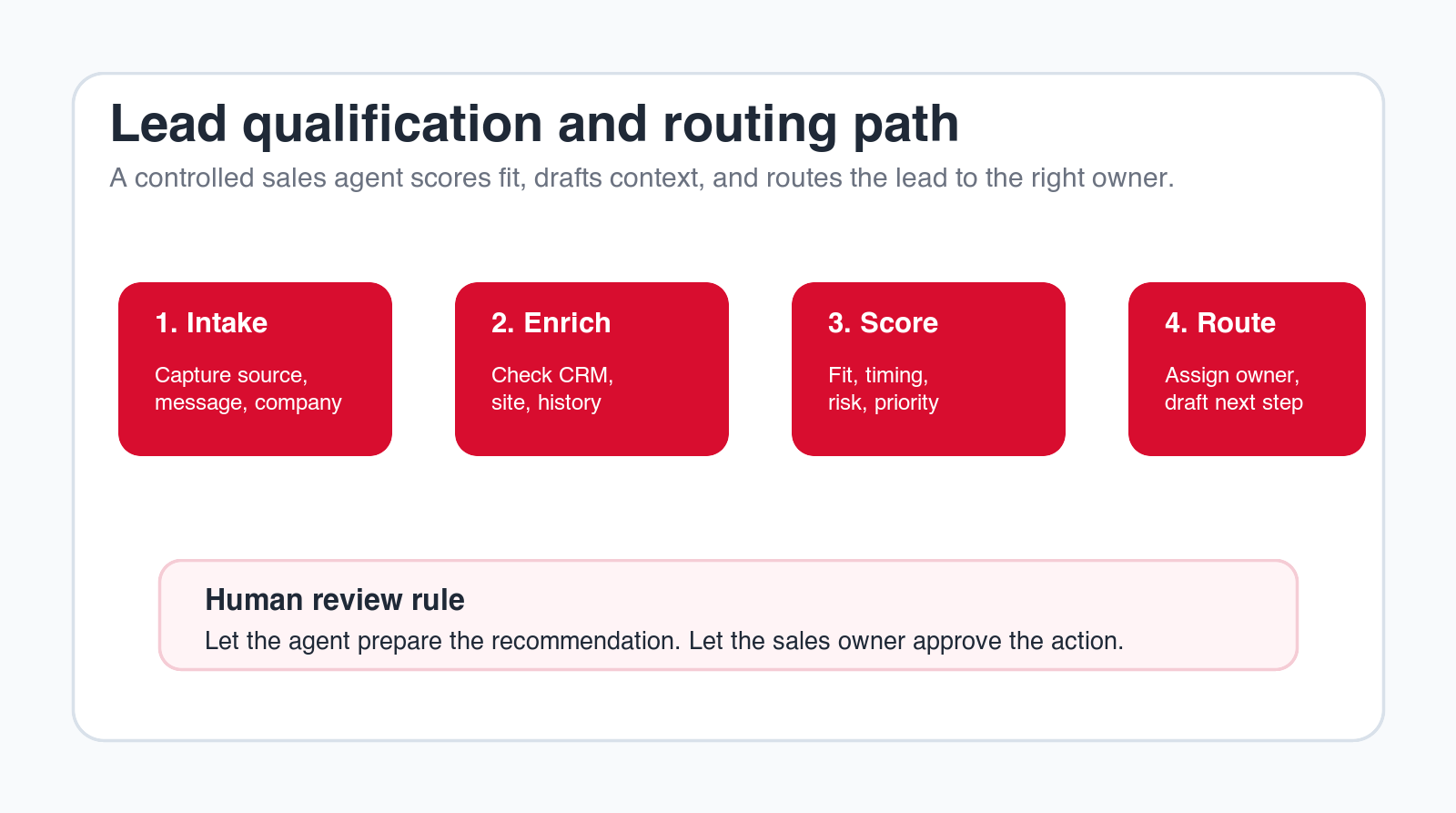
Inbound lead qualification is one of the best first AI sales agent workflows because it has a clear trigger and a clear business value. A new form submission, email, ad lead, chat inquiry, or referral arrives. The agent reads the request, checks basic company information, looks for existing CRM records, scores fit, identifies urgency, and recommends the right owner or route.
The agent can prepare a structured lead summary: company, role, source, stated need, likely fit, missing information, suggested priority, duplicate record warnings, and next action. It can also create a draft task for the assigned rep or SDR. That saves time and reduces the chance that good leads sit in a shared inbox.
Human review is still important. The business should approve scoring rules, territory rules, priority rules, and edge cases. The agent should not invent fit signals or overrule strategic accounts without review. Start by letting the agent recommend routing, then allow automatic assignment only after the rules are proven.
2. Fast Follow-Up Drafts
Speed matters in inbound sales, but speed should not mean careless replies. An AI sales agent can draft the first response using the lead source, requested need, company context, and available scheduling path. The draft can be ready within the workflow, while the sales owner still decides whether to send it.
This workflow is valuable because many replies follow a pattern but still need context. The agent can reference the right service, ask one clarifying question, suggest a next step, and avoid generic copy. It can also create a follow-up task if no reply comes back after a defined period.
The main guardrail is tone and claims. The agent should not promise pricing, timelines, results, or technical feasibility unless those statements are approved. Treat the AI as a fast drafter, not a closer. The salesperson should own the relationship and final message.
3. Account Research and CRM Enrichment
Sales research is necessary but repetitive. A rep may check a company website, LinkedIn profile, old CRM notes, recent tickets, past meetings, industry, headcount, location, tech stack, and buying signals before reaching out. An AI sales agent can assemble that context into a short account brief.
The agent should not dump every available fact. It should answer practical sales questions: what does the company do, why might this conversation matter, what is the likely pain point, what history do we already have, who is involved, what is missing, and what should the rep ask first?
This is a strong early workflow because the output is easy to review. A rep can quickly tell whether the brief is useful. The risk is lower than autonomous messaging, especially if the agent cites or links to the source records it used. If data quality is weak, the agent can also flag conflicts instead of pretending everything is certain.
4. Meeting Prep and Discovery Briefs
Sales meetings improve when the rep has a clear brief before the call. An AI sales agent can prepare that brief by pulling CRM history, account research, prior notes, open tasks, last conversation summaries, known objections, and likely agenda items. The output should be short enough to read before the meeting.
A useful discovery brief might include the account context, contact role, reason for the meeting, likely buyer pain, prior touchpoints, open questions, relevant services, and suggested discovery prompts. It can also remind the rep of missing information, such as budget, timing, decision process, or current tools.
This workflow is safer than trying to automate the conversation itself. The agent prepares the rep. The rep still listens, asks questions, adapts tone, and makes judgment calls. For many teams, this is where AI sales automation creates immediate practical value.
5. Discovery Call Summaries and Next-Step Extraction
After a sales call, the rep needs to capture what happened. That usually means notes, next steps, objections, stakeholders, timing, pain points, competitor mentions, pricing questions, and follow-up tasks. When this work is skipped, the CRM becomes unreliable and the next conversation starts from memory.
An AI sales agent can summarize call notes or transcripts into a structured recap. It can identify buyer goals, objections, decision criteria, promised follow-ups, missing details, and recommended next steps. It can draft CRM notes and tasks so the rep edits instead of starting from scratch.
The guardrail is accuracy. The agent should separate confirmed facts from inferred recommendations. It should not create commitments the rep did not make. A good workflow lets the rep approve the summary before it updates important CRM fields or sends any customer-facing follow-up.
6. Follow-Up Email Drafts and Task Creation
Follow-up is one of the most obvious sales workflows to support with AI because the work is frequent and often delayed by blank-page friction. An AI sales agent can draft a concise follow-up based on the call summary, buyer goals, promised materials, next meeting path, and the salesperson's preferred style.
The agent can also create internal tasks: send proposal, introduce technical expert, share case-relevant service page, confirm timeline, ask finance about quote range, or schedule next meeting. The key is to keep the task list specific. "Follow up" is weak. "Send workflow audit outline and ask for CRM access owner" is useful.
This workflow should remain human-approved. The rep should review tone, details, and any claims. The agent can improve speed and consistency, but the salesperson should own the message. That balance keeps the workflow helpful without making the communication feel careless.
7. Proposal and RFP Intake Summaries
Proposal and RFP work often begins with a messy intake process. Requirements arrive in documents, emails, forms, shared folders, call notes, or forwarded messages. Sales and delivery teams then spend time figuring out scope, deadlines, required attachments, risks, stakeholders, and open questions.
An AI sales agent can read the intake material and prepare a proposal brief. The brief can include buyer need, requested scope, deadline, mandatory requirements, missing information, likely internal owners, risks, and recommended next action. It can also draft a first response asking for clarifications.
Human review is critical because proposal language can create expectations. The agent should not decide pricing, scope, legal commitments, or delivery feasibility. It should organize the intake, reduce manual reading, and help the team decide whether to pursue the opportunity.
8. CRM Cleanup and Pipeline Hygiene
CRM cleanup is not glamorous, but it is one of the highest-leverage sales automation workflows. If stages are stale, owners are wrong, close dates are unrealistic, notes are missing, duplicate records exist, and tasks are overdue, managers cannot trust the pipeline. An AI sales agent can help find and prepare cleanup recommendations.
The agent can scan records for missing fields, contradictory notes, inactive opportunities, stage-age problems, duplicate contacts, unlogged follow-ups, and deals with no clear next step. It can prepare a review list for reps or managers instead of changing everything automatically.
This is a good workflow for human-in-the-loop automation. The agent identifies likely problems. The owner approves changes. Over time, low-risk updates can become more automatic, but only after the business confirms the rules. Clean CRM data makes every other sales agent workflow better.
Build a controlled sales pilot
Want the first sales agent mapped before you build?
We can help choose one workflow, define the guardrails, connect the right systems, and launch an AI sales agent pilot with human review.
We will reply with a practical first-workflow recommendation.
9. Renewal, Expansion, and Risk Signal Monitoring
Sales work does not stop after the first deal. Renewals, expansions, upsells, and customer risk signals often live across several systems: CRM, support tickets, usage data, meeting notes, billing records, and customer success updates. An AI sales agent can monitor those signals and prepare account-level recommendations.
The agent might flag accounts with renewal dates approaching, unresolved support issues, declining engagement, expansion intent, new stakeholders, product usage changes, or repeated objections. It can create a short account brief for the account owner and recommend a next step.
This workflow needs careful guardrails because customer relationships are sensitive. The agent should not send renewal or expansion messages automatically unless the business has strong rules. It should surface context so the account owner can act with better timing.
10. Quote, Pricing, and Approval Handoff Prep
Pricing and quote handoffs often create bottlenecks because the information needed for approval is scattered. A manager or finance owner may need deal size, scope, discount request, timeline, customer context, contract terms, margin notes, competitor pressure, and risk before approving anything.
An AI sales agent can prepare the approval packet. It can gather the relevant CRM data, summarize the requested terms, list missing fields, highlight risks, and draft the internal approval request. That does not mean the agent decides the price. It means the agent makes the human approval faster and better documented.
This is a strong agency-supported workflow because it touches revenue, policy, and accountability. The business should define what the agent can summarize, what it can recommend, and what requires explicit approval. For most teams, pricing decisions should stay human-owned.
11. Outbound Prospect Research and Personalization
Outbound sales can benefit from AI, but it is also easy to do badly. Generic personalization at scale can damage trust. A better use of an AI sales agent is research preparation: identify relevant company context, summarize why the account might be worth contacting, connect that context to an approved offer, and draft a message for review.
The agent should focus on relevance, not fake familiarity. It can prepare account notes, likely pain points, trigger events, role-specific angles, and approved messaging options. It should avoid unsupported claims, creepy personalization, or pretending to know facts that are not in the data.
Human review matters here because outbound tone is brand-sensitive. Start with small batches, review messages carefully, and track replies, objections, and complaints. The agent should help reps prepare better outreach, not flood prospects with weak automation.
12. Sales Manager Pipeline Review and Forecast Prep
Pipeline reviews often become status meetings because the data is incomplete. Managers ask what changed, which deals are stuck, what next step is missing, which close dates are unrealistic, where risk is rising, and which reps need support. An AI sales agent can prepare that review before the meeting starts.
The agent can summarize pipeline changes, stage aging, next-step gaps, large deal risks, stalled opportunities, owner workload, overdue tasks, and forecast changes. It can also create suggested discussion points for each rep or deal. The manager still makes the judgment call, but the meeting starts with better context.
This workflow is valuable because it connects AI automation to management rhythm. It does not only save admin time. It improves weekly sales operations. The best version of this agent is transparent: it shows which records created the recommendation and where data is missing.
Guardrails Every AI Sales Agent Needs
Sales agents need guardrails because they operate near customer communication, revenue, pricing, and CRM data. Guardrails define what the agent can read, what it can write, when it must ask for review, which sources it can trust, and which actions are never allowed.
Start with autonomy levels. Level one is draft-only: the agent prepares summaries, messages, and recommendations. Level two is reviewed action: the agent creates tasks or updates fields after a human approves. Level three is limited automation: the agent takes low-risk actions inside defined rules. Most first sales workflows should stay at level one or level two.
The business should also define data boundaries. Which CRM fields can the agent access? Can it read emails? Can it inspect transcripts? Can it use support tickets? Can it update deal stages? Can it write customer-facing drafts? These answers should be documented before launch, not discovered after an error.
A Practical 90-Day AI Sales Agent Implementation Plan
In the first thirty days, map and choose the workflow. List candidate sales workflows, then score each one by frequency, value, risk, data readiness, and owner commitment. Select one pilot and write the brief: trigger, inputs, systems, agent role, human review, output, exception path, owner, and success metric.
In days thirty to sixty, build and test. Connect the agent to the minimum systems required. Use real examples, including clean cases, messy cases, duplicates, missing fields, bad transcripts, and edge cases. Test whether reps can quickly review the output. If review takes longer than doing the work manually, the workflow needs redesign.
In days sixty to ninety, launch to a small group. Measure time saved, response speed, review acceptance, CRM field quality, follow-up completion, meeting prep usage, and user feedback. Do not expand to all sales workflows until the first pilot proves that the agent improves real work.
The Minimum Useful Sales Agent
The minimum useful sales agent should have one trigger, one owner, one primary output, and one review path. For example, it might qualify inbound leads and prepare a routing recommendation. Or it might summarize calls and draft follow-up tasks. If the first agent tries to handle every sales workflow at once, it will be hard to test and harder to trust.
What to Avoid in the First Build
Avoid autonomous discount decisions, automatic customer promises, unsupported personalization, broad sales assistants with no clear workflow, and CRM updates that nobody reviews. Also avoid building on top of messy data without acknowledging it. AI agents can help expose CRM problems, but they cannot make bad data trustworthy by themselves.
Questions to Answer Before Launch
- Which sales workflow is the agent responsible for?
- Which CRM fields, emails, transcripts, or documents can it read?
- Which outputs are draft-only and which can update systems?
- Who reviews the agent output during the pilot?
- What metric proves the workflow improved?
When to Hire an AI Automation Agency for Sales Agents
A team can build simple sales agents with no-code tools when the workflow is clear and integrations are standard. Agency support becomes more useful when the workflow crosses systems, touches pricing, requires CRM cleanup, needs human review design, or must fit an existing sales operating rhythm.
An AI automation agency should help choose the first sales workflow, map the process, define guardrails, connect systems, build the agent, test real examples, train users, and measure the pilot. It should also say when not to automate. If a workflow is too unclear or too risky, discovery and cleanup should come before automation.
The best agency work gives the sales team a repeatable pattern. After the first pilot, the business should understand how to scope future agents, what needs approval, how to monitor quality, and which workflows are strong candidates for the next build.
How to Measure Whether an AI Sales Agent Is Working
An AI sales agent should be measured by sales operations outcomes, not by how impressive the demo looks. Before launch, choose a small set of metrics that match the workflow. For lead routing, measure response time, routing accuracy, duplicate detection, and owner acceptance. For call summaries, measure edit rate, task completion, and whether next steps are captured more consistently. For CRM cleanup, measure missing fields, stale opportunities, stage-age issues, and manager trust in the pipeline.
The review acceptance rate is especially useful. If reps accept most agent recommendations with light editing, the workflow is probably helping. If reps rewrite everything, ignore the output, or create side notes outside the CRM, the agent is either using weak data, following the wrong instructions, or solving the wrong problem. That feedback is not failure. It is the signal the team needs to improve the pilot.
Track errors openly. A sales agent may route a lead to the wrong owner, summarize an objection incorrectly, miss a duplicate, suggest a weak follow-up, or flag a deal as risky for the wrong reason. The team should know where those errors go, who reviews them, and how the agent is improved. A hidden error queue is dangerous because salespeople will stop trusting the workflow without explaining why.
CRM and Data Readiness Before You Build
Sales agents depend on sales data. If the CRM has unclear stages, missing owners, duplicate accounts, inconsistent notes, outdated close dates, or fields that mean different things to different reps, the agent will struggle. It may still draft text, but it will not reliably support decisions. That is why CRM readiness should be part of the first workflow review.
Readiness does not mean the CRM must be perfect. It means the workflow has enough reliable data to support one narrow agent. For lead routing, the required data might be source, company domain, territory, lead type, current owner, and duplicate status. For meeting prep, the required data might be contact role, account notes, recent calls, open opportunities, and previous objections. Define the minimum data set before the build.
When data is weak, the first agent can be a cleanup assistant rather than a customer-facing assistant. It can flag missing fields, inconsistent stages, duplicate records, or deals without next steps. This may feel less exciting than an outbound agent, but it often creates the foundation needed for better sales AI later.
Design the Human Handoff Before Launch
The handoff between the AI sales agent and the salesperson is where the workflow either works or fails. If the agent produces an output but nobody knows where to review it, the work disappears. If the agent creates too many alerts, people ignore it. If the agent updates fields without explanation, managers lose confidence. The handoff should be designed as carefully as the agent itself.
A good handoff answers five questions: where does the agent output appear, who reviews it, what can they approve or reject, how do they correct mistakes, and what happens after approval? For example, a lead-routing agent might post a recommendation inside the CRM record, create a task for the owner, and require one click to accept or reassign. A call-summary agent might create a draft note and task list that the rep edits before saving.
Handoff design is also a training issue. Salespeople should know what the agent is responsible for, what it is not responsible for, and how to report bad output. Managers should know how to inspect quality. The more visible the handoff, the easier it is to improve the system without turning the pilot into a black box.
Final Checklist: What to Automate First With an AI Sales Agent
- Start with repeated sales admin, not final selling judgment.
- Choose workflows with clear triggers, inputs, outputs, and owners.
- Keep pricing, legal language, sensitive customer messages, and deal strategy human-approved.
- Use the agent to prepare lead summaries, account briefs, call recaps, follow-up drafts, CRM cleanup recommendations, and manager review notes.
- Measure the pilot with sales operations metrics, not vague AI excitement.
- Expand only after reps trust the workflow and managers can see the results.
An AI sales agent should make the sales process easier to run. It should reduce repeated work, improve handoffs, prepare better context, and keep systems cleaner. The first pilot should be narrow enough to launch and important enough to matter.
If the team can describe the workflow clearly, start with a controlled no-code or platform-based build. If the workflow needs process design, custom integration, CRM cleanup, or rollout support, bring in an AI automation agency. Either way, start with one sales workflow and prove it before expanding.
Free AI sales agent review
Get a first-pass recommendation for your sales workflow.
Send your email and we will reply with a practical view of which sales workflow should become your first AI agent pilot.
No spam. We use this to reply with the recommendation.
FAQ: AI Sales Agents
What is an AI sales agent?
An AI sales agent is an AI system that supports sales workflows such as lead qualification, research, follow-up drafting, CRM updates, call summaries, proposal intake, and pipeline review using approved tools and instructions.
What sales workflow should I automate first?
Start with a frequent, measurable workflow where the agent prepares work for human review, such as inbound lead routing, follow-up drafts, account research, call summaries, or CRM cleanup recommendations.
Should an AI sales agent send emails automatically?
For most first pilots, no. Let the agent draft emails and let a salesperson approve the message. Automatic sending can be considered later for low-risk messages with clear rules and strong monitoring.
Can AI sales agents update the CRM?
Yes, but start with reviewed updates. The agent can prepare CRM notes, tasks, field changes, and cleanup recommendations. Automatic updates should be limited to low-risk fields after the workflow is tested.
Can Go Expandia build an AI sales agent?
Yes. Go Expandia can help map the sales workflow, choose the first pilot, build the AI sales agent, connect systems, design human review, and support rollout.
About Bailey Roque
Bailey Roque writes for Go Expandia on AI automation, AI agent development, workflow design, AI consulting, and practical rollout models for business teams.
Related posts
Keep planning your AI agent roadmap
Agentic guide
Agentic Workflows
See business examples you can automate with AI agents and human review.
Builder guide
AI Agent Builder
Decide when no-code is enough and when agency support is useful.
Service
AI Agent Development
Build controlled AI agents for business workflows, tools, and approvals.
Ready to Build an AI Sales Agent?
Go Expandia helps companies choose the right sales workflow, design safe agent behavior, and launch AI sales automation with practical human review.