AI Lead Generation: 15 Workflows to Automate Without Damaging Sales Quality
AI lead generation should not mean more spam, weaker handoffs, or a messier CRM. The strongest systems automate the repeated work around lead capture, qualification, routing, follow-up, and reporting while keeping humans in control of judgment.
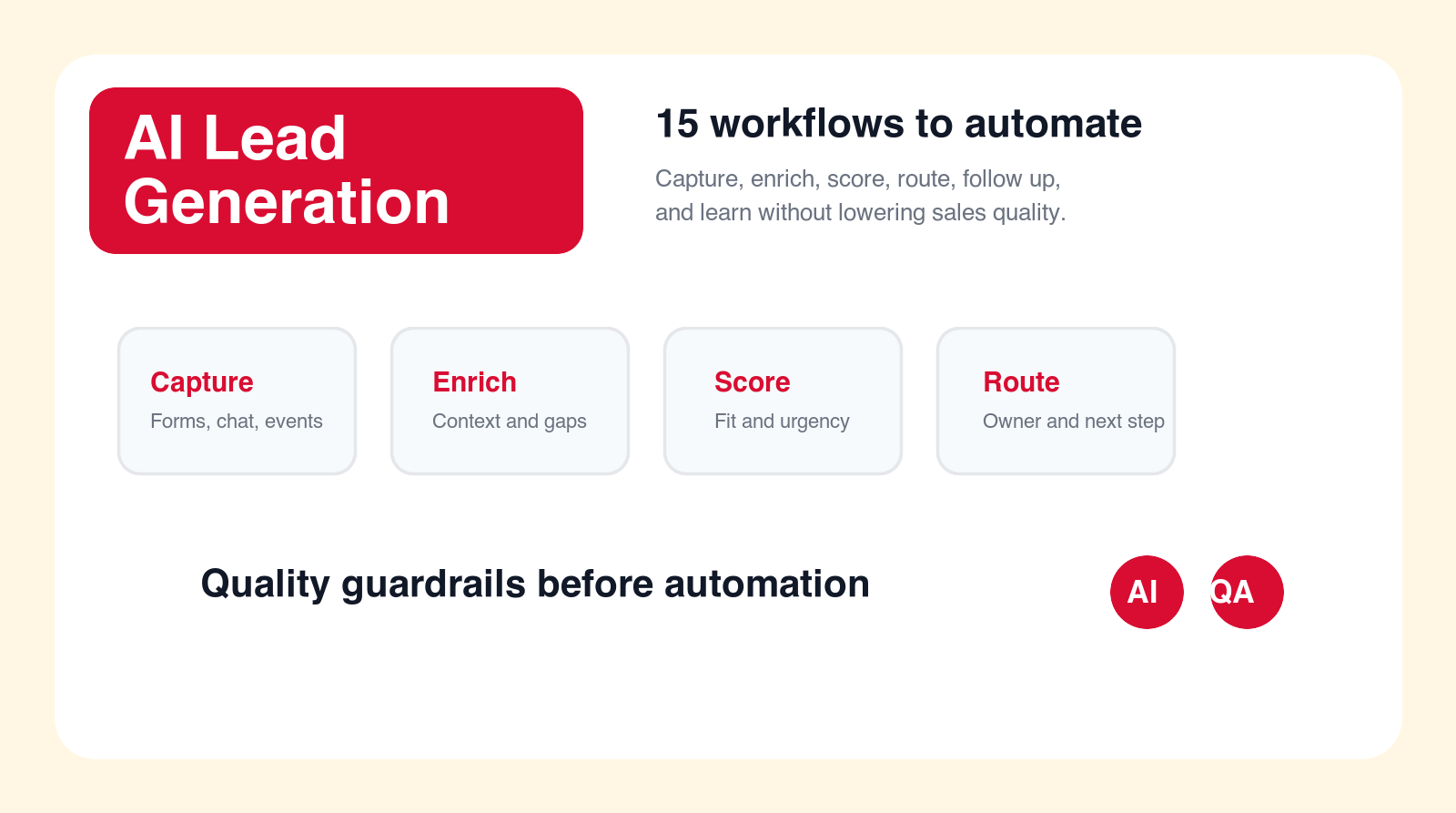
Best first move
Automate lead handling where the agent prepares the work and sales approves the quality bar.
Focus
AI lead generation
Decision point
Implementation planning
Best for
Sales and marketing teams
Main service
AI Automation Agency
TL;DR
AI lead generation works best when it improves lead quality, speed, and routing instead of simply increasing outbound volume. Strong first workflows include lead intake normalization, enrichment, duplicate detection, fit scoring, urgency classification, owner routing, response drafts, meeting booking handoffs, nurture segmentation, content recommendations, account research, event lead cleanup, referral intake, reactivation prioritization, and lead quality reporting. Keep humans in review for scoring rules, sensitive claims, pricing, buyer fit, and customer-facing messages until the workflow is proven.
AI lead generation is often misunderstood. Some teams hear the phrase and imagine an automated machine that sends thousands of messages, books meetings without context, and pushes every contact into the CRM. That is not a strong business system. It is a fast way to create low-quality pipeline, annoy prospects, and make sales teams distrust automation.
The practical version is different. AI lead generation should help the business capture leads more cleanly, qualify them more consistently, route them faster, prepare better follow-up, and learn which sources produce real sales opportunities. The goal is not more noise. The goal is better movement from first signal to useful sales conversation.
This guide is written for founders, sales leaders, marketing teams, revenue operations owners, and business operators who want AI automation without damaging sales quality. It explains 15 workflows to automate first, what the AI should do, what a person should still approve, and how to build a lead generation system that sales actually trusts.
Quick Answer: Automate Lead Handling, Not Sales Judgment
The best first AI lead generation workflows sit around the sales process. They clean incoming data, enrich missing context, classify intent, prepare routing, draft follow-up, and surface lead quality patterns. They do not make final pricing decisions, promise outcomes, decide strategic account fit, or send sensitive messages without review.
A lead generation automation should make the next human action easier. A salesperson should open the CRM and see why the lead matters, what the person asked for, what source created the lead, whether the account already exists, what response is suggested, and what information is missing. That is useful. A black-box score with no explanation is not.
If your current lead process is messy, start with a workflow that exposes and fixes the mess. Duplicate detection, source cleanup, missing field checks, and routing recommendations may sound less exciting than an autonomous outreach agent, but they create the foundation for better automation later.
| Automation style | Healthy version | Damaging version | Best control |
|---|---|---|---|
| Lead scoring | Explains fit, urgency, and missing data. | Creates a mystery score reps ignore. | Show reasons and review rules. |
| Follow-up drafts | Prepares relevant replies for approval. | Sends generic messages at scale. | Keep customer-facing replies reviewed. |
| Routing | Uses source, territory, account, and intent. | Assigns leads without context. | Audit owner rules and exceptions. |
| Reporting | Shows source quality and accepted leads. | Counts leads without sales feedback. | Close the feedback loop with CRM outcomes. |
What AI Lead Generation Actually Means
AI lead generation is the use of AI to support the workflows that create, qualify, route, nurture, and measure leads. It can include AI agents, workflow automation, enrichment logic, CRM cleanup, message drafting, lead scoring, source analysis, and reporting. The useful part is not only the model. The useful part is the workflow around the model.
A strong lead generation workflow starts with a trigger. That trigger might be a form submission, chat conversation, webinar registration, event scan, partner referral, downloaded guide, reply to outreach, or reactivated CRM contact. The AI then reads the available context, applies a narrow task, prepares the next action, and pushes the result into the right sales system.
That structure matters because lead generation is not one activity. It is a chain of small decisions. Is this a real company? Is the record a duplicate? Which service are they asking about? Is the request urgent? Who owns the account? What should the first response say? Which source produced the lead? Which leads became real opportunities? AI can help answer those questions when the system is designed carefully.
How to Choose What to Automate First
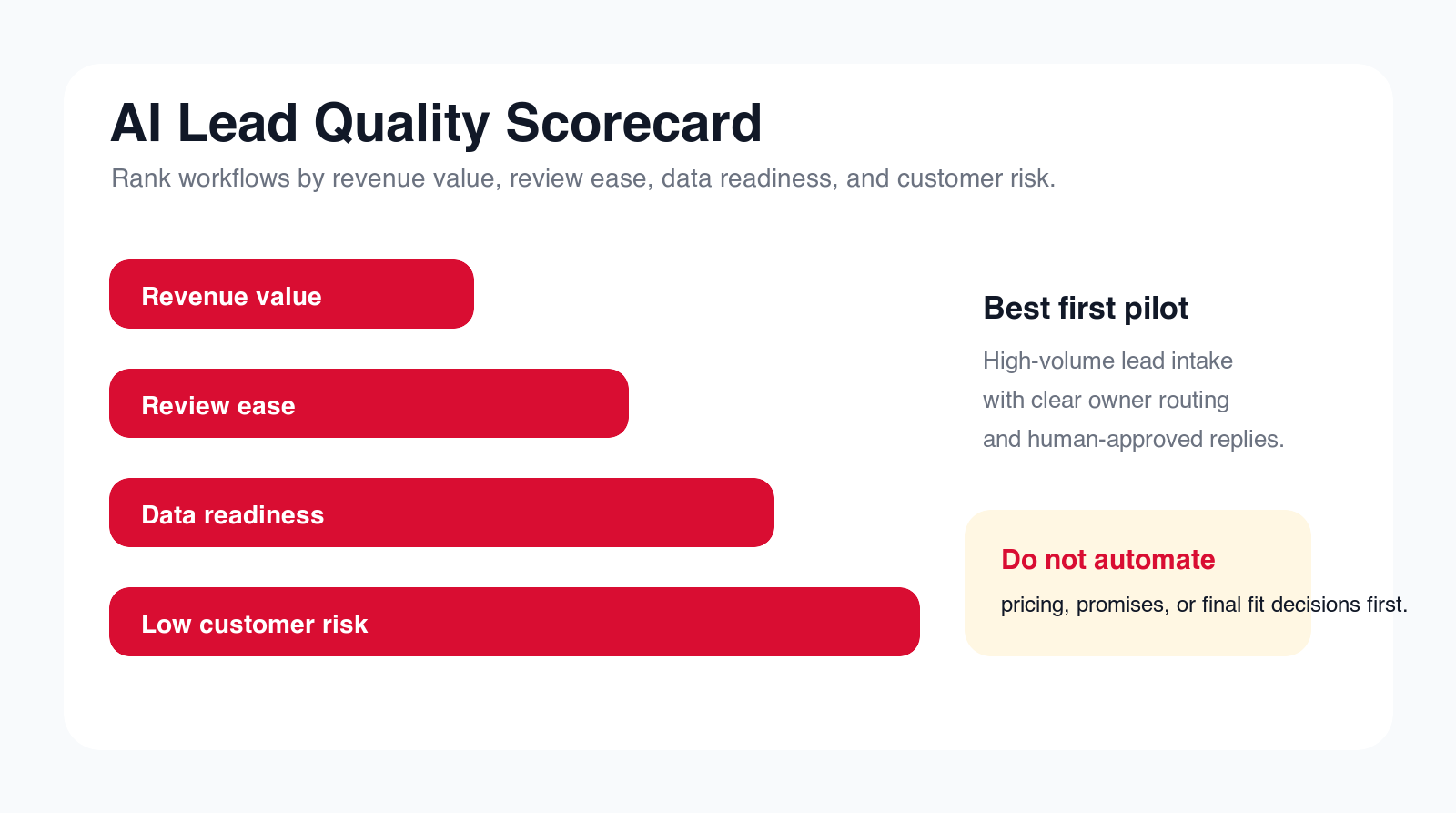
Choose the first workflow by volume, value, data readiness, review effort, and risk. A good first workflow happens often, wastes time today, has a clear owner, uses data you can access, and can be reviewed quickly. A weak first workflow is rare, unclear, politically sensitive, or tied to customer promises that require careful human judgment.
The first project should also have a measurable business outcome. Faster response time, better routing accuracy, fewer duplicates, higher meeting acceptance, cleaner CRM fields, lower manual research time, and stronger source quality reporting are practical metrics. "More AI" is not a metric. "More leads" is not enough either if the leads are low quality.
If you are not sure where to start, map the lead journey from first touch to sales acceptance. Look for repeated manual work, late handoffs, missing context, and places where sales says the leads are weak. Those friction points usually reveal better AI automation opportunities than a generic tool demo.
Free lead workflow check
Find your first AI lead generation workflow.
Drop your email and we will send a first-pass recommendation for the safest lead generation workflow to automate first.
No spam. We use this to reply with the recommendation.
1. Lead Intake Normalization
Lead intake is where many quality problems begin. Leads arrive from forms, chat, ads, events, referrals, partner pages, emails, and spreadsheets. Each source may use different fields, naming conventions, campaign labels, consent details, and qualification questions. If the intake layer is messy, every later workflow becomes harder.
AI can help normalize the lead into a consistent structure. It can classify the request, clean company names, identify the likely service interest, summarize free-text messages, flag missing fields, and prepare a standard CRM record. This makes routing and reporting more reliable because every lead enters the system in a similar shape.
Keep this workflow practical. The agent should not decide whether the lead is valuable yet. Its job is to prepare a clean intake packet with source, contact, company, request, missing data, and confidence. A human or downstream scoring rule can decide what happens next.
2. Lead Enrichment and Missing Context Checks
Salespeople often waste time searching for basic context before they can decide what to do with a lead. They may need company size, industry, location, website, role, existing account status, current customer status, and whether the lead already has an open conversation. AI can prepare that context faster.
The enrichment workflow should be careful with confidence. Some data is reliable, some is inferred, and some is missing. A useful agent separates confirmed fields from suggestions. It can say, "company website found," "industry likely," "role missing," or "possible existing account match" instead of hiding uncertainty behind a polished summary.
This workflow improves lead quality because reps see what they need before they act. It also prevents weak personalization. A sales message based on uncertain information can sound careless. Let AI prepare context, but make uncertainty visible.
3. Duplicate Detection and CRM Matching
Duplicate leads create slow handoffs, annoyed buyers, and bad reporting. One person may fill out a form twice, contact sales from a different email, register for a webinar, and reply to an old campaign. If those records do not connect, the team may treat the same account as several separate leads.
AI can help find likely duplicates by comparing email domains, names, company names, account history, phone numbers, form messages, and CRM records. It can prepare a match recommendation and show the evidence. The workflow should not merge records automatically at first, because a wrong merge can expose data or corrupt account history.
A strong first version creates a review queue. Sales operations or the lead owner sees possible duplicate matches, accepts or rejects them, and improves the rules. This protects data quality while reducing manual searching.
4. Ideal Customer Profile Fit Scoring
Fit scoring helps the team decide which leads deserve faster attention. The agent can compare a lead against the company's ideal customer profile using company size, industry, geography, role, budget signals, service interest, current tools, and stated business problem. The output should include reasons, not only a number.
The safest version is recommendation-based. The agent can label a lead as strong fit, possible fit, weak fit, or needs review, then explain why. For example, "strong fit because the lead requested AI workflow automation, has an operations role, and described a repeated manual process." That is more useful than a score that nobody understands.
Human review matters because fit rules reflect strategy. A lead may look weak by firmographic data but be strategically important. Another lead may look strong but be outside the company's delivery model. Sales leadership should approve the scoring criteria and review exceptions regularly.
5. Intent and Urgency Classification
Not all leads have the same urgency. Some are ready to book a call, some are researching options, some need education, and some are vendors or job seekers. AI can classify the intent from form text, chat messages, page source, campaign, and recent behavior. That classification helps the business respond appropriately.
A lead asking "Can you automate our invoice approval workflow this month?" should not be handled the same way as someone downloading a broad guide. The first may need a fast sales call. The second may need a nurture path. The third may need disqualification. AI can prepare that recommendation before a person opens the record.
The guardrail is overconfidence. A short message may not contain enough evidence. The agent should be allowed to say "unclear" and ask for human review. It is better to route uncertain leads carefully than to force every lead into a category.
6. Territory, Segment, and Owner Routing
Routing sounds simple until the business has multiple services, regions, account owners, partner relationships, strategic accounts, or language needs. A lead may belong to a territory, an existing account owner, a service specialist, or a sales queue. AI can help prepare the routing decision by reading context across systems.
The agent can look for existing accounts, open opportunities, previous owners, territory rules, source campaign, service interest, and urgency. It can recommend the owner, explain why, and create a task. This reduces lead sitting time and prevents the common problem where several people assume someone else is handling the lead.
Start with reviewed routing. Let the agent recommend, then compare its recommendations with sales operations decisions. Once the rules are reliable, low-risk assignments can become automatic while strategic accounts and unclear cases remain reviewed.
7. Fast Response Drafts
Fast response matters, but a fast bad response can damage trust. AI can draft the first reply using the lead's request, source page, service interest, and approved messaging. The draft should help the salesperson respond quickly without sounding generic or making unsupported promises.
A good draft includes the buyer's context, one useful next step, and one clarifying question. It does not invent results, quote prices without approval, promise timelines, or pretend the company has already reviewed the full situation. The purpose is to reduce writing time while keeping the sales owner accountable.
The first version should be draft-only. Reps can edit and send. Track acceptance rate, editing time, replies, and objections. If reps rewrite every draft, the agent needs better examples, stronger knowledge sources, or a narrower workflow.
8. Meeting Booking and Calendar Handoff
Meeting booking is a good lead generation workflow because it often fails through small delays. The lead asks for help, the rep needs to respond, find the right owner, offer times, ask for context, and prepare the meeting. AI can prepare that handoff so the path to a conversation is clearer.
The agent can draft a booking reply, identify the right meeting type, attach the correct calendar link, summarize the lead context, and create a pre-call checklist. If the lead needs a technical scoping call instead of a general discovery call, the workflow can route accordingly.
Do not let booking automation ignore quality. A meeting with a bad-fit lead wastes sales time. A meeting booked with the wrong owner creates a weak first impression. Use AI to speed the handoff, but keep fit and routing rules visible.
Build a controlled lead pilot
Want lead automation without lower-quality pipeline?
We can map your lead flow, choose the first workflow, define quality controls, and build an AI automation pilot with human review.
We will reply with a practical first-workflow recommendation.
9. Lead Nurture Segmentation
Not every lead should go directly to sales. Some need education, some need a later follow-up, some should receive industry-specific content, and some should be disqualified. AI can classify leads into nurture paths based on intent, service interest, buyer stage, industry, and missing readiness signals.
A practical nurture workflow might label leads as ready for sales, needs education, needs qualification, partner/referral, vendor, student/job seeker, or unclear. It can then recommend the right next email, resource, or internal action. This keeps sales focused on real opportunities while marketing continues to serve early-stage buyers.
Keep the segmentation explainable. If a lead is moved into nurture, sales and marketing should know why. If the lead later becomes active, the system should bring the context back to sales instead of burying the person in a campaign forever.
10. Content and Offer Recommendation
AI lead generation is not only about finding people. It is also about matching the next helpful resource to the buyer's question. A lead asking about invoice automation may need an AP automation guide. A lead asking about AI agents may need an agent development page. A lead asking about a local partner may need the AI automation agency service page.
The agent can recommend which service page, blog post, checklist, or offer should support the follow-up. It can also draft a short note explaining why the resource is relevant. This makes follow-up more useful and prevents generic "thanks for reaching out" messages.
The guardrail is relevance. Do not send every lead the same long sequence. The point of AI is to make the next step fit the buyer's actual context. Quality improves when the system recommends fewer, better actions.
11. Account Research Briefs
Account research is a natural extension of lead generation. When a promising lead arrives, the sales owner needs to know who the company is, what problem the lead described, whether the account exists, which services are relevant, and what questions to ask first. AI can prepare this brief before the first conversation.
A good brief is short and sourced. It should include the lead source, company summary, buyer role, likely pain, prior activity, related account records, suggested discovery questions, and missing details. It should not be a long generic company profile that the rep will not read.
This workflow protects quality because the salesperson enters the conversation prepared. It also reduces the temptation to use weak personalization. The agent should help the rep understand the account, not manufacture fake familiarity.
12. Webinar, Event, and Trade Show Lead Cleanup
Event leads often arrive as messy lists. Some people are real buyers, some are partners, some are competitors, some are students, and some are existing contacts. Manual cleanup is slow, so many event lists sit untouched until they lose value. AI can help turn event data into useful follow-up queues.
The workflow can normalize names and companies, match existing CRM records, classify role and company type, identify high-priority attendees, draft event-specific follow-up, and route leads to the right owner. It can also separate people who should enter nurture from people who deserve immediate sales attention.
Human review is important because event context can be thin. A badge scan or attendee list rarely tells the full story. Use AI to prepare and prioritize, then let sales decide which conversations are worth pursuing.
13. Partner and Referral Lead Intake
Partner and referral leads deserve careful handling because the relationship includes more than the end buyer. The company may need to respect partner rules, attribution, territory, communication expectations, and context from the referral source. AI can organize this information before sales acts.
The agent can summarize who referred the lead, what was promised, what the buyer needs, which partner owns the relationship, what follow-up is appropriate, and what information is missing. It can create tasks for both internal sales and partner communication.
The guardrail is relationship sensitivity. Do not let an automated workflow send messages that conflict with partner expectations. Let AI prepare the handoff and keep the human owner responsible for the relationship.
14. Dormant Lead and Lost Opportunity Reactivation
Many companies have old leads, stalled opportunities, and inactive contacts in the CRM. Some are no longer relevant, but some may be worth revisiting because timing has changed, a new service exists, or the lead originally showed strong intent. AI can help prioritize which records deserve attention.
The workflow can review old source, last conversation, stated pain, company fit, prior objections, current account status, and missing next steps. It can prepare a ranked reactivation list with recommended angles and draft messages for review. This helps the team avoid random blasts to old contacts.
Quality matters here. Reactivation should feel relevant and respectful. The agent should avoid pretending the relationship is warmer than it is. Sales should approve messaging, especially when the last contact was long ago or the prior opportunity ended poorly.
15. Lead Quality Reporting and Feedback Loops
The most important AI lead generation workflow may be reporting. If the business only counts lead volume, it will optimize for quantity. If it tracks sales acceptance, meeting quality, opportunity creation, source conversion, duplicate rate, routing accuracy, and rep feedback, it can improve the entire system.
AI can summarize lead quality by source, campaign, service interest, segment, and owner. It can identify which sources create real sales conversations and which create low-fit activity. It can also pull qualitative feedback from sales notes: bad fit, no budget, unclear need, duplicate, student, vendor, wrong geography, or not ready.
This closes the loop between marketing and sales. The system learns from outcomes instead of only from form fills. A good AI automation agency should design this feedback loop early because it prevents the lead generation system from chasing the wrong metric.
Guardrails That Protect Sales Quality
Lead generation automation needs guardrails because it sits close to brand reputation and revenue. A bad workflow can send weak messages, route good leads to the wrong owner, pollute the CRM, or push salespeople to ignore automation entirely. Guardrails prevent speed from becoming noise.
The first guardrail is human review for customer-facing messages. Let the agent draft, but do not let it send sensitive replies automatically at the start. The second is explainable scoring. Every score should show the reasons behind it. The third is source quality reporting. The system should reveal which channels create real opportunities, not just more records.
The fourth guardrail is permission design. The agent should only read the data needed for the workflow and only update low-risk fields unless a person approves. The fifth is error handling. If the agent is uncertain, missing data, or finds conflicting records, it should stop and route the case for review.
A Practical 90-Day AI Lead Generation Implementation Plan
In the first thirty days, map the current lead journey. List every lead source, required field, CRM destination, owner rule, response path, nurture path, and reporting metric. Choose one workflow that happens often and can be reviewed. Write the brief: trigger, inputs, AI task, human review, output, exceptions, owner, and success metric.
In days thirty to sixty, build the controlled pilot. Connect only the systems required for the workflow. Test real leads, duplicate records, weak-fit records, missing data, unclear requests, event leads, and high-priority leads. Track whether the agent produces useful summaries, routing recommendations, drafts, or reports.
In days sixty to ninety, launch with a small team. Measure response time, routing accuracy, sales acceptance, rep editing time, duplicate reduction, meeting quality, and lead source performance. Expand only after the first workflow proves it can improve quality and reduce manual work without creating new cleanup problems.
The Minimum Useful Lead Generation Agent
The minimum useful agent should have one trigger, one lead source or lead type, one primary output, and one owner. For example, it might classify inbound contact form leads, check for duplicates, recommend routing, and draft the first response for review. That is enough to prove value without turning the first project into a full revenue operations rebuild.
What to Avoid in the First Build
Avoid automatic bulk outreach, automatic pricing promises, hidden fit scores, CRM merges without review, and campaigns that treat every lead the same. Also avoid building on unclear definitions. If marketing and sales disagree on what a qualified lead means, define that before automation.
Questions to Answer Before Launch
- Which lead source or workflow is the pilot responsible for?
- Which fields and systems can the agent read?
- Which outputs require human approval?
- How will sales report bad routing, weak scores, or poor drafts?
- Which metric proves that lead quality improved?
When to Hire an AI Automation Agency
Internal teams can automate simple lead handling when the source is clear, the CRM is clean, and the rules are already documented. An AI automation agency becomes more useful when the workflow crosses marketing, sales, CRM, enrichment tools, email, calendars, reporting, and human review. That is where implementation quality matters.
A good agency should not start by selling a generic AI lead generation tool. It should map the current workflow, identify the first pilot, define lead quality rules, design the review path, connect the necessary systems, test real examples, train users, and measure whether the workflow creates better sales outcomes.
The agency should also be willing to say when not to automate. If the lead source is poor, the CRM is unusable, or the team has no shared qualification definition, the first project may need cleanup before AI. That is not a delay. It is how you avoid scaling the wrong problem.
How to Measure AI Lead Generation Without Fooling Yourself
Measure lead generation automation by quality and movement, not only volume. Useful metrics include time to first response, routing accuracy, duplicate rate, missing field rate, sales acceptance rate, meeting booked rate, opportunity creation rate, source quality, rep edit rate, and CRM cleanup reduction.
The most useful metric is often sales acceptance. If sales rejects many automated leads, the system is not helping. If reps accept the routing, use the summaries, edit drafts lightly, and trust the CRM record, the workflow is creating practical value. Quality is visible in adoption.
Keep a feedback loop. When a lead is weak, sales should be able to mark why: bad fit, no budget, duplicate, unclear request, vendor, student, wrong service, wrong region, or not ready. That feedback improves scoring, routing, nurture, and reporting.
Where AI Lead Generation Fits in the Sales Stack
AI lead generation should not become a separate side system that only one person understands. It should sit inside the sales stack where work already happens. The CRM should remain the system of record. Marketing automation should still manage consent, campaign history, and nurture rules. Calendar tools should still control booking availability. Reporting should still connect lead activity to pipeline outcomes. The AI layer should make those systems easier to use, not replace ownership.
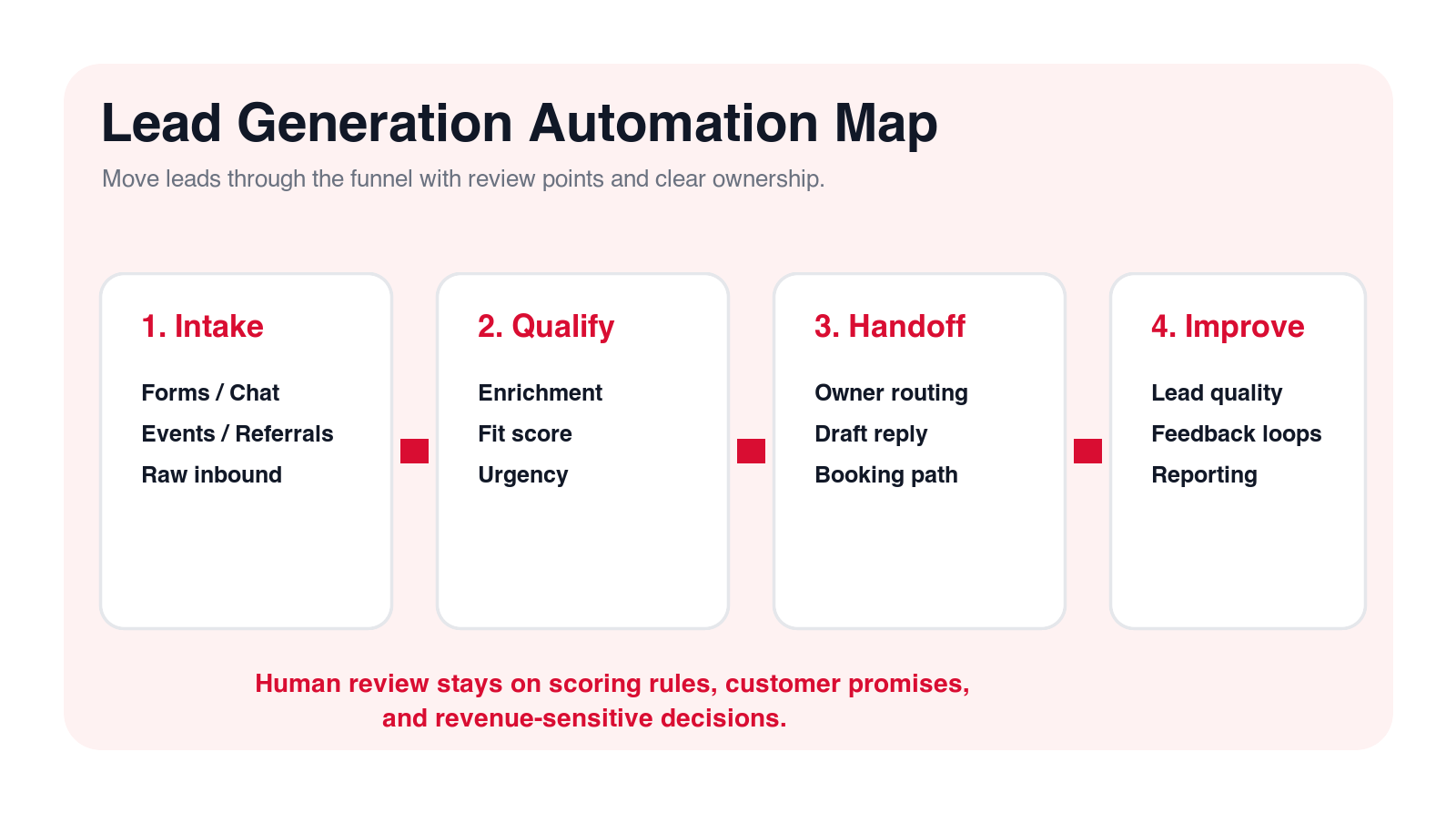
A practical architecture usually has four parts. First, the lead source creates the trigger: form, chat, ad, webinar, referral, or old CRM record. Second, the AI workflow prepares context: summary, enrichment, duplicate check, fit score, urgency, and recommended route. Third, the review layer gives the right person a place to approve, edit, or reject the output. Fourth, the system of record is updated with the approved result so reporting and follow-up stay clean.
This is where many teams overbuild. They buy a lead generation tool, an enrichment tool, an AI writing tool, a workflow tool, and a separate dashboard, then wonder why nobody trusts the process. A better approach is to pick one lead workflow and connect only what it needs. If the first pilot is inbound form routing, you may only need the form source, CRM, enrichment source, review queue, and email draft. Add more systems only when the workflow proves value.
The ownership model matters as much as the tool stack. Marketing may own source quality. Sales may own acceptance criteria. Revenue operations may own CRM fields and routing rules. Leadership may own pipeline definitions. An AI automation agency can help align those responsibilities before the build starts. Without that agreement, AI will expose disagreements faster than it solves them.
Final Checklist: Automate Lead Generation Without Damaging Sales Quality
- Start with one repeated lead workflow, not every source at once.
- Use AI to prepare context, classify intent, draft replies, and route work.
- Keep customer-facing messages reviewed until quality is proven.
- Make lead scores explainable so sales can trust them.
- Protect the CRM from automatic bad merges, weak updates, and unclear fields.
- Measure accepted leads, meetings, opportunities, and source quality, not only lead count.
AI lead generation should make your sales process calmer and more reliable. It should help the team see which leads matter, respond faster, route work correctly, and learn from outcomes. If automation creates more noise, it is not a lead generation improvement. It is a quality problem moving faster.
Start narrow. Pick one lead source or workflow, define what good looks like, keep humans in review, measure the result, and expand only after the system proves it can protect both speed and quality.
Free AI lead generation review
Get a first-pass recommendation for your lead workflow.
Send your email and we will reply with a practical view of which lead generation workflow should become your first AI automation pilot.
No spam. We use this to reply with the recommendation.
FAQ: AI Lead Generation
What is AI lead generation?
AI lead generation uses AI to support lead capture, enrichment, qualification, routing, follow-up drafts, nurture segmentation, CRM cleanup, and reporting. The best systems improve lead quality and speed without removing human sales judgment.
What lead generation workflow should I automate first?
Start with a frequent workflow that has clear data and an easy review path, such as inbound lead intake, duplicate detection, fit scoring, owner routing, first-response drafts, or lead quality reporting.
Can AI send lead follow-up emails automatically?
For most first pilots, AI should draft follow-up emails and a salesperson should approve them. Automatic sending can be tested later for low-risk messages with clear rules, approved copy, and monitoring.
How do I protect lead quality when using AI?
Use explainable scoring, human review for sensitive messages, duplicate checks, clear routing rules, CRM field validation, source quality reporting, and feedback from sales on why leads are accepted or rejected.
Can Go Expandia build AI lead generation automation?
Yes. Go Expandia can map the lead workflow, choose the first automation pilot, build AI lead routing or qualification workflows, connect systems, design human review, and support rollout.
About Bailey Roque
Bailey Roque writes for Go Expandia on AI automation, AI agent development, workflow design, AI consulting, and practical rollout models for business teams.
Related posts and services
Keep planning your AI sales automation roadmap
Sales guide
AI Sales Agent
See 12 sales workflows to automate first with controlled AI agents.
Workflow guide
AI Workflow Automation
Compare 15 business processes that can become AI automation pilots.
Main service
AI Automation Agency
Build practical workflow automation with AI agents, integrations, and human review.
Ready to Improve Lead Generation With AI?
Go Expandia helps companies choose the right lead workflow, design quality controls, and launch AI automation that sales teams can actually trust.