AI Receptionist: How to Automate Calls, Booking, and Lead Intake
An AI receptionist should help your business answer more calls, capture cleaner lead information, book the right appointments, and route requests faster without making customers feel trapped inside a careless phone bot.
Best first pilot
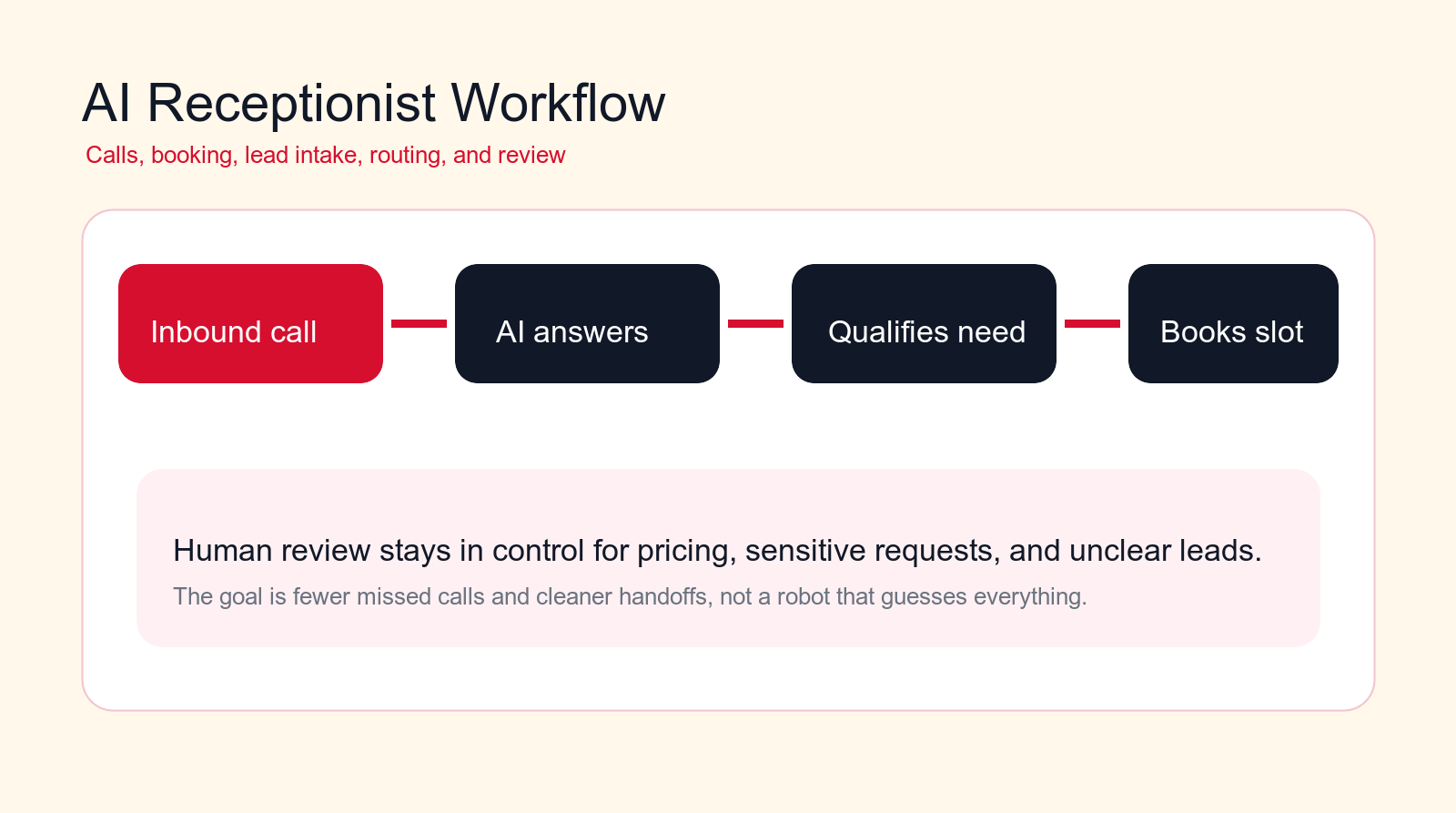
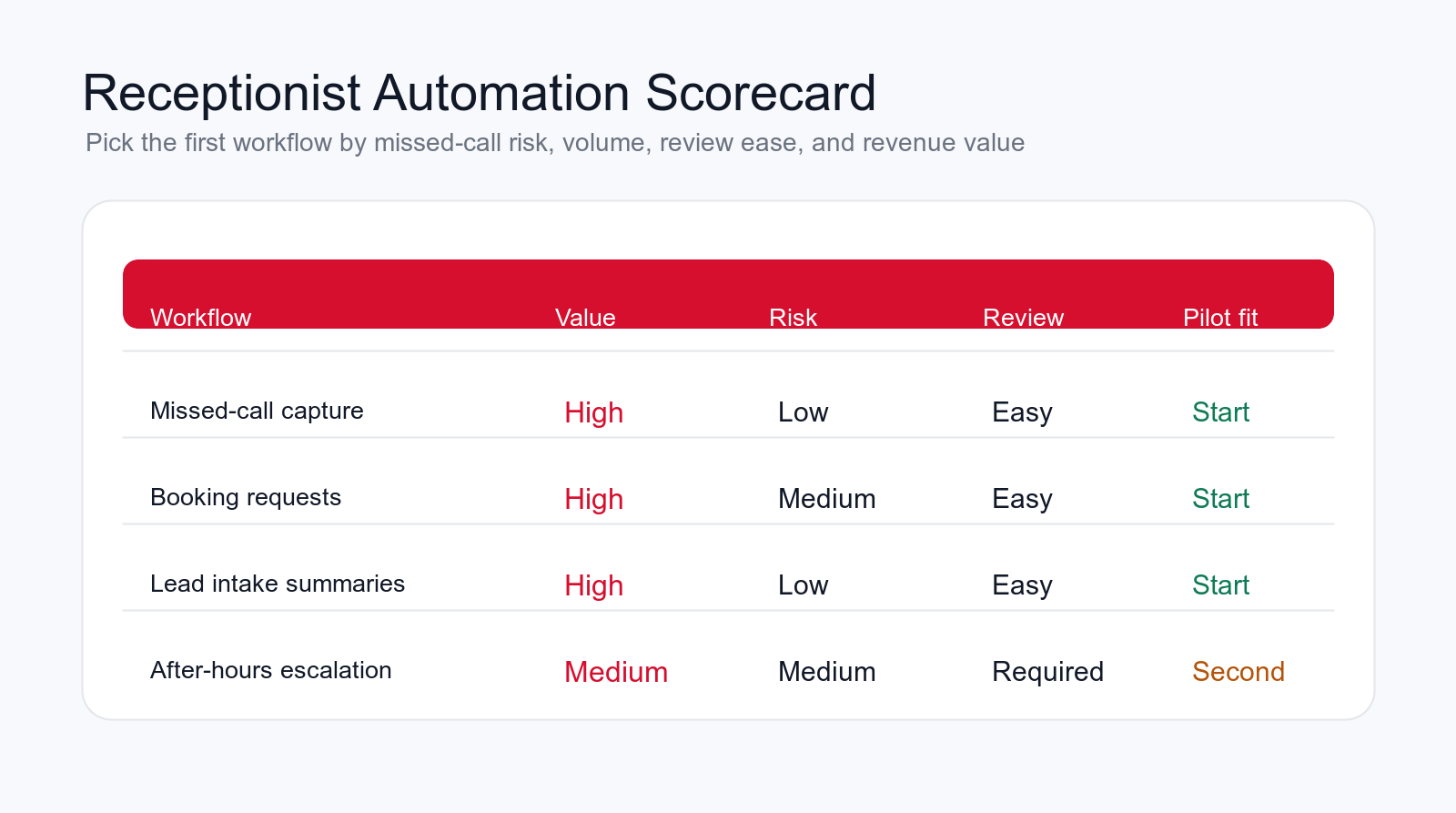
Start with missed-call capture, booking handoffs, or lead intake summaries before automating complex customer decisions.
Focus
AI receptionist
Best for
Call intake and booking teams
Best first workflow
Missed-call capture
Main service
AI Automation Agency
TL;DR
An AI receptionist is most useful when it automates repeated front-desk work: answering calls, capturing caller intent, qualifying new leads, booking appointments, updating the CRM, sending reminders, routing urgent issues, and reporting call quality. The safest first workflows are missed-call text-back, appointment requests, lead intake summaries, and after-hours triage. Keep humans in control for pricing, complaints, medical or legal judgment, sensitive customer requests, and any call where the caller is confused, upset, or asking for a promise the business has not approved.
An AI receptionist can be a strong first AI automation project because receptionist work is full of repeated steps. Someone calls, asks a question, wants an appointment, needs a price range, requests a callback, changes a booking, or gives details for a new lead. The business needs to answer quickly, capture the information correctly, and move the request to the right person.
The risk is obvious too. A bad AI receptionist can frustrate callers, book the wrong service, miss urgency, collect weak lead details, or make the company sound less human. The goal is not to replace care with automation. The goal is to remove the repetitive delay around calls and intake so the right human can act with better context.
This guide explains how to automate calls, booking, and lead intake with an AI receptionist while protecting customer quality. It is written for business owners, operations managers, sales teams, local service companies, clinics, agencies, professional services firms, and growing teams that need better call handling without hiring a full front-desk team for every hour of the week.
Quick Answer: Automate Reception Tasks, Not Customer Trust
The best AI receptionist workflows answer simple questions, gather structured information, book approved appointment types, create clean handoffs, and escalate anything sensitive. The AI should not guess prices, argue with callers, decide complex eligibility, handle legal or medical judgment, or hide uncertainty from staff.
A strong first version does three things well. First, it makes sure calls are answered or captured. Second, it asks the same high-quality intake questions every time. Third, it gives the right person a clean summary with caller details, reason for the call, urgency, requested service, preferred time, and recommended next step.
If you are choosing a first pilot, start with the workflow that causes the most visible waste today. For many businesses, that is missed calls, after-hours inquiries, appointment requests, or leads that arrive with too little context. These are practical places for an AI automation agency to build a controlled pilot before expanding into more complex call handling.
| Receptionist workflow | Good automation | Bad automation | Quality control |
|---|---|---|---|
| Call answering | Answers, identifies need, and routes clearly. | Loops callers through vague menus. | Escalate confusion fast. |
| Booking | Books approved services into the right calendar. | Books any caller into any slot. | Use service and availability rules. |
| Lead intake | Captures problem, fit, urgency, and contact details. | Collects shallow notes sales cannot use. | Require a complete intake packet. |
| Escalation | Routes urgent, sensitive, and unclear calls to a person. | Pretends every call can be automated. | Define stop rules. |
What an AI Receptionist Actually Does
An AI receptionist is a phone, chat, or voice workflow that handles front-desk tasks with AI. It can answer common questions, identify caller intent, ask intake questions, schedule appointments, send confirmations, create CRM records, summarize calls, and route work to sales, support, operations, or a human receptionist.
The useful part is not just the voice model. The useful part is the workflow design around the model. A receptionist workflow needs triggers, approved knowledge, routing rules, booking rules, escalation logic, system integrations, review steps, and reporting. Without those pieces, the AI may sound impressive in a demo but fail inside the real business.
Think of the AI receptionist as an intake layer. It should turn messy caller information into structured next steps. A caller says, "I need help with a new project next week, can someone call me?" The system should capture who they are, what they need, when they want help, how urgent it is, whether they are a new or existing customer, and who should own the next action.
When AI Receptionist Automation Works Best
AI receptionist automation works best when the call patterns are repeated and the next steps are clear. Appointment requests, service inquiries, new lead intake, callback requests, basic FAQ calls, event registration, reminder calls, and after-hours capture are usually better first candidates than complex dispute handling.
It also works better when the business has clear rules. Which services can be booked automatically? Which appointment types require approval? Which callers should be routed to sales? Which calls need emergency handling? Which fields must be captured before a lead is accepted? If the rules live only in one employee's head, document them before automating.
The best early projects have a narrow scope, a human review path, and a measurable result. You should be able to compare missed calls, time to callback, booking accuracy, lead completeness, no-show rate, and staff time before and after the pilot. If the workflow cannot be measured, it is harder to know whether the AI receptionist improved anything.
Where an AI Receptionist Fits in the Operations Stack
An AI receptionist should not become a separate side channel that staff forget to check. It should sit inside the systems the business already uses. The phone system handles the call. The calendar controls availability. The CRM stores leads and customers. The ticketing system handles support. The inbox or task tool tells staff what to do next. The AI layer should connect those pieces and make the handoff cleaner.
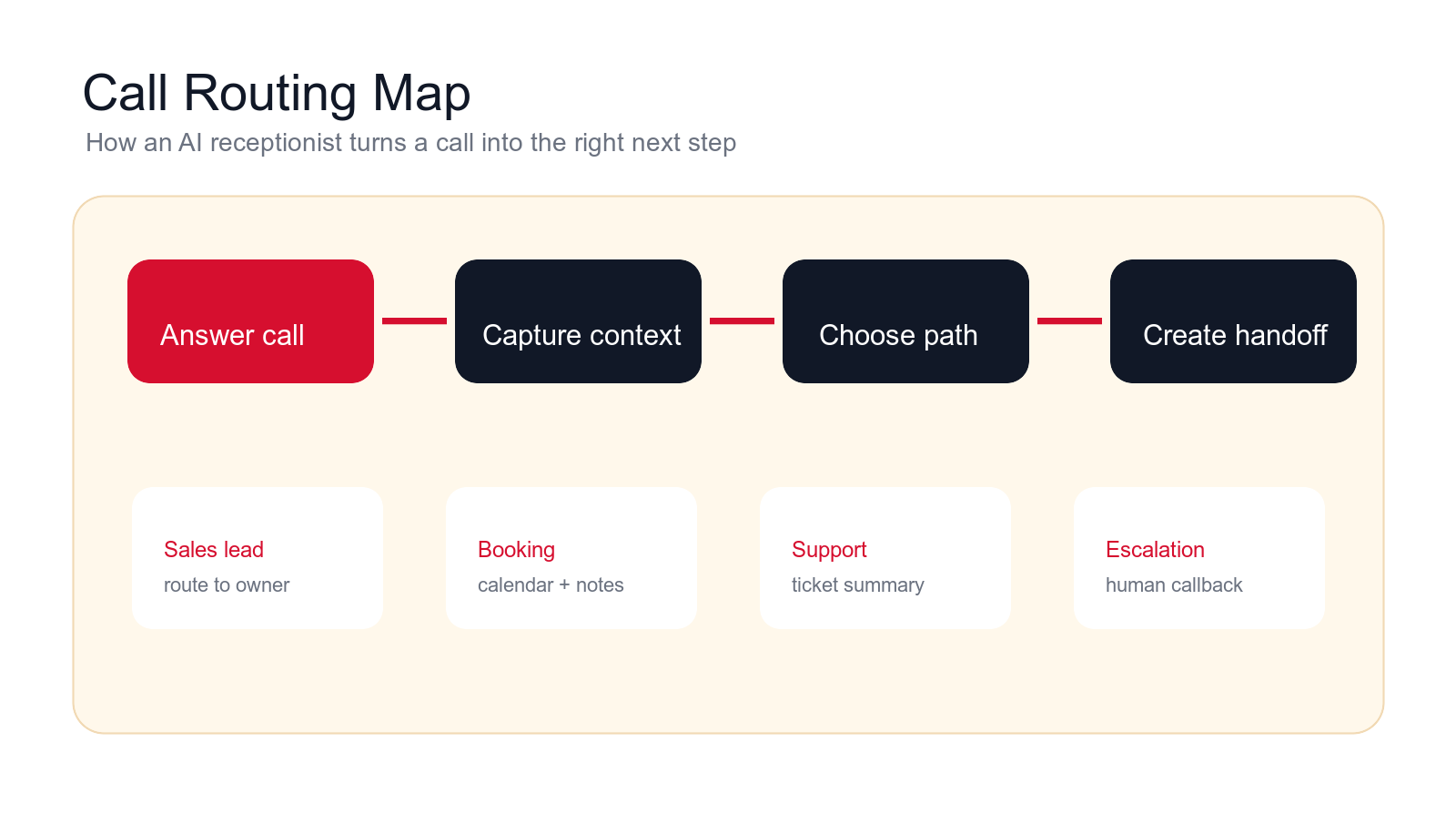
A practical setup usually has five parts. First, the phone or chat trigger starts the workflow. Second, the AI receptionist uses approved knowledge to answer simple questions and ask intake questions. Third, it chooses the next path: booking, sales lead, support ticket, callback, or escalation. Fourth, it updates the right system with a structured summary. Fifth, a person reviews exceptions, corrections, and quality reports.
This structure prevents the common mistake of treating voice AI as the whole project. The voice experience matters, but the real business value comes from what happens after the call. If the caller gives useful details and those details never reach the calendar, CRM, or staff member, the automation has not solved the operational problem.
Ownership also matters. Operations may own call routing. Sales may own lead qualification. Customer service may own support triage. Leadership may own escalation policy. A good AI automation agency will clarify those owners before building, because a receptionist workflow touches several teams at once. Without that agreement, the AI receptionist may expose process confusion faster than it removes work.
Free call workflow check
Find your first AI receptionist workflow.
Drop your email and we will send a first-pass recommendation for the safest receptionist workflow to automate first.
No spam. We use this to reply with the recommendation.
1. Missed-Call Capture and Text-Back
Missed calls are often the fastest AI receptionist win. A caller tries to reach the business, nobody answers, and the lead may call a competitor instead. The AI receptionist can detect the missed call, send a quick text-back, ask what the caller needs, and offer a callback or booking path.
This workflow should stay simple. The system should confirm the caller's name, reason for calling, urgency, preferred callback time, and whether they are new or existing. It can create a task for staff or route the lead to sales. It should not pretend a person is already reviewing the request if nobody is.
Quality improves when the message sounds direct and useful. The AI does not need a long script. It needs to acknowledge the missed call, collect the next useful detail, and move the request into the right queue.
2. After-Hours Call Answering
Many businesses lose leads outside working hours. An AI receptionist can answer after-hours calls, explain that the office is closed, collect the request, identify urgency, and offer a booking or callback. This helps the business capture demand without promising live support at every hour.
The workflow needs strong boundaries. It should know what counts as urgent, what requires a human callback, what can wait, and what emergency instructions are approved. It should not improvise instructions for sensitive industries. The safest design is to collect information and escalate according to defined rules.
The best metric is not just call volume captured. Measure how many after-hours callers become booked appointments, accepted leads, resolved requests, or successful callbacks. That tells you whether the AI receptionist is creating real business movement.
3. Caller Intent Classification
Receptionist work becomes easier when the system knows why the person is calling. The caller may want sales, support, billing, scheduling, a quote, a status update, a cancellation, directions, or a human manager. AI can classify intent from the caller's words and choose the next path.
A good intent classifier is allowed to be uncertain. If the caller says something unclear, the AI should ask a short clarifying question or transfer to a person. Forcing every call into a category can create wrong routing and frustrated customers.
Store the intent in the CRM, ticket, or call log. Over time, intent reporting shows which calls are wasting staff time, which questions need better website content, and which call types are good candidates for deeper automation.
4. New Lead Intake Questions
New lead intake is one of the strongest AI receptionist use cases. Human receptionists and salespeople often ask different questions depending on time pressure. An AI workflow can ask the same approved questions every time and create a cleaner intake packet for the team.
The questions should be short and relevant. For a service business, the AI may ask what the customer needs, where they are located, when they want help, whether this is urgent, what budget or scope exists, and how the team should follow up. For B2B, it may capture company, role, use case, current process, timeline, and decision stage.
Do not turn intake into an interrogation. The system should collect enough detail to route the lead and prepare the next conversation. If the caller is ready to book, move toward booking. If the caller is confused, route to a person.
5. Booking Qualification Before Scheduling
Booking automation can create problems when it schedules the wrong appointment. A caller may need a service the business does not offer, a location outside the service area, a specialist rather than a general appointment, or a callback before the calendar should be used. Qualification protects the schedule.
The AI receptionist can ask a few qualifying questions before showing booking options. It can check service type, location, urgency, preferred time, customer status, and any required preconditions. If the caller qualifies, the workflow can continue to booking. If not, it can offer the right alternative.
This is where approved rules matter. The AI should not decide the business model on the fly. It should follow the same booking rules your best receptionist would use and flag exceptions for review.
6. Calendar Booking and Confirmation
Calendar booking is a practical automation target because it is repetitive, time-sensitive, and easy to measure. The AI receptionist can offer available times, book the correct appointment type, confirm contact details, add notes, and send a confirmation by email or SMS.
The workflow should connect to the real calendar and use accurate rules. Appointment length, buffer time, staff availability, service area, location, and meeting type must be respected. If the business uses several calendars, routing has to happen before booking so the right person gets the appointment.
Booking automation should also prepare the internal handoff. The calendar event should include the caller summary, intake answers, reason for appointment, source, and any warnings. Otherwise the booking may happen quickly but the team still enters the meeting unprepared.
7. Rescheduling, Cancellations, and Waitlist Handling
Reception teams spend a lot of time changing appointments. An AI receptionist can handle simple rescheduling, cancellations, and waitlist requests when the rules are clear. This reduces phone volume and keeps the calendar cleaner.
The system should confirm identity, locate the appointment, explain available options, and update the calendar only when the caller clearly agrees. It should also notify staff when a cancellation affects capacity, revenue, or a high-priority customer.
The guardrail is policy. Cancellation windows, deposits, no-show fees, limited appointment types, and manual exceptions must be defined. If the caller disputes a policy, the AI should escalate instead of arguing.
8. CRM Contact Creation and Call Notes
A receptionist call is only useful if the information lands in the system where the team works. An AI receptionist can create or update CRM contacts, attach call summaries, add source information, and create follow-up tasks. This prevents call details from staying inside voicemail, sticky notes, or memory.
The workflow should check for duplicates before creating a new record. It should compare phone number, email, company, and existing account data. If there is a possible match, it can recommend the match for review instead of creating another duplicate.
Good call notes are short and structured. They should include who called, what they need, urgency, booking status, next owner, promised follow-up, and open questions. A long transcript may be stored, but the team needs a clean summary.
Build a controlled receptionist pilot
Want call automation without hurting caller experience?
We can map your call flow, choose the first receptionist workflow, define escalation rules, and build an AI automation pilot with human review.
We will reply with a practical first-workflow recommendation.
9. Sales Lead Routing
Some receptionist calls are sales opportunities. Others are support, billing, vendor, recruiting, or general questions. AI can route qualified sales leads to the right owner based on service interest, location, account status, lead source, urgency, and existing relationships.
Routing should include an explanation. A task that says "new lead" is weak. A task that says "new inbound lead, interested in AI automation, needs call this week, existing account not found, recommended owner: sales queue" is useful.
Start with recommendation-based routing if the rules are complex. Sales operations can review the AI's suggested owner, correct mistakes, and improve the rules. Once the workflow is reliable, low-risk routing can become automatic while strategic accounts stay reviewed.
10. Support and Service Triage
Receptionists often receive support calls even when support is handled by another team. An AI receptionist can classify support requests, capture the problem, check whether the caller is an existing customer, and create a ticket with the right priority.
The workflow should avoid pretending to solve issues it cannot solve. It can gather details, offer approved basic information, and escalate to the support team. If the caller is upset, the AI should make it easier to reach a person, not keep asking more questions.
This workflow is useful because it reduces repeated intake work for support. The team receives a clear summary instead of starting from zero. Customers also avoid repeating the same explanation to multiple people.
11. Quote, Estimate, and Consultation Request Summaries
Many calls are not ready for instant booking. The caller wants a quote, estimate, proposal, consultation, or scoping conversation. The AI receptionist can collect enough information to prepare the next step without making promises the business has not approved.
For a quote request, the workflow may capture service type, scope, location, timeline, existing tools, budget range, photos or documents, and decision process. For a consultation, it may ask about the business problem, current process, goals, and urgency.
Keep pricing and scope guarded. The AI can explain that the team will review details and follow up. It should not create custom prices, promise exact timelines, or qualify complex requests beyond approved rules.
12. Appointment Reminders and No-Show Reduction
After a booking is made, the AI receptionist can send reminders, confirm attendance, collect missing information, and offer a reschedule path. This is especially useful for businesses where missed appointments waste staff time.
The reminder workflow should be respectful. It should confirm the appointment, include the practical details, ask for any missing information, and make rescheduling easy. It should not spam the customer with too many messages or use pressure tactics.
Measure no-show rate, reschedule rate, confirmed appointments, and staff time spent chasing customers. If the reminder system reduces no-shows but creates more customer complaints, the message timing or wording needs adjustment.
13. Voicemail Transcription and Callback Prioritization
Voicemail is a common bottleneck. Staff may listen to messages in batches, miss key details, or call people back in the wrong order. An AI receptionist can transcribe voicemail, summarize the request, detect urgency, and create a callback queue.
The callback queue should show the caller, phone number, summary, urgency, topic, recommended owner, and confidence. If the audio quality is poor or the message is unclear, the AI should flag it instead of guessing.
This workflow is often a good starting point because it does not require the AI to speak directly with callers. It improves operations behind the scenes while keeping human callback quality intact.
14. Language Detection and Clear Handoff
Some businesses receive calls in multiple languages or from customers who need extra help explaining the request. An AI receptionist can detect language, capture the core request, and route the call to the right staff member or callback path.
Use this carefully. Language support should improve access, not create false confidence. If the business cannot serve a language live, the workflow can collect contact details and schedule a callback with the right person. If translation is used, the system should show staff what was translated and where uncertainty exists.
The benefit is better intake and less confusion. The risk is misunderstanding. Keep escalation easy and avoid using AI translation for sensitive commitments unless the business has approved that path.
15. Reception Quality Reporting and Feedback Loops
The most valuable receptionist automation may be reporting. The business should know how many calls were answered, missed, booked, escalated, abandoned, converted into leads, or routed to support. It should also know where callers get confused.
AI can summarize call reasons, repeated questions, booking blockers, lead quality, after-hours demand, wait times, and staff follow-up performance. It can identify which call types should be automated next and which ones need better human handling.
Reporting closes the loop. If callers ask the same question every day, the website, call script, or FAQ may need improvement. If many calls are urgent, escalation rules may need work. If many leads are weak, intake questions or marketing sources may need review.
Guardrails That Keep the AI Receptionist Useful
Receptionist automation needs guardrails because callers are trusting the business in real time. A weak system can damage that trust quickly. The first guardrail is a clear scope. The AI should know which questions it can answer, which appointments it can book, which records it can update, and which situations require a person.
The second guardrail is escalation. If the caller is angry, confused, asking for a manager, describing an emergency, disputing a charge, requesting sensitive advice, or asking for something outside the script, the AI should hand off. A good escalation path is not a failure. It is what makes automation safe.
The third guardrail is approved knowledge. The AI receptionist should use approved service descriptions, policies, hours, locations, booking rules, intake questions, and response language. It should not invent company policy or make promises because the caller asked confidently.
The fourth guardrail is review and audit. Store call summaries, route decisions, booking outcomes, and error flags. Review a sample of calls every week during the pilot. Look for wrong routing, incomplete intake, awkward phrasing, missed urgency, and callers who tried to reach a human but could not.
If the receptionist makes outbound reminder or confirmation calls, approve the call policy before launch. AI-generated voice calls can trigger consent, disclosure, opt-out, call-recording, and state-specific requirements depending on jurisdiction, so outbound workflows need a stricter review path than simple inbound intake.
A Practical 90-Day AI Receptionist Implementation Plan
In the first thirty days, map the current call flow. List each phone number, call source, common reason for calling, business hours, routing rule, booking rule, staff owner, CRM or ticket destination, and follow-up path. Listen to real calls or review call notes. Find the highest-volume repeated workflow with the lowest customer risk.
In days thirty to sixty, build the controlled pilot. Connect only the systems needed for the first workflow: phone system, calendar, CRM, ticket system, or email. Write approved scripts and intake questions. Test normal calls, unclear calls, angry callers, booking conflicts, duplicate contacts, after-hours requests, and escalation cases.
In days sixty to ninety, launch to a limited call type or time window. Track answered calls, missed-call recovery, booking accuracy, lead completeness, human escalations, staff edits, and customer complaints. Expand only when the team trusts the summaries, routing, and booking behavior.
The Minimum Useful AI Receptionist
The minimum useful AI receptionist has one trigger, one caller type, one booking or routing path, and one human owner. For example, it can answer after-hours calls, identify new leads, collect intake information, offer an approved booking link, and create a CRM task for the next business day. That is enough to prove value without automating every front-desk situation at once.
What to Avoid in the First Build
Avoid complex pricing conversations, complaints, emergency guidance, policy disputes, automatic refunds, and open-ended promises. Also avoid connecting every system on day one. A narrow pilot with clean handoffs is better than a broad AI receptionist that nobody trusts.
Questions to Answer Before Launch
- Which call types should the AI receptionist handle first?
- Which calls must always be escalated to a person?
- Which booking rules are approved and documented?
- Which systems can the AI read and update?
- How will staff report bad summaries, wrong routing, or poor caller experience?
How to Measure Cost, ROI, and Call Quality
Measure an AI receptionist by customer movement and operational quality, not by novelty. Useful metrics include missed-call recovery, time to callback, booked appointments, booking accuracy, lead completeness, staff time saved, escalation rate, abandoned calls, no-show rate, and number of calls that become accepted opportunities.
Quality metrics matter just as much. Review whether callers get clear answers, whether the AI asks too many questions, whether escalation is easy, whether call summaries are accurate, and whether staff trust the handoff. If staff ignore the AI notes, the workflow is not finished.
ROI often comes from a combination of recovered calls, faster booking, fewer manual intake tasks, cleaner CRM records, and better follow-up. Do not claim savings before measuring. Establish a baseline for call volume, missed calls, bookings, and lead quality before the pilot starts.
When to Hire an AI Automation Agency
Some businesses can use an off-the-shelf AI receptionist for simple call capture. An AI automation agency becomes more useful when the receptionist needs to connect to calendars, CRM, ticketing, lead routing, custom intake questions, compliance rules, multi-location routing, or human review workflows.
A good agency should not start by forcing a generic phone bot into the business. It should map call types, choose the first pilot, write approved scripts, define escalation rules, connect the required systems, test real scenarios, train staff, and measure whether call handling improved.
The agency should also tell you when not to automate a call type yet. If staff disagree on booking rules, the CRM is full of duplicates, or there is no clear escalation path, the first project may need workflow cleanup. That work makes the AI receptionist safer and more useful.
Final Checklist: Automate Calls, Booking, and Lead Intake Safely
- Start with one repeated call workflow, such as missed calls, after-hours calls, or booking requests.
- Use the AI receptionist to capture context, classify intent, book approved appointments, and create clean handoffs.
- Keep humans in control for pricing, complaints, sensitive requests, emergencies, and unclear cases.
- Use approved scripts, service rules, booking rules, and escalation rules.
- Push summaries and tasks into the CRM, calendar, ticket system, or inbox where staff already work.
- Measure missed-call recovery, booking accuracy, lead completeness, customer experience, and staff trust.
An AI receptionist should make the front desk calmer, not colder. The best systems answer more calls, collect better information, and route work faster while making it easy for a person to step in when judgment matters.
Start narrow. Choose one receptionist workflow, define what a good call outcome looks like, build the review path, test real calls, and expand only after the pilot proves it can protect both speed and caller experience.
Free AI receptionist review
Get a first-pass recommendation for your call workflow.
Send your email and we will reply with a practical view of which receptionist workflow should become your first AI automation pilot.
No spam. We use this to reply with the recommendation.
FAQ: AI Receptionist
What is an AI receptionist?
An AI receptionist is an AI-powered call, chat, or voice workflow that can answer common questions, capture caller intent, ask intake questions, schedule appointments, create call summaries, and route requests to the right person or system.
What receptionist workflow should I automate first?
Start with a frequent, low-risk workflow such as missed-call text-back, after-hours intake, appointment requests, voicemail summaries, or new lead intake. These workflows are easy to review and usually show value quickly.
Can an AI receptionist book appointments automatically?
Yes, when the appointment type, availability, qualification rules, calendar access, and escalation rules are clearly defined. Complex or sensitive bookings should stay reviewed until the workflow is proven.
How do I keep an AI receptionist from frustrating callers?
Use short prompts, clear escalation options, approved scripts, narrow scope, call review, and human handoff for confusion, complaints, urgent issues, pricing, or sensitive requests.
Does an AI receptionist replace a human receptionist?
Usually the best use is support, not full replacement. AI can handle repetitive intake, missed calls, booking, and summaries while humans handle judgment, relationship-sensitive calls, exceptions, and quality review.
Can Go Expandia build AI receptionist automation?
Yes. Go Expandia can map your call workflow, choose the first receptionist pilot, design intake and escalation rules, connect calendar or CRM systems, and build a controlled AI automation rollout.
About Bailey Roque
Bailey Roque writes for Go Expandia on AI automation, AI agent development, workflow design, AI consulting, and practical rollout models for business teams.
Related posts and services
Keep planning your AI call and sales automation roadmap
Lead guide
AI Lead Generation
See 15 lead generation workflows to automate without lowering sales quality.
Sales guide
AI Sales Agent
Compare sales workflows where AI agents can prepare work for review.
Main service
AI Automation Agency
Build practical workflow automation with AI agents, integrations, and human review.
Ready to Build a Safer AI Receptionist?
Go Expandia helps companies choose the right call workflow, design escalation controls, and launch AI automation that customers and staff can trust.