Intelligent Document Processing: How AI Reads, Routes, and Reviews Business Documents
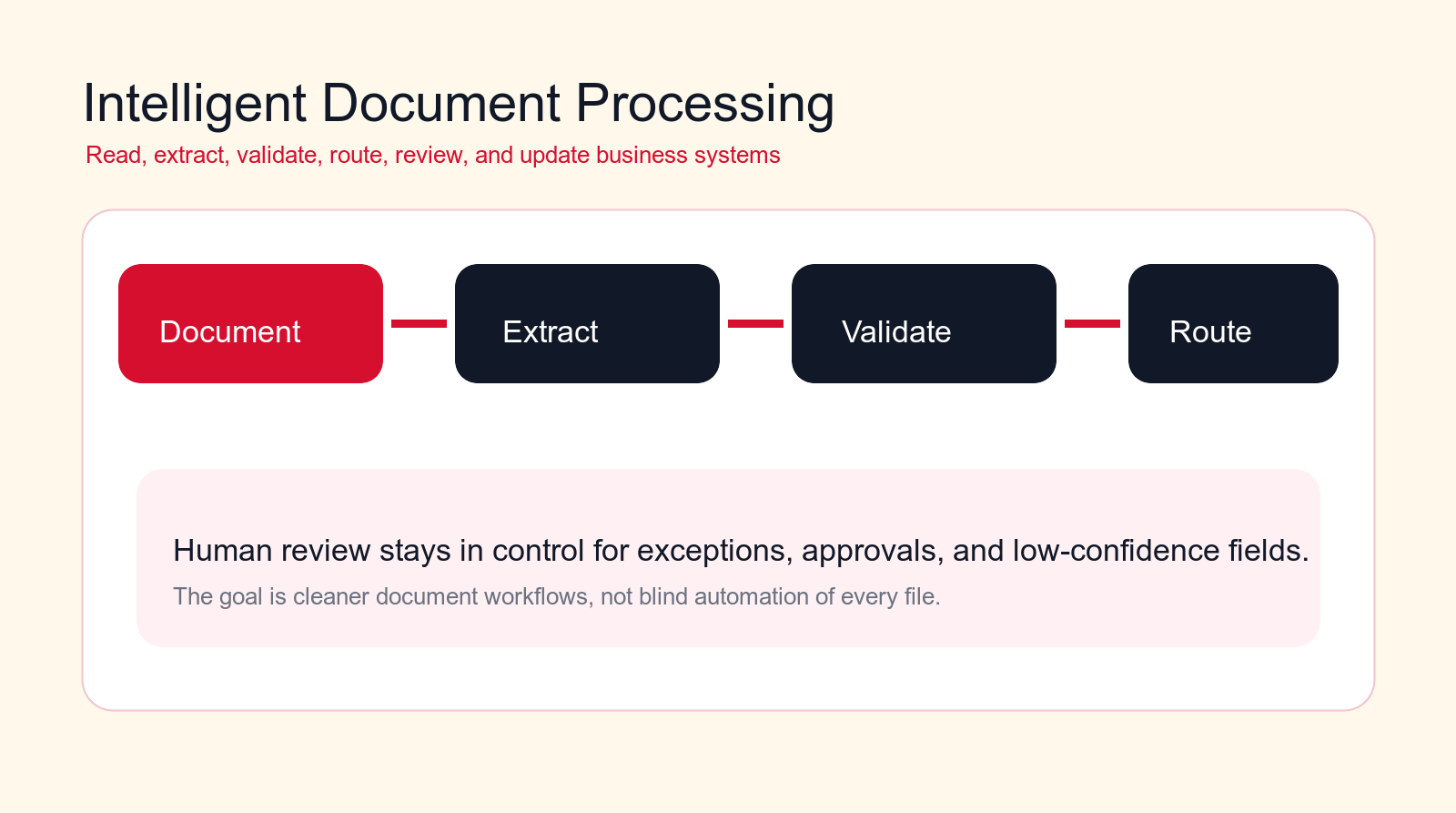
Intelligent document processing turns invoices, forms, contracts, applications, claims, and attachments into structured work. The best systems read the file, extract the right fields, route exceptions, and keep humans in control of important decisions.
Best first pilot
Start with a frequent document type that has clear fields, clear owners, and an easy human review path.
Focus
Intelligent document processing
Best for
Operations and document teams
Best first workflow
Document intake
Main service
Custom AI Solutions
TL;DR
Intelligent document processing uses AI to classify documents, extract fields, validate information, route work, prepare summaries, and update business systems. It is useful for invoices, order forms, contracts, applications, claims, onboarding documents, compliance packets, HR records, vendor documents, shipping papers, and document-heavy support queues. The safest rollout does not let AI approve everything. It uses confidence thresholds, source references, exception queues, approval rules, and human review for low-confidence fields, regulated documents, contracts, financial decisions, and any workflow where a wrong extraction could create real business risk.
Free document workflow check
Find your first intelligent document processing pilot.
Drop your email and we will send a first-pass recommendation for the safest document workflow to automate first.
No spam. We use this to reply with the recommendation.
Intelligent document processing matters because business documents are still where a large amount of operational work begins. A customer sends a form. A supplier emails an invoice. A candidate uploads a document. A vendor sends a certificate. A client signs a contract. A support case arrives with attachments. Someone inside the company then has to open the file, read it, decide what it is, copy fields into another system, check for missing information, route it to the right owner, and follow up when something is wrong.
That repeated handling is slow, easy to lose, and hard to measure. It also creates hidden risk. A copied invoice total can be wrong. A contract renewal date can be missed. A customer application can sit in the wrong inbox. A compliance document can be accepted without the right review. A support attachment can be ignored because nobody knew it changed the priority of the case.
Intelligent document processing, often shortened to IDP, is the practical use of AI document processing, rules, workflow automation, and human review to turn files into structured business actions. The goal is not to remove every person from document work. The goal is to make every document easier to understand, easier to route, easier to validate, and easier to audit.
This guide explains how AI reads, routes, and reviews business documents. It is written for operations leaders, finance teams, service businesses, B2B companies, agencies, founders, and department heads that want better document automation without creating a blind approval machine.
Quick Answer: IDP Turns Documents Into Reviewed Work
Intelligent document processing is a workflow that receives a document, identifies what kind of document it is, extracts the important fields, validates those fields against business rules or source systems, routes the document to the right queue, and asks for human review when confidence is low or the decision is sensitive.
A useful IDP workflow does not stop at optical character recognition. OCR reads visible text. Intelligent document processing adds business context. It can recognize that a PDF is a supplier invoice, find the vendor name, invoice number, tax amount, currency, due date, purchase order, and line items, compare that information against existing records, flag mismatches, prepare an approval packet, and send the exception to the accounts payable owner.
The same pattern applies beyond finance. A contract workflow can extract parties, renewal dates, notice periods, payment terms, liability language, and signature status. A customer onboarding workflow can extract identity details, business information, uploaded certificates, missing fields, and approval status. A support workflow can read attachments and route the case to the right product specialist.
The important point is control. AI should prepare document work and reduce manual handling, but it should not silently make high-risk decisions. Strong IDP systems show the source document, field confidence, validation status, reviewer notes, routing history, and system updates.
| Document stage | Good IDP | Bad IDP | Best control |
|---|---|---|---|
| Read | Classifies the document and extracts fields with source references. | Copies text without knowing what the file means. | Show confidence and source snippets. |
| Route | Sends the file to the right owner, queue, or system. | Drops files into generic folders or inboxes. | Use clear routing rules and exception queues. |
| Review | Asks humans to check low-confidence or high-risk fields. | Auto-approves fields nobody has validated. | Use approval thresholds and audit trails. |
| Update | Posts clean, approved data into the right business system. | Writes messy or duplicate records. | Validate before write access expands. |
What Is Intelligent Document Processing?
Intelligent document processing is the combination of document capture, AI reading, classification, extraction, validation, workflow routing, human review, and system updates. It helps teams process structured, semi-structured, and unstructured business documents with less manual work.
Structured documents follow a fixed format. A form with the same fields in the same place is structured. Semi-structured documents have a pattern but not always the same layout. Invoices are a common example because they usually contain similar fields, but each supplier may use a different design. Unstructured documents are harder. Contracts, long emails, reports, statements, and case files may contain important information buried inside paragraphs, attachments, tables, or scanned pages.
Older document automation often depended on templates. If the invoice looked a certain way, the software could pull the same box from the same location. That still works for some documents, but it breaks when layouts change. AI document processing can read documents more flexibly. It can understand labels, nearby text, table structures, dates, totals, clauses, and business context better than a simple template.
That does not mean every file is easy. Poor scans, handwritten notes, rotated pages, missing pages, inconsistent labels, merged PDFs, screenshots, and unclear attachments still create errors. A mature IDP workflow expects those errors and routes them to review instead of hiding them.
A helpful way to think about IDP is that it turns a document into a work item. The document comes in as a file. It leaves as a structured packet: document type, extracted fields, validation results, missing information, confidence levels, source references, reviewer notes, next owner, and the action that should happen next.
Where IDP Fits in a Business Automation Stack
Intelligent document processing should sit between document intake and the systems that run the business. Intake may come from email, web forms, portals, shared folders, scanners, customer uploads, vendor inboxes, support tickets, CRMs, ERPs, or document management systems. The output may go to accounting software, a CRM, a help desk, a case management system, a contract repository, a task manager, a database, or a reporting dashboard.
A document automation project fails when the AI is treated as a separate tool instead of a workflow. Reading the document is only one part. The workflow also needs to decide what happens after the file is read. Does the invoice need approval? Does the contract need legal review? Does the onboarding form need missing information? Does the certificate need renewal tracking? Does the support attachment change the case priority?
This is why IDP often belongs inside a broader business process automation plan. The best result is not a folder full of extracted JSON. The best result is cleaner handoff, fewer missed documents, faster review, better system records, and a clear audit trail.
In practical terms, IDP should have five layers. First, intake captures the file and metadata. Second, AI reads and classifies the document. Third, validation checks extracted data against rules and source systems. Fourth, routing sends the work to the correct owner or queue. Fifth, review and reporting show what happened, where documents are blocked, and which fields need process improvement.
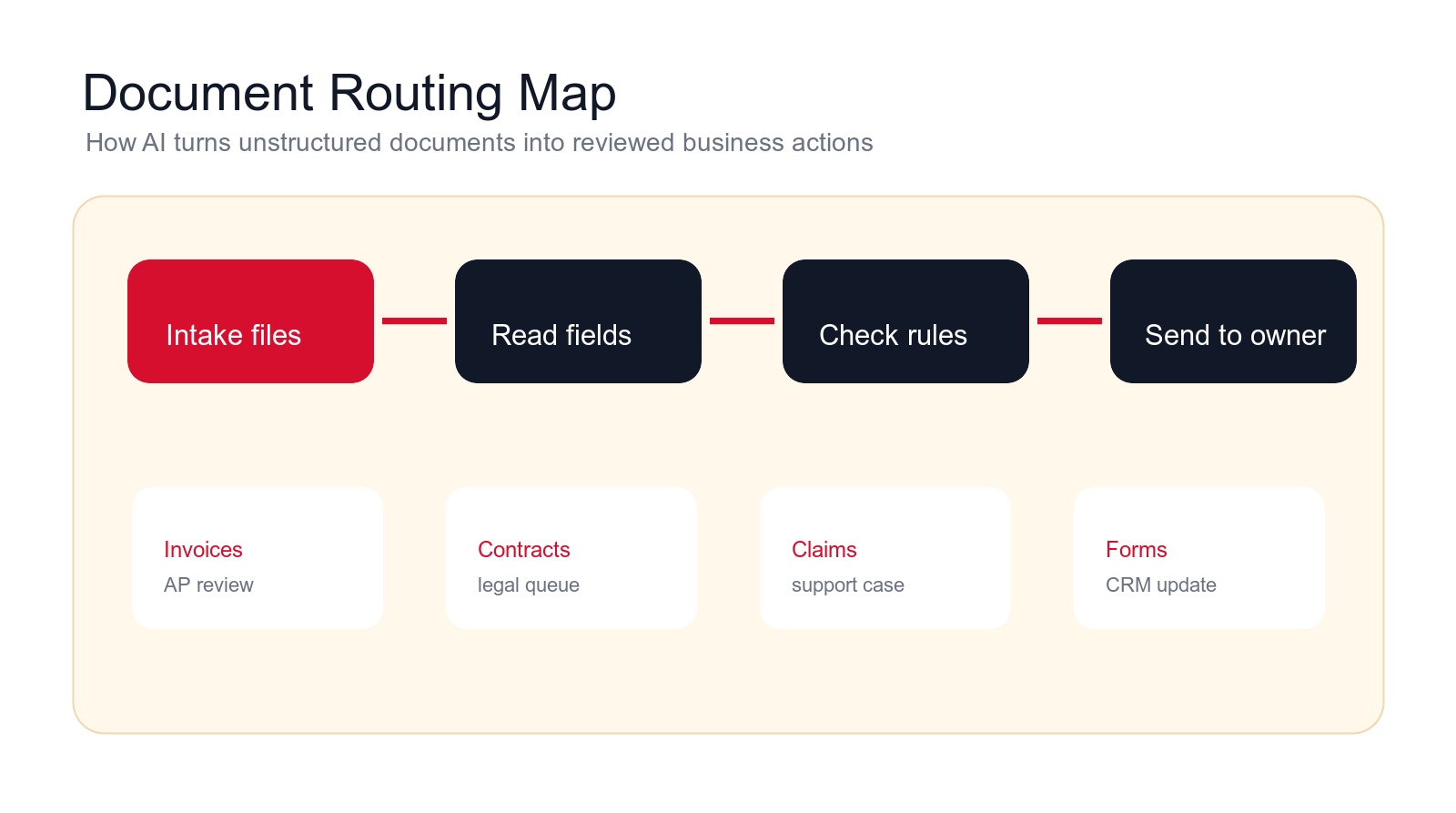
How AI Reads, Routes, and Reviews Documents
The reading step starts with capture. The workflow receives the file, normalizes it, and prepares it for analysis. That may include splitting merged documents, detecting pages, correcting rotation, reading text from scans, identifying tables, and preserving the original file so reviewers can see the source.
Classification comes next. The system decides whether the document is an invoice, contract, form, claim, certificate, purchase order, receipt, identity document, statement, report, shipping paper, or something else. Classification matters because each document type needs different fields and different business rules.
Extraction is where AI pulls key fields out of the file. For an invoice, that may include supplier, invoice number, date, due date, total, currency, tax, purchase order reference, line items, and bank details. For a contract, it may include party names, effective date, renewal date, notice period, payment terms, governing law, and signature status. For an application form, it may include applicant details, eligibility answers, uploaded evidence, and missing fields.
Validation is the quality gate. Extracted fields should be checked before the workflow trusts them. The system can compare the vendor name against approved vendors, match an invoice to a purchase order, check whether a tax ID format looks valid, confirm whether a contract renewal date is in the future, detect duplicate invoice numbers, or flag missing signatures.
Routing turns the reading result into action. A clean invoice can go to standard approval. A mismatched invoice can go to an exception queue. A contract with unusual terms can go to legal. A customer application with missing evidence can trigger a request for more information. A support ticket with a technical attachment can route to the product team.
Review keeps people responsible for decisions that matter. Reviewers should not have to re-read the whole document from scratch every time. They should see the extracted fields, source highlights, confidence levels, validation checks, and a clear accept or correct path. When they correct the data, the workflow should store that correction and make it visible for audit and improvement.
How to Choose the First IDP Workflow
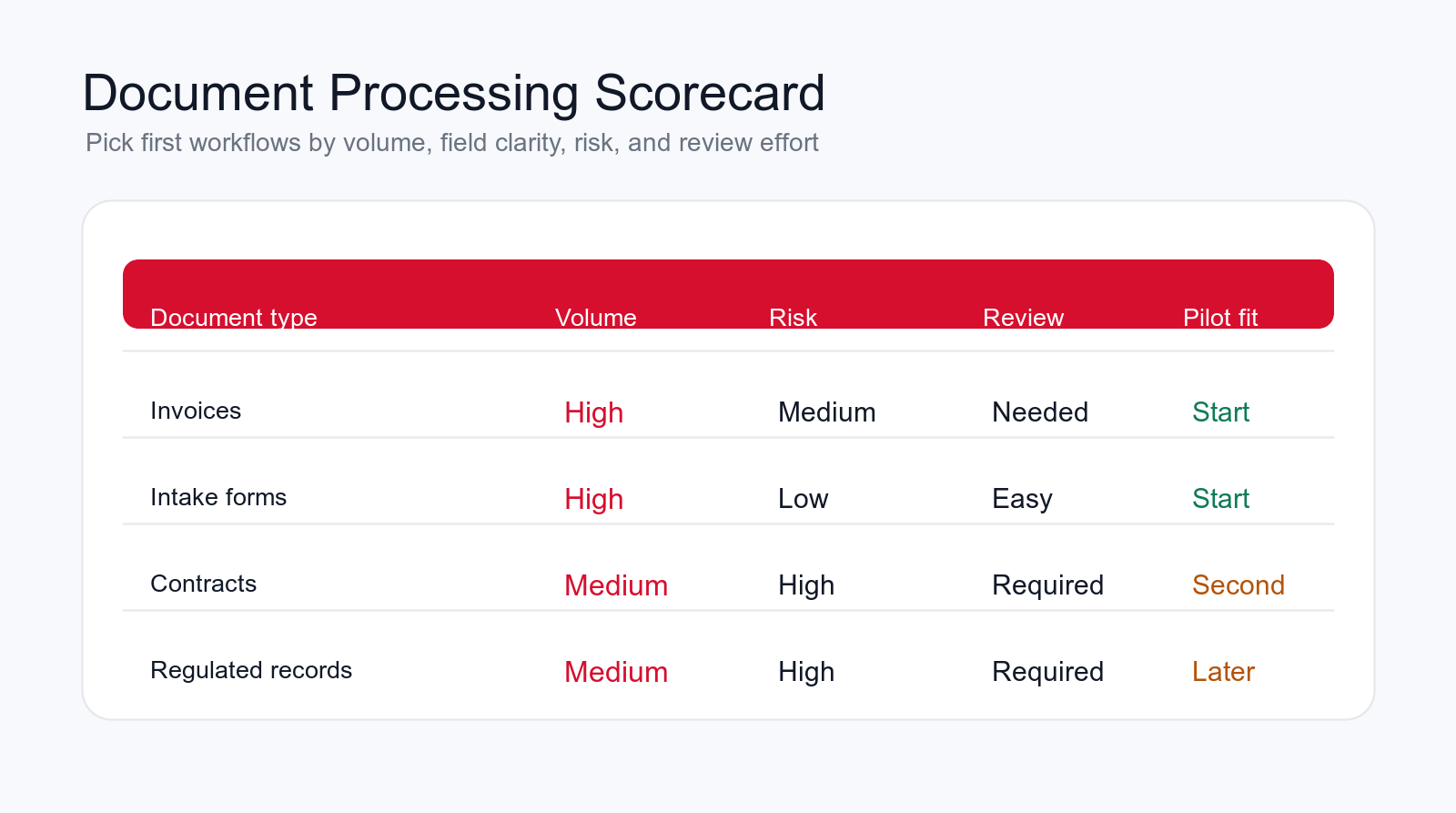
The first intelligent document processing workflow should be frequent, visible, and easy to review. Look for a document type that arrives often, contains predictable fields, creates delays today, and has a clear owner. If the workflow has no owner, no rules, and no review path, AI will expose the confusion instead of fixing it.
Good first candidates usually have high volume and medium risk. Invoice intake, customer forms, vendor documents, support attachments, employee forms, order paperwork, or compliance evidence can work well because the business already understands what should happen next. Highly sensitive documents can still be automated later, but they need stronger review and governance.
Avoid starting with the hardest document in the company. Complex contracts, regulated records, handwritten documents, multi-party legal packets, and rare edge cases may be important, but they are usually poor first pilots. They require deeper rules and more careful testing. Start where the document workflow is annoying, repeated, and measurable.
A practical scoring model looks at volume, field clarity, business risk, review effort, system access, and measurable value. If a document type scores high on volume, high on field clarity, low to medium on risk, and easy on review, it is a strong candidate for the first IDP pilot.
12 Business Document Workflows to Automate First
Intelligent document processing becomes easier to plan when you look at specific business workflows instead of the abstract idea of document AI. The following use cases are common because they combine repeated documents, clear fields, defined owners, and visible delays. They are not all equal. The right starting point depends on your industry, systems, risk tolerance, and review capacity.
1. Invoice Intake and AP Document Processing
Invoice intake is one of the most practical IDP workflows because invoices are frequent and field-based. The AI can identify the supplier, invoice number, invoice date, due date, currency, subtotal, tax, total, purchase order reference, line items, payment terms, and bank details. It can compare the invoice to vendor records, purchase orders, receipts, and approval rules.
The best first version does not automatically pay invoices. It prepares the accounts payable review packet. It flags duplicates, missing purchase orders, mismatched totals, changed bank details, unclear tax, and vendors that need review. Finance keeps control, but the manual opening, reading, keying, and routing work is reduced.
2. Purchase Orders, Order Forms, and Sales Paperwork
Purchase orders and customer order forms often arrive as PDFs, scans, email attachments, or portal uploads. Staff may need to read product codes, quantities, shipping details, buyer information, delivery dates, special instructions, and contract references before creating or updating orders.
IDP can extract the order details, check whether fields are complete, compare product codes against a catalog, detect conflicting delivery instructions, and route the order to sales operations or fulfillment. A strong workflow links the source document to the created record so the team can trace every field back to the original file.
3. Contracts and Agreement Review Packets
Contracts are riskier than invoices because the important information is often buried in language, not just fields. Intelligent document processing can still help by extracting parties, dates, renewal terms, termination notice periods, payment terms, liability limits, confidentiality obligations, signatures, missing exhibits, and unusual clauses.
The system should not approve legal terms on its own. A safer workflow creates a review packet for legal, finance, sales, or leadership. The AI can summarize what needs attention, compare extracted terms against internal policy, and highlight the source paragraphs. Humans decide whether the language is acceptable.
4. Customer Onboarding Forms and Applications
Customer onboarding often includes forms, identity details, business information, tax documents, certificates, agreements, uploaded evidence, and internal review steps. Manual handling creates delays when documents are incomplete or sent to the wrong person.
IDP can classify each file, extract required fields, check whether the onboarding packet is complete, identify missing documents, and route the account to the right review queue. It can also prepare a customer follow-up request when information is missing, while keeping final approval with the team.
5. Claims, Applications, and Case Files
Claims and application workflows are document-heavy by nature. A case may include forms, letters, receipts, photos, statements, IDs, attachments, emails, and supporting evidence. The first challenge is often knowing what has been submitted and what is still missing.
AI document processing can create a case inventory, classify files, extract key dates and amounts, summarize supporting evidence, flag missing requirements, and route the case to a reviewer. This improves case preparation without letting AI make the final eligibility or approval decision.
6. Email Attachment Sorting
Many companies do not have a document intake system. They have an inbox. Documents arrive as attachments with vague subject lines, forwarded threads, partial context, and inconsistent file names. Someone has to open each file and decide where it belongs.
An IDP workflow can monitor an approved inbox, classify attachments, rename files, extract enough context to create a work item, and route the result to finance, sales, support, HR, legal, or operations. This is often a practical first pilot because it improves the front door of document work.
7. Compliance and Audit Document Collection
Compliance work often depends on collecting the right evidence from the right people. The documents may include policies, certificates, screenshots, approvals, logs, signed forms, reports, training records, vendor attestations, and renewal documents.
Intelligent document processing can classify evidence, extract dates, identify owners, check expiration, flag missing approvals, and prepare audit packets. The review team still decides whether the evidence is acceptable, but the system reduces chasing, renaming, sorting, and manual tracking.
8. HR and Employee Documents
HR teams process resumes, onboarding forms, policy acknowledgments, employee requests, training records, certifications, leave documents, and offboarding paperwork. These workflows need careful privacy controls because employee information can be sensitive.
IDP can classify employee documents, detect missing signatures, extract effective dates, prepare onboarding checklists, route forms to the right owner, and keep records organized. Access should be limited, and any hiring, disciplinary, payroll, or sensitive employment decision should remain human-controlled.
9. Vendor and Supplier Document Intake
Vendor onboarding and supplier management require documents such as tax forms, insurance certificates, bank letters, service agreements, product data sheets, compliance records, and signed terms. These files often arrive at different times and in different formats.
IDP can extract vendor names, document type, effective dates, expiration dates, insurance limits, payment details, required approvals, and missing items. It can route high-risk changes, such as changed bank details, to extra review before any system update is made.
10. Shipping, Logistics, and Delivery Documents
Logistics workflows may include bills of lading, packing lists, delivery notes, customs documents, proof of delivery, purchase documents, photos, carrier messages, and exception notes. The documents affect fulfillment, billing, claims, and customer communication.
AI document processing can extract shipment references, delivery dates, carrier names, quantities, addresses, exceptions, signatures, and mismatch signals. It can route exceptions to operations, trigger customer updates, and link documents to the correct order or shipment record.
11. Financial Statement and Report Package Preparation
Finance and leadership teams often prepare report packages from statements, exports, supporting documents, reconciliations, approval notes, and management comments. The work is partly data handling and partly review preparation.
IDP can help collect the right files, identify missing statements, extract period dates, summarize attached reports, route questions, and prepare a review checklist. The final interpretation belongs to finance, but the document assembly and review readiness can be automated.
12. Document Quality Reporting and Feedback Loops
A mature document automation workflow should report where documents break. Which suppliers submit incomplete invoices? Which customers miss the same onboarding field? Which contract templates create the most legal review? Which form questions cause confusion? Which teams send files to the wrong inbox?
IDP can turn document errors into process intelligence. By tracking missing fields, correction rates, low-confidence extraction, exception reasons, routing errors, and reviewer changes, the business learns which templates, instructions, portals, and internal rules need improvement.
Build a controlled document pilot
Want AI document processing without messy records?
We can map your document intake, choose the first workflow, define validation rules, and build an IDP pilot with human review.
We will reply with a practical first-workflow recommendation.
Intelligent Document Processing Risks to Control
The first risk is wrong extraction. If the AI reads a total, date, address, clause, or account number incorrectly, the downstream workflow can make the wrong decision. This is why source references, confidence levels, and review thresholds matter. The reviewer should be able to see where the extracted answer came from.
The second risk is missing context. A document may look complete but still need information from an email thread, order record, vendor profile, contract history, or support case. IDP should connect to business context carefully instead of reading the file in isolation.
The third risk is bad routing. A correctly read document can still create a mess if it goes to the wrong owner. Routing should be based on document type, business unit, customer, vendor, amount, urgency, exception reason, and approval rules. When routing confidence is low, the file should go to a review queue rather than disappearing into the wrong process.
The fourth risk is privacy and permissions. Documents may contain financial data, personal information, health details, employment records, contracts, or customer data. The workflow needs access controls, retention rules, and clear boundaries around which data the AI can read, store, and write.
The fifth risk is over-automation. It is tempting to let IDP approve, reject, post, email, and archive everything once extraction looks good in a demo. Production workflows need slower expansion. Start with preparation and routing, then add write actions only after review quality is proven.
Guardrails That Make IDP Safe Enough for Business Work
Confidence thresholds are the first guardrail. The workflow should know which fields can move forward automatically and which fields require review. A high-confidence document type with simple fields may only need spot checks. A contract clause, bank detail, employee document, or regulated record should require stronger review even when the AI sounds confident.
Source linking is the second guardrail. Reviewers should be able to click from an extracted field back to the source page, line, table, or paragraph. If the system cannot show where an answer came from, reviewers will not trust it. Source links also make audits easier because the decision can be traced to the original document.
Exception queues are the third guardrail. Not every file should follow the happy path. Missing pages, unreadable scans, duplicate documents, unexpected document types, mismatched totals, changed bank details, expired certificates, unusual contract terms, and conflicting customer information should all create clear exceptions with owners.
Permission limits are the fourth guardrail. A document-reading workflow should not automatically gain broad access to every system. Give it only the access required for the pilot. Read access should be separated from write access. Posting to an ERP, CRM, HR system, or contract repository should usually require stronger validation than creating a review task.
Audit trails are the fifth guardrail. The business should know when the document arrived, how it was classified, which fields were extracted, which validations passed, who reviewed it, what corrections were made, which system was updated, and why exceptions were routed. Without that trail, the system becomes hard to trust when something goes wrong.
Human review is not a failure of AI. It is the mechanism that makes document automation usable for real business work. The right design reduces unnecessary reading and typing while keeping people in charge of decisions that have financial, legal, customer, or compliance impact.
A Practical 90-Day Intelligent Document Processing Plan
In the first thirty days, map the document workflow before touching tools. Identify where documents arrive, who opens them, what fields are copied, which systems are updated, what goes wrong, what must be reviewed, and how long the work currently takes. Collect real sample documents, including messy examples. The messy files matter because they reveal the actual production risk.
Choose one pilot document type. Write the target output clearly: document classification, fields to extract, validation checks, routing rules, exception types, review owner, and system update. Decide which actions the workflow can take automatically and which actions need approval. This is where an AI automation agency or internal automation lead should push for specificity.
In days thirty to sixty, build the controlled pilot. Connect the intake source, create the extraction model or prompt workflow, define confidence thresholds, build the review screen or queue, and connect only the systems needed for the first workflow. Test with real samples, not just perfect demo documents. Track every wrong extraction and every confusing review state.
In days sixty to ninety, launch to a limited queue. Run the workflow with human review, measure corrections, and compare output against manual handling. Expand only after the team trusts the extracted fields, routing decisions, and exception handling. If the first workflow still creates too much cleanup, fix it before adding more document types.
The Minimum Useful IDP Pilot
The minimum useful IDP pilot handles one document type, one intake source, one review queue, and one downstream update. For example, it may read invoices from a finance inbox, extract header fields and line items, check for duplicates and purchase order references, route exceptions to AP, and prepare approved records for posting.
That narrow pilot is enough to prove whether the workflow can save time and improve control. It also shows which documents are too messy, which rules are unclear, and which system integrations need better data.
What to Avoid in the First Build
Avoid trying to process every document type at once. Avoid giving the workflow broad write access before extraction quality is reviewed. Avoid auto-approving high-value invoices, legal obligations, employment decisions, regulated records, or sensitive customer documents. Avoid measuring success only by files processed if reviewers still spend the same time correcting errors.
Questions to Answer Before Launch
- Which document type is the pilot responsible for?
- Which fields must be extracted, and which are optional?
- Which fields require source highlights or reviewer approval?
- Which validation rules must pass before routing or system updates?
- Which exceptions require a person, and who owns that queue?
- How will corrections, failed documents, and routing mistakes be reviewed?
How to Measure IDP Results
Measure intelligent document processing by business outcomes, not only by extraction accuracy. Useful metrics include cycle time, documents processed, straight-through percentage, extraction correction rate, missing field rate, exception rate, duplicate rate, average review time, routing accuracy, system update accuracy, and audit completeness.
Review time is especially important. If the AI extracts fields but reviewers must re-read the entire document, the workflow is not strong enough. The review experience should make it faster to confirm or correct fields than to process the document manually.
Track exception reasons. A high exception rate may mean the AI is weak, but it may also mean the documents are bad. Maybe vendors submit incomplete invoices. Maybe customers misunderstand a form. Maybe internal instructions are unclear. IDP should expose those patterns so the business can fix upstream process problems.
Also track trust. Do teams use the extracted data? Do they accept routing decisions? Do they correct the same field repeatedly? Do they bypass the system because it creates more work? Adoption is a real metric because document automation only works when the people responsible for the process trust the workflow.
When to Hire an AI Automation Agency for IDP
Basic document tools can be useful when the workflow is simple and the business only needs extraction from a few predictable forms. An AI automation agency becomes more useful when document work touches multiple systems, custom routing, human review, approvals, exceptions, compliance needs, or data quality problems.
A good agency should not start by selling a generic document AI demo. It should map the document workflow, identify the first pilot, define extraction fields, write validation rules, design human review, connect the right systems, and set up measurement. The agency should also be willing to say when the document process needs cleanup before automation expands.
The strongest partner will understand that IDP is part of business process automation. Reading a file is useful. Turning that file into a controlled, reviewed, measurable business action is where the value appears.
Final Checklist: Build IDP Without Losing Control
- Choose one frequent document workflow before expanding to every file type.
- Define the exact fields, rules, routing paths, exceptions, and review owners.
- Use confidence thresholds, source links, exception queues, permissions, and audit trails.
- Keep humans responsible for financial, legal, regulated, employment, and sensitive customer decisions.
- Measure cycle time, correction rate, routing accuracy, review effort, and staff trust.
- Improve upstream document quality instead of only tuning the AI.
Intelligent document processing is valuable when it makes document-heavy work clearer. It should reduce manual reading, reduce copying, reduce lost attachments, and improve routing. It should also make errors easier to catch, not harder to see.
The best IDP implementation feels practical. Documents arrive through known channels, AI reads and extracts the right fields, rules validate the data, exceptions go to the right person, reviewers see the source, and approved records update the right systems. That is how AI document processing becomes real operations improvement instead of another disconnected tool.
Free IDP workflow review
Get a first-pass recommendation for your document workflow.
Send your email and we will reply with a practical view of which document workflow should become your first intelligent document processing pilot.
No spam. We use this to reply with the recommendation.
FAQ: Intelligent Document Processing
What is intelligent document processing?
Intelligent document processing is the use of AI, rules, workflow automation, and human review to classify documents, extract fields, validate information, route work, and update business systems.
How is IDP different from OCR?
OCR reads text from a document. IDP uses that text with document classification, field extraction, validation, routing, exception handling, human review, and system updates.
What documents should we automate first?
Start with a frequent document type that has clear fields, clear owners, medium or low risk, and an easy review path. Invoices, intake forms, order documents, vendor packets, and support attachments are common first pilots.
Can AI approve documents automatically?
Some low-risk document steps may be automated after testing, but sensitive approvals should keep human review. Financial, legal, regulated, HR, and high-value decisions need stricter controls and audit trails.
Can Go Expandia build an IDP workflow?
Yes. Go Expandia can map the document workflow, define extraction fields and validation rules, build the review process, connect business systems, and launch a controlled intelligent document processing pilot.
About Bailey Roque
Bailey Roque writes for Go Expandia on AI automation, AI agent development, workflow design, AI consulting, and practical rollout models for business teams.
Related posts and services
Keep planning your AI document automation roadmap
AP guide
Invoice Automation With AI
See how document processing supports AP intake, matching, approvals, and ERP preparation.
Process guide
Business Process Automation With AI
Plan how AI moves repeated business work through systems, review, and reporting.
Main service
Custom AI Solutions
Build custom AI workflows for document-heavy operations, integrations, and review paths.
Ready to Build a Controlled IDP Workflow?
Go Expandia helps companies choose the right document workflow, design safe AI document processing, and launch automation with practical human review.