Business Process Automation With AI: What to Automate
Business process automation works best when AI is applied to repeatable workflows with clear inputs, clear outputs, visible delays, and measurable value. This guide shows what to automate first and what to leave alone until the process is ready.

Best first automation target
A repeated workflow with enough structure to route, draft, check, summarize, or approve work safely.
Focus
Business process automation
Decision point
Implementation planning
What it covers
First processes to automate
Next step
Automation checkup
TL;DR
Start business process automation with AI where work is frequent, structured, measurable, and annoying enough that employees already feel the pain. Good first candidates include lead routing, support triage, invoice review, CRM updates, reporting, document processing, meeting follow-up, and approval workflows. Avoid vague transformation projects, rare decisions, sensitive judgment calls, and workflows with no clear owner.
Business process automation is the practice of moving work through a defined process with less manual handling. When AI is added, the system can classify information, extract fields, summarize context, draft responses, check records, recommend routes, and flag exceptions. The goal is not to replace every human step. The goal is to remove repetitive work while keeping human judgment where it matters.
The mistake many teams make is starting with the most exciting AI idea instead of the most useful workflow. The best first project is usually practical. It has a clear trigger, a repeatable input, a known owner, a measurable output, and enough volume to prove value. If the process is rare, political, sensitive, or undocumented, it may need mapping before automation.
Use this list as a prioritization guide. You do not need to automate every process below. Choose the two or three that create visible delay, manual work, or rework today. Then pick one pilot and build a small controlled version first.
How to Choose What to Automate First
Score each process before you choose it. A strong first automation candidate should happen often, use information that is accessible, have a defined next action, include a clear review point, and produce a result the team can measure. This keeps the project grounded in operations instead of generic AI experimentation.
The best first process is rarely the most dramatic one. It is usually the process that everyone already knows is repetitive, slow, and annoying. People copy the same fields, rewrite the same summary, chase the same approval, route the same request, or build the same report every week. Those workflows are easier to improve because the pain is visible and the baseline is measurable.
AI adds value when the workflow contains judgment-shaped preparation. That means the system can classify a request, extract fields, summarize history, draft a response, compare records, flag missing information, or recommend a route. AI does not need to make the final decision to create value. In many cases, the safest first step is to let AI prepare work so a person can decide faster.
| Automation signal | Good first process | Poor first process |
|---|---|---|
| Frequency | Happens daily or weekly. | Only happens a few times per year. |
| Input | Comes from a form, ticket, email, document, CRM field, or report. | Depends on hidden context in people's heads. |
| Output | Creates a clear route, draft, summary, check, update, or approval. | Has no agreed definition of done. |
| Risk | Can include human review before the decision is final. | Requires irreversible decisions without oversight. |
Automation Readiness: The Five Questions to Answer First
Before you automate a business process with AI, answer five questions. What starts the workflow? What information does the system need? What should AI do with that information? Where does a person review the result? How will the business measure whether the workflow improved? If those answers are clear, the process is close to pilot-ready. If they are vague, start by mapping the process.
The trigger matters because it defines where automation begins. A trigger can be a form submission, email, ticket, invoice, document upload, CRM stage change, meeting transcript, project update, or scheduled reporting cycle. The cleaner the trigger, the easier it is to automate the first step.
The input matters because AI quality depends on context. A support ticket with product, customer, urgency, history, and knowledge base links is much easier to handle than a vague message with no account data. An invoice with purchase order references is easier to review than a PDF disconnected from finance records. A lead with company, role, need, and source is easier to route than a blank contact form.
The review point matters because it keeps automation safe. A person may need to approve a customer-facing response, payment decision, legal issue, hiring action, discount approval, or sensitive account change. Good business process automation makes that review easier. It does not hide the decision from the person responsible.
What AI Should Actually Do Inside a Business Process
AI is not one function. In business process automation, AI can play several narrow roles. It can classify incoming work, such as deciding whether a ticket is billing, technical, cancellation, or complaint-related. It can extract fields from documents and messages. It can summarize customer history or meeting notes. It can draft a reply or internal update. It can compare information across systems and flag mismatches.
AI can also act as a decision-support layer. For example, it can recommend that a lead should go to the enterprise sales team, but the system can still allow a sales manager to review high-value leads. It can suggest that an invoice is ready for payment, but finance can still approve. It can identify a support issue as urgent, but a team lead can still decide whether escalation is needed.
The safest pattern is preparation before authority. Let AI prepare the work, show the evidence, and recommend the next step. Then let humans approve sensitive decisions. Over time, the business can automate more steps where the risk is low and the system has proven reliability.
This approach also makes adoption easier. Employees are more likely to trust a system that saves preparation time than one that suddenly makes decisions without explanation. When AI is visible, reviewable, and useful, teams learn where it helps and where it still needs human judgment.
Start with one process
Want help choosing the strongest automation pilot?
Go Expandia can map your workflows, score automation fit, and define the first AI pilot before you invest in a larger rollout.
1. Lead Capture, Qualification, and Routing
Lead routing is a strong first business process automation project because the work is repetitive and time-sensitive. AI can read form submissions, email inquiries, ad leads, or chat requests, then classify the need, summarize the company, score fit, assign the owner, and create the next task in the CRM.
Keep the first version controlled. Let AI enrich, summarize, tag, and route leads, but keep high-value opportunities under human review. Measure response time, assignment accuracy, missed leads, and the number of manual CRM updates removed.
This process is a strong pilot because speed matters. If leads wait too long, conversion drops and salespeople lose context. AI can reduce the lag between inquiry and first action by preparing the record immediately. It can also standardize the information that sales sees, which makes follow-up more consistent.
The first version should avoid complex scoring models unless the data is reliable. Start with practical routing rules: geography, company size, service interest, urgency, source, and existing account status. Once the process is working, the team can add richer scoring based on outcomes.
2. Customer Support Triage
Support teams spend a large amount of time reading tickets, identifying the issue, finding context, and deciding who should handle the request. AI can classify ticket type, urgency, sentiment, account context, and likely next action before an agent opens the ticket.
Do not start by allowing AI to answer every customer automatically. Start with labels, internal notes, suggested replies, escalation paths, and relevant knowledge articles. This reduces manual sorting while preserving customer trust.
A good support triage automation should show why it made a recommendation. If it marks a ticket as urgent, the reason might be account tier, sentiment, outage language, or repeated failed attempts. If it suggests a knowledge article, it should surface the article source so the agent can verify it quickly.
Measure routing accuracy, first response time, reassignment rate, agent acceptance of suggested replies, and the number of tickets escalated correctly. If agents keep rewriting everything, the knowledge base, prompt, or ticket categories need improvement.
3. Invoice Review and Payment Checks
Invoice review is usually structured enough for AI-assisted automation. The system can extract supplier name, invoice number, due date, amount, tax fields, purchase order references, and payment terms. It can compare those fields against expected records and flag mismatches.
The first pilot should focus on preparation and exception detection, not unsupervised payment. Let the automation prepare the review, route exceptions, and reduce data entry. Keep final approval with finance until accuracy is proven.
Invoice automation often produces value because small errors are expensive at scale. Missing purchase order numbers, duplicate invoices, wrong tax fields, unexpected amounts, and changed payment terms all create manual review. AI can bring those issues to the surface before finance spends time searching for them.
The process should include a clear exception queue. If the system is confident, it prepares the record for approval. If something is missing or inconsistent, it routes the invoice to the right reviewer with a short explanation. That keeps finance in control while reducing repetitive checks.
4. Weekly Reporting and Performance Summaries
Many teams manually copy numbers from CRM, spreadsheets, project tools, and support systems into weekly updates. AI can gather context, summarize changes, highlight exceptions, and draft the first version of a report for a manager to review.
This is a strong early use case because the output is easy to inspect. The manager can quickly see whether the report is accurate, what was missed, and which data fields need cleanup. Over time, the report becomes more consistent and less dependent on manual chasing.
Reporting automation should not simply create prettier dashboards. It should reduce the work of explaining what changed. AI can identify unusual movement, summarize blockers, compare this week with last week, and draft a short management note. That is often more useful than another chart without context.
Start with one report that already exists. If leaders already expect a weekly sales, support, finance, or operations update, automate the preparation of that report first. This avoids the adoption problem of building a report nobody asked for.
5. CRM Updates and Data Hygiene
CRM cleanup is not glamorous, but it is one of the highest-leverage business process automation targets. AI can detect missing fields, duplicate records, outdated stages, inconsistent notes, stale opportunities, and accounts that need follow-up.
Start with suggestions and queue-based review. The automation can prepare updates, but sales owners should approve sensitive changes. Measure cleaner records, fewer manual updates, and better pipeline visibility.
CRM automation becomes more valuable when it helps people sell instead of punishing them for data quality. The system can prepare updates from emails, calls, meeting notes, forms, and support history. It can then ask the owner to approve the change instead of forcing salespeople to start from a blank record.
Good CRM automation also improves downstream AI. Lead scoring, forecasting, renewal alerts, and account research all depend on reliable records. Cleaning the CRM may feel basic, but it often creates the data foundation for better AI automation later.
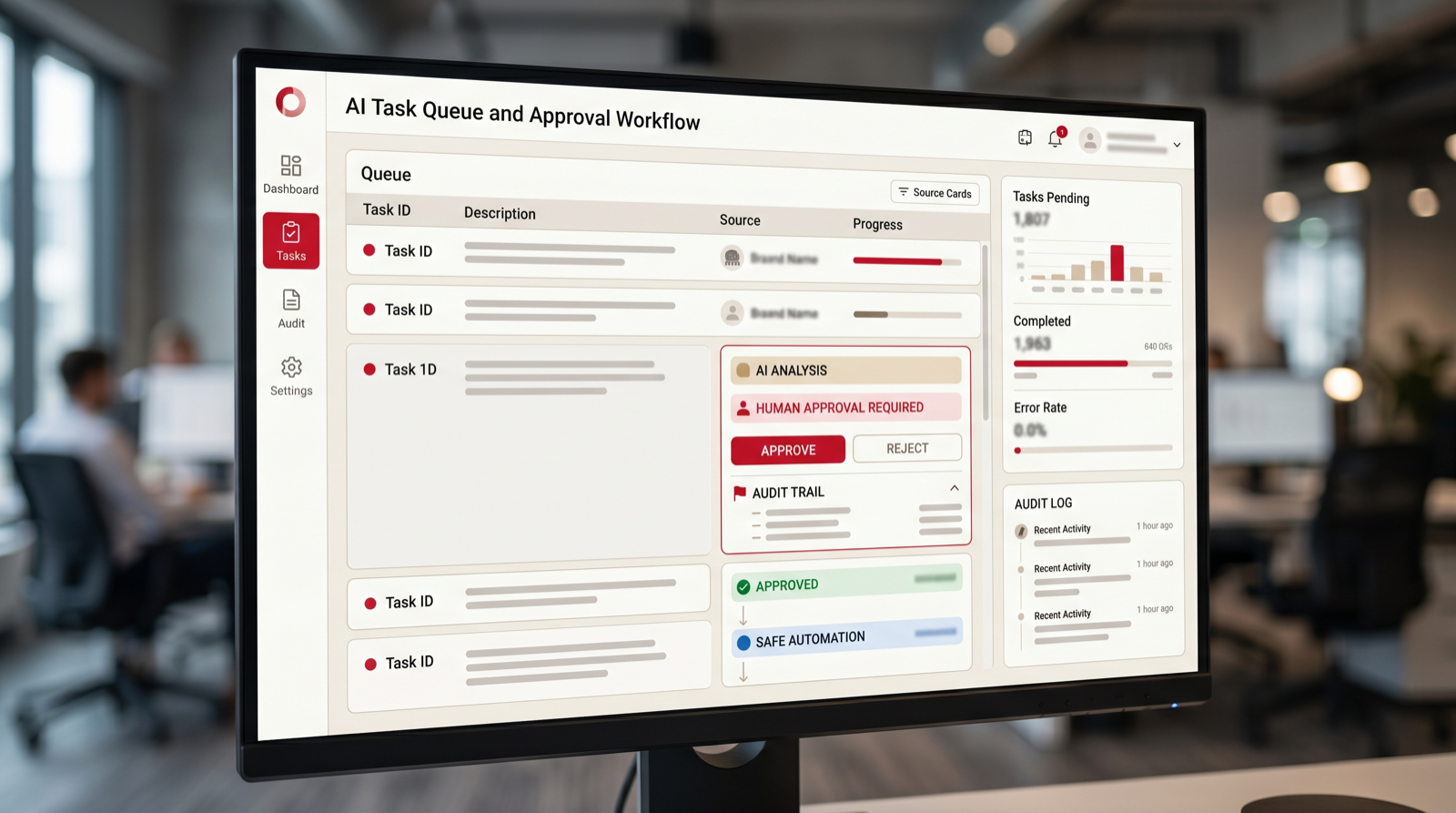
6. Document Intake and Processing
Document-heavy teams often lose time extracting the same information from contracts, forms, invoices, resumes, applications, policy documents, or customer submissions. AI can identify document type, extract key fields, summarize obligations, and route the document to the right person.
The best first version should focus on structured extraction and review. Do not make AI the final legal or financial decision-maker. Let it reduce reading time, improve routing, and make review faster.
Document automation should include confidence and source visibility. If AI extracts a date, amount, clause, or name, the reviewer should be able to see where it came from. This is especially important when documents affect contracts, payments, compliance, claims, or customer commitments.
Start with one document type. Trying to handle every document at once usually creates too many exceptions. A focused pilot with invoices, onboarding forms, contracts, resumes, or intake forms is easier to test and improve.
7. Meeting Notes, Follow-Ups, and Task Creation
Meeting follow-up is a practical automation because the workflow repeats constantly. AI can summarize the meeting, identify decisions, extract tasks, assign owners, draft follow-up emails, and update CRM or project records.
The main risk is accuracy. The first version should show the source transcript or notes, allow edits, and avoid creating tasks without review. Measure follow-up speed and the number of missed action items.
Meeting automation is useful because the value is immediate. People often leave meetings with vague ownership, scattered notes, and delayed follow-up. AI can turn discussion into structured next steps while the context is fresh. This helps sales, customer success, recruiting, project management, and internal operations.
The workflow should not flood the team with low-quality tasks. Let a person approve the action list before tasks are created. Over time, the system can learn which types of action items are useful and which should remain notes.
8. Internal Approval Workflows
Approvals often slow down because requests arrive with missing context. AI can check whether a request includes the required information, summarize the case, highlight policy issues, and route it to the right approver.
This works for discount approvals, budget requests, content approvals, purchase requests, onboarding approvals, and operational exceptions. Keep the final decision with the approver, but remove the manual work of chasing information.
Approval automation is valuable because delays are often caused by incomplete requests. AI can check whether required fields are missing, summarize the request, identify policy conflicts, and show the approver what needs attention. This reduces back-and-forth without removing accountability.
Be clear about authority. The automation can recommend approval, but the approver should still make the decision where money, legal exposure, pricing, hiring, or customer commitments are involved. The system should record the decision and the reason so the process can be reviewed later.
9. Knowledge Base Search and Internal Answers
Internal knowledge is often scattered across documents, chats, tickets, and project folders. AI can help employees find the right policy, process, template, or answer without asking another person every time.
Start with trusted sources and citation-style answers. The system should show where the answer came from and when the source was updated. If the source is weak, the automation should say so instead of inventing an answer.
This use case is often strongest inside support, operations, HR, finance, and onboarding. Employees need the same answers repeatedly, but the answer may live in a policy document, shared drive, old ticket, or internal note. AI can reduce interruptions by making trusted knowledge easier to find.
The main work is not only connecting AI to documents. The business must decide which sources are authoritative. Outdated documents should be archived or labeled. Sensitive documents should respect permissions. Without that work, internal answer systems can spread confusion faster.
10. Proposal and Statement-of-Work Drafting
Proposal drafting is a strong AI-assisted process when the company already has good service descriptions, pricing logic, examples, and scope rules. AI can assemble a first draft, summarize the client need, identify missing details, and prepare sections for human review.
Do not automate final pricing or legal commitments without review. The first goal is faster drafting and fewer blank-page delays, not uncontrolled contract generation.
Proposal automation works best when the company already has strong reusable material. Service descriptions, case language, scope rules, pricing logic, and terms should be organized before AI drafts a proposal. Otherwise the tool may produce polished text that still needs heavy rewriting.
A practical workflow can gather call notes, selected services, customer context, timeline, and known constraints. AI drafts the proposal sections, highlights missing information, and routes the draft to the owner. This saves time while keeping commercial judgment with the team.
11. Renewal and Customer Health Workflows
Customer renewals often depend on signals scattered across product usage, support history, invoices, account notes, and emails. AI can summarize account health, flag risks, draft renewal reminders, and create tasks for the account owner.
This is valuable because missed renewals are expensive. The automation should make the account state visible early enough for a person to act.
Renewal workflows are strong candidates because the business already knows the desired outcome: keep the customer and address risk early. AI can summarize recent issues, usage changes, invoice history, support sentiment, and account notes. It can then prepare a renewal brief for the account owner.
Keep customer communication under review at first. The automation can draft outreach and create reminders, but account owners should approve messages for strategic accounts. Measure renewal preparation time, missed renewal dates, and the number of risk signals caught earlier.
12. Recruiting Intake and Candidate Review Preparation
Recruiting workflows include repeated intake, resume review preparation, interview scheduling, candidate summaries, and status updates. AI can help organize information and reduce administrative delay.
Be careful with fairness, privacy, and decision-making. Use AI to prepare information, not to make final hiring decisions without human review. Keep criteria consistent and document how the workflow works.
Recruiting automation can reduce administrative delay without turning hiring into an opaque model decision. AI can organize applications, summarize experience against stated role requirements, identify missing information, and prepare interview packets. Humans should remain responsible for evaluation and selection.
The process should be transparent to the hiring team. Define what AI is allowed to summarize, what criteria are used, how corrections are handled, and where candidate data is stored. The value is faster preparation and cleaner coordination, not unsupervised screening.
13. Content and Marketing Operations
Content operations include briefs, approvals, publishing steps, campaign notes, asset requests, and performance summaries. AI can turn a campaign idea into a brief, check whether required details are missing, draft metadata, summarize performance, and route work for review.
This is a good automation target when marketing work gets stuck in handoffs. The automation should not replace brand judgment. It should prepare the brief, standardize the process, and make approvals visible. The first pilot might focus on one content type, such as blog posts, email campaigns, landing pages, or ad creative requests.
Measure cycle time from request to publish, number of missing details, number of approval loops, and the amount of manual status chasing removed. This keeps marketing automation tied to operational value rather than content volume alone.
14. Procurement and Vendor Intake
Vendor intake often involves forms, documents, approvals, pricing comparisons, compliance checks, and finance handoffs. AI can summarize vendor submissions, flag missing documents, compare terms, identify renewal dates, and route requests to the right approver.
This process is useful because procurement delays often come from incomplete context. A manager may approve a purchase faster if the request includes the business reason, budget code, vendor details, contract term, security notes, and alternatives. AI can prepare that context before the approver reviews it.
Keep final vendor and payment decisions under human control. The automation should make review faster and more complete, not choose vendors without oversight. Start with low-risk recurring purchase requests before expanding to larger contracts.
15. Compliance Evidence and Audit Preparation
Compliance work often requires gathering evidence from many systems. AI can help collect documents, summarize control activity, flag missing evidence, prepare audit notes, and route exceptions to owners. This is not a glamorous workflow, but it can remove a large amount of manual chasing.
The risk is that compliance outputs must be accurate and traceable. The automation should show sources, timestamps, owners, and review status. It should not invent evidence or hide missing information. A good first pilot might focus on evidence collection for one recurring control or one audit checklist.
Measure time spent gathering evidence, number of missing items, number of manual follow-ups, and audit readiness. This type of automation is strongest when the company already has defined controls but struggles with coordination.
How to Start the First AI Process Automation Pilot
Start with a short discovery sprint. List the processes that create the most repeated manual work. For each one, estimate volume, time per run, rework, delay, risk, data access, and owner commitment. Then choose one pilot that is useful but narrow enough to build quickly.
Next, write the workflow brief. The brief should include the trigger, input, systems, AI role, human review point, output, exception path, owner, and metric. This document is more important than the tool choice because it defines what the automation is supposed to do.
Then gather examples. Use real leads, tickets, invoices, reports, documents, or approvals. Include normal cases and edge cases. A pilot that only works on perfect examples will fail in production. Testing with real examples helps the team design better rules and review paths.
Finally, launch with a small group of users. Watch how they interact with the workflow, where they edit AI outputs, which exceptions repeat, and whether the automation actually saves time. Use the pilot results to decide whether to expand, adjust, or stop.
How to Prioritize the Next Automation Backlog
After the first pilot, do not jump randomly to the next idea. Build an automation backlog. Each item should include the process name, owner, volume, current manual effort, data source, systems involved, risk level, expected value, and readiness score. This turns automation from a one-time project into a repeatable operating improvement program.
Rank backlog items by value and readiness together. A high-value process with poor data may need preparation before automation. A medium-value process with clean inputs and a motivated owner may be a better second pilot. The goal is momentum. Each successful workflow should make the next one easier by improving data, patterns, and internal trust.
Keep the backlog practical. Avoid vague entries such as "automate operations" or "use AI in sales." Write specific items such as "route inbound demo requests," "summarize escalated support tickets," "check invoice fields before finance review," or "prepare weekly pipeline summaries." Specific backlog items can be scoped, built, and measured.
Review the backlog monthly. Remove ideas that no longer matter, add new bottlenecks, and update readiness after systems or data improve. This habit prevents automation from becoming a pile of disconnected experiments. It also helps leadership see where AI is producing operational value and where more foundational process work is still needed.
A useful backlog also separates quick wins from foundation work. Quick wins are processes where the workflow is clear, the inputs are available, the owner is engaged, and the risk is manageable. Foundation work includes cleaning customer records, standardizing categories, fixing permissions, improving document structure, or agreeing on approval rules. Both matter, but they should not be mixed together as if they require the same effort.
For each backlog item, define the smallest useful version. If the team wants to automate customer onboarding, the first useful version may only prepare the kickoff notes, create the internal task list, and flag missing information. If the team wants to automate reporting, the first useful version may only gather the numbers and draft commentary for manager review. Smaller versions make testing easier and reduce the chance that the project becomes too broad to finish.
Assign one business owner and one technical owner to every backlog item. The business owner confirms the process, reviews outputs, and decides whether the workflow is actually useful. The technical owner manages systems, data access, error handling, and implementation details. If either owner is missing, the automation idea should wait. AI workflow automation fails when responsibility is spread so widely that nobody can make decisions.
Finally, connect the backlog to company priorities. Sales automation should support response speed, conversion quality, or forecast accuracy. Support automation should support first response time, resolution quality, or escalation control. Finance automation should support accuracy, approval speed, or cash flow visibility. When each automation idea is tied to a business metric, it becomes easier to defend the roadmap and easier to stop projects that no longer matter.
What Not to Automate First
Do not start with processes that are rare, undefined, politically sensitive, legally risky, or dependent on hidden judgment. Do not start with workflows where nobody owns the outcome. Do not start with a process that has poor data and no willingness to clean it. AI can help messy operations, but it cannot fix an unclear process by itself.
The best path is to automate preparation before automating decisions. Let AI gather context, draft, summarize, route, and flag exceptions. Then let people approve the important step. This creates value while building trust.
Be especially careful with workflows where the cost of a wrong action is high and the review path is weak. Examples include final legal approval, disciplinary decisions, customer refunds above a meaningful threshold, financial commitments, or sensitive HR communication. AI may still help prepare context for those workflows, but the final authority should stay with accountable people and the evidence trail should be easy to inspect.
Also avoid automating work that should be eliminated instead. If a report is no longer read, do not automate it. If an approval step exists only because an old system lacked visibility, fix visibility before preserving the approval. If teams duplicate data because two tools do not share a source of truth, choose the right system of record before building a bridge. The best AI process automation sometimes removes a step instead of making it faster.

Free automation checkup
Find the first process worth automating.
Put your work email below and we will send a quick first-pass review path for choosing your first business process automation pilot.
FAQ: Business Process Automation With AI
What is business process automation with AI?
Business process automation with AI uses AI, rules, integrations, and workflow logic to move repeatable business tasks from input to output with less manual work. It can classify, route, summarize, draft, check, and escalate work while keeping humans in control where judgment matters.
What should a business automate first?
Start with frequent workflows that have clear inputs and measurable value, such as lead routing, support triage, invoice review, reporting, CRM cleanup, document intake, meeting follow-up, and approvals.
When should a process not be automated first?
Avoid starting with rare, undefined, high-risk, sensitive, or poorly owned processes. If the data is weak or the workflow cannot be explained clearly, map and improve the process before automating it.
Do I need custom AI solutions for process automation?
Not always. Some workflows can use existing software and integrations. Custom AI solutions are useful when the process has unique data, approval rules, user experience needs, or multi-system actions that generic tools cannot support well.
Can Go Expandia help automate business processes?
Yes. Go Expandia helps businesses map workflows, choose the first AI automation pilot, build controlled automations and agents, connect systems, train users, and support rollout after launch.
Ready to Automate the First Business Process?
Go Expandia helps companies choose the right process, build AI automation safely, and expand from pilot to repeatable operating model.