AI Workflows: The Practical Guide for Business Teams
AI workflows help business teams turn repeated work into controlled systems. The practical question is not whether AI can help. It is where the work starts, what data it can use, who reviews the output, and which system gets updated.
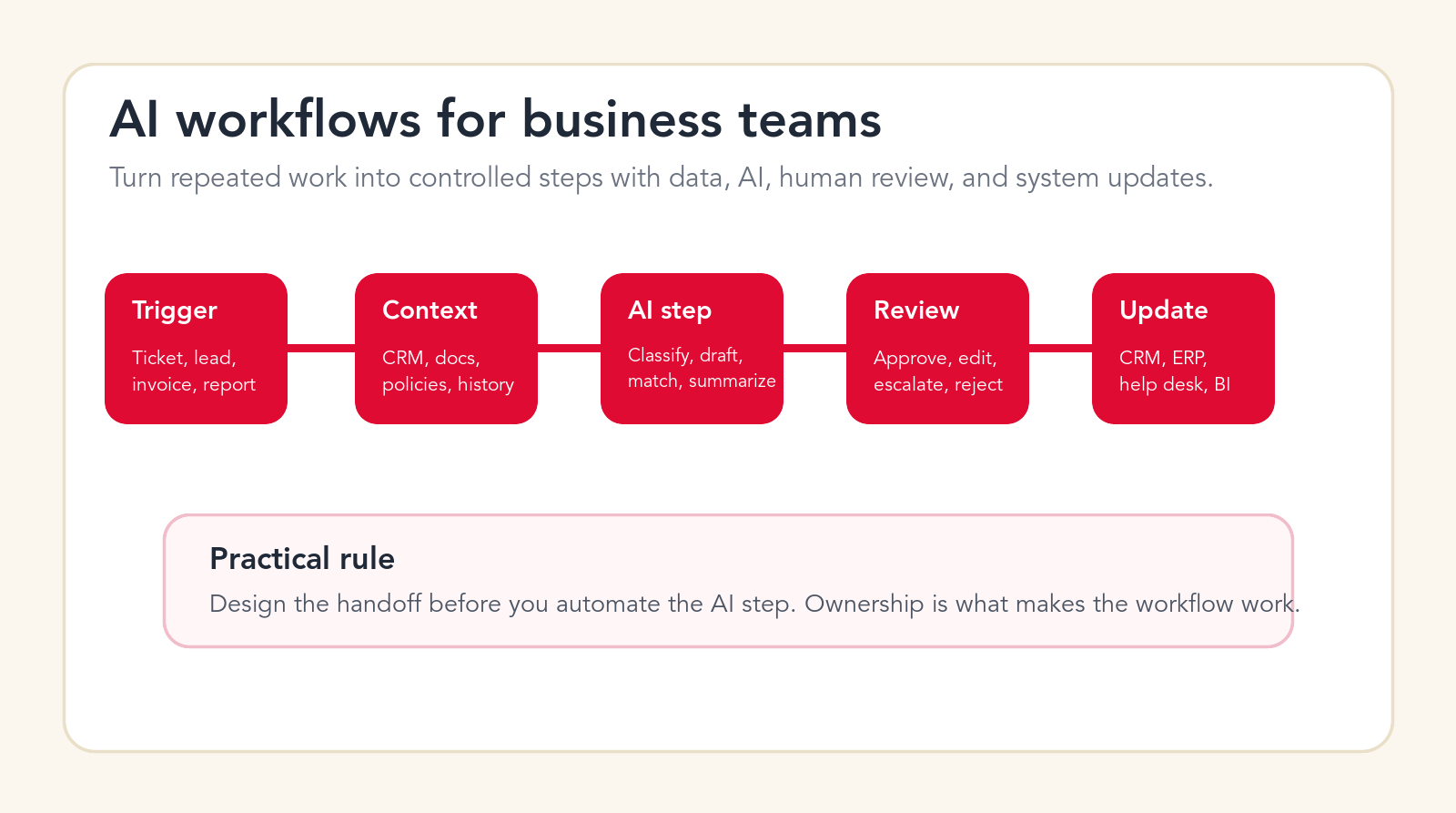
Practical rule
An AI workflow is only useful when the handoff is clear and the output changes real work.
Focus
AI workflows
Best for
Teams designing AI workflows
What it covers
Workflow design and launch
Main service
AI Automation Agency
TL;DR
AI workflows are repeatable business processes where AI handles specific steps such as classification, summarization, drafting, matching, routing, scoring, or reporting. Business teams should start with one visible workflow, define the trigger and outcome, map the data sources, decide the AI task, add human review, connect the system of record, and measure quality before expanding. The strongest first workflows are high-volume, pattern-based, easy to review, and tied to a real business metric.
AI workflows sound technical, but the best ones start with ordinary business work. A sales lead arrives and needs qualification. A support ticket needs triage. An invoice needs extraction and matching. A project update needs a summary. A customer onboarding task needs routing. A report needs data pulled from several systems. These are workflows before they are AI projects.
The mistake many teams make is starting with the model instead of the work. They ask which AI tool to buy, which agent platform to use, or which chatbot to launch. Those questions are useful later. First, the team needs to understand the repeated work, the decision points, the systems involved, the people responsible, and the risk of a wrong output.
This guide explains AI workflows in practical business language. It is written for operators, founders, department leaders, revenue teams, support teams, finance teams, and managers who want AI to improve daily execution rather than create another disconnected experiment. The goal is a workflow your team can use, trust, measure, and improve.
Quick Answer: AI Workflows Combine Triggers, Data, AI Tasks, Review, and System Updates
An AI workflow is a sequence of business steps where AI performs a defined part of the work. The workflow usually starts with a trigger, such as a form submission, email, ticket, invoice, lead, note, file, meeting transcript, or scheduled report. It then pulls context from approved sources, applies AI to a specific task, routes the output for review if needed, and updates a business system.
A useful AI workflow is not the same as asking a chatbot a question. A chatbot interaction may help one person in one moment. A workflow changes a repeatable process. It should have an owner, a measurable outcome, an audit trail, and a clear rule for what happens when the AI is uncertain.
The fastest path is usually assisted automation. Let AI prepare the work first. Let humans approve, edit, or reject the output. Once the team understands accuracy, edge cases, and adoption, the workflow can become more automatic. That progression is safer than giving AI control over a process before the business understands the failure modes.
| Workflow part | Business question | AI role | Control point |
|---|---|---|---|
| Trigger | What starts the work? | Watch for a ticket, lead, email, file, record, or schedule. | Only use approved sources and clear event rules. |
| Context | What should the AI know? | Retrieve customer, policy, CRM, ERP, document, or history data. | Limit data access and show source evidence. |
| AI task | What should AI do? | Classify, draft, extract, score, match, route, summarize, or recommend. | Keep the task narrow and measurable. |
| Review and update | Who trusts the result and where does it go? | Prepare an output, collect review, and update a system of record. | Define approvals, exceptions, logs, and rollback paths. |
What Are AI Workflows?
AI workflows are repeatable business processes that use AI in one or more steps. The AI may read text, classify an item, extract data, summarize context, draft a response, compare records, score priority, recommend a next step, or prepare a report. The workflow is the structure around that AI task.
That structure matters because business work rarely ends with a generated answer. A lead qualification workflow may need to update a CRM, assign a sales owner, and schedule a follow-up. A support workflow may need to classify the ticket, pull knowledge base sources, draft a reply, and escalate sensitive cases. A finance workflow may need to extract invoice fields, match a purchase order, and route exceptions. A reporting workflow may need to pull data, summarize changes, and send a weekly update.
The workflow is what turns AI from a helpful assistant into an operational system. Without the workflow, AI outputs live in chat windows, documents, or disconnected tools. With the workflow, AI becomes part of how work moves through the company.
Why Business Teams Struggle With AI Workflows
Most business teams do not struggle because AI is too advanced. They struggle because the workflow is unclear. The current process may be spread across email, spreadsheets, Slack messages, CRM records, shared folders, calls, and personal judgment. Nobody has written down the exact trigger, owner, data source, approval rule, or expected output.
AI exposes that ambiguity. If the team cannot explain what a good output looks like, AI cannot reliably produce one. If the team cannot explain which data source is trusted, AI may pull the wrong context. If the team cannot explain who should review exceptions, automation creates a new queue nobody owns.
The second problem is over-automation. Leaders want a big result, so they try to automate a full process at once. That makes the pilot harder to test and harder to trust. A better approach is to pick a narrow workflow that matters, design it carefully, and expand only after the team sees consistent value.
Free AI workflow check
Find the first workflow your team should automate.
Drop your email and we will send a first-pass recommendation for a practical AI workflow pilot based on your team and process.
No spam. We use this to reply with the recommendation.
The Practical AI Workflow Guide for Business Teams
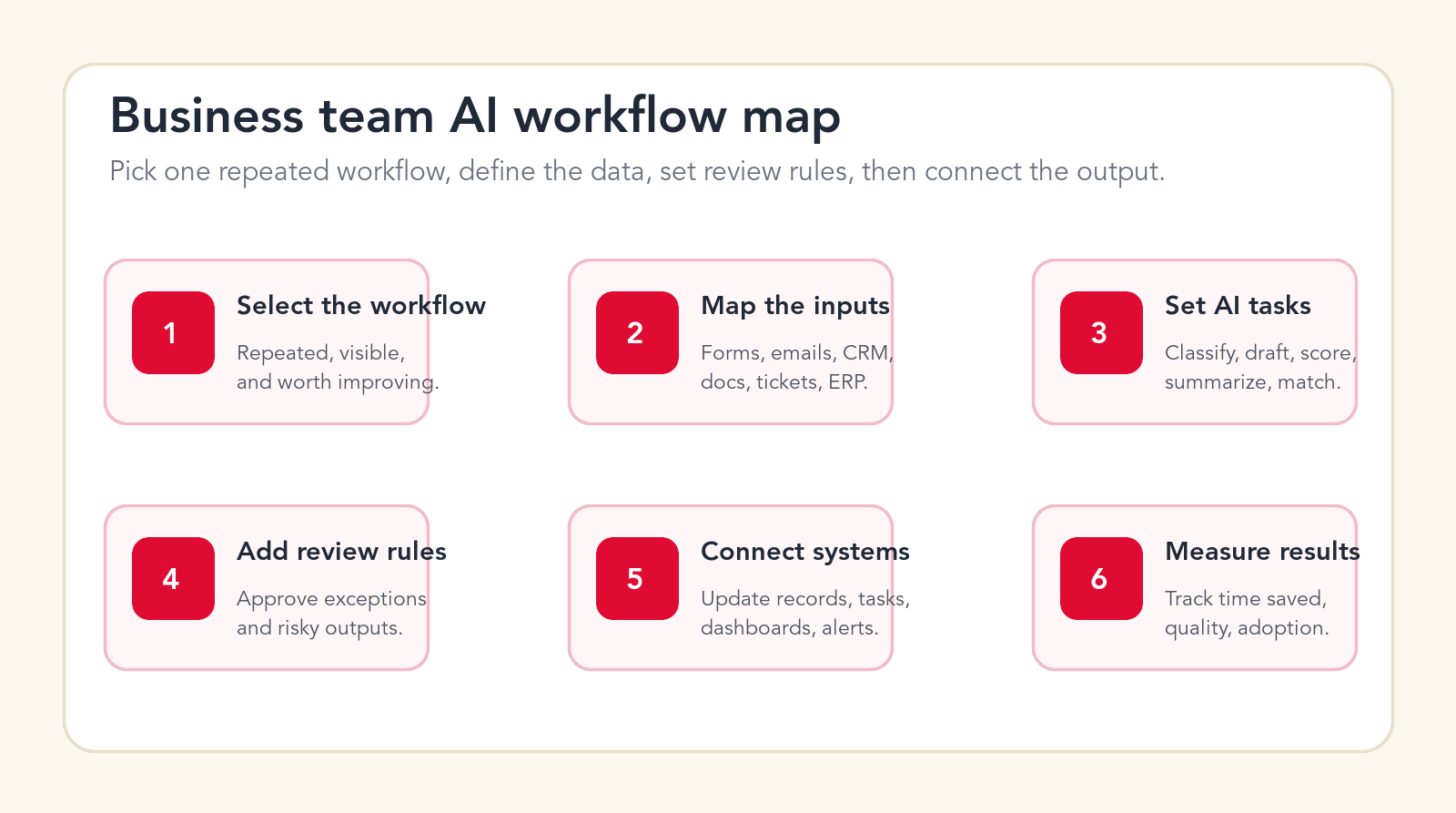
The following steps give business teams a practical way to plan AI workflows. They are not limited to one department. The same structure applies to sales, support, finance, operations, HR, marketing, legal intake, account management, customer onboarding, procurement, and reporting.
1. Choose One Repeated Workflow, Not a Broad AI Goal
A strong AI workflow starts with a repeated business process. "Use AI in sales" is too broad. "Classify inbound demo requests and draft the first follow-up" is specific. "Improve customer service" is too broad. "Route refund requests and draft policy-backed replies for agent review" is specific. "Use AI in finance" is too broad. "Extract invoice fields and flag purchase order mismatches" is specific.
The workflow should happen often enough to matter. It should also be visible enough that the team can judge whether the automation is helping. If the workflow happens twice per year, it may not be a good pilot. If the workflow happens every day and consumes team attention, it is worth studying.
The best first workflows are usually boring. They involve repeated triage, data entry, drafting, summarizing, routing, matching, checking, or reporting. That is not a weakness. Boring repeated work is where automation produces reliable value.
2. Define the Owner and the Business Outcome
Every AI workflow needs an owner. The owner is not always the person who builds the automation. It is the person responsible for the business outcome. A sales operations leader may own lead routing. A support manager may own ticket triage. A controller may own invoice review. An operations manager may own onboarding tasks.
The owner should define what success means. Time saved is useful, but it is not the only metric. The goal might be faster lead response, fewer missed tickets, cleaner CRM data, lower invoice cycle time, better report quality, fewer manual handoffs, or fewer policy mistakes. The metric should connect to a business result, not just tool usage.
Clear ownership prevents the workflow from becoming an orphan. If nobody owns the outcome, nobody maintains the rules, reviews failures, improves prompts, updates knowledge, or decides when to expand.
3. Map the Trigger, Inputs, Steps, and Endpoint
A workflow needs a start and an end. The trigger might be a new form submission, a new CRM lead, a new support ticket, a new invoice, a new file, a scheduled report, a customer email, a call transcript, or a changed status in a system. The endpoint might be a drafted reply, a routed task, an updated CRM field, an approval packet, a report, or an alert.
Write the process down as it works today. Include the hidden steps. Who checks the spreadsheet? Who knows which manager approves the request? Who looks up the policy? Who fixes the data before a report is sent? Those hidden steps are often where AI can help, but they are also where bad workflow design creates errors.
The map should show systems, people, data, decisions, and handoffs. If the current workflow is messy, the AI workflow should not simply automate the mess. It should simplify the process where possible before adding AI.
4. Decide What Context the AI Is Allowed to Use
AI workflows are only as useful as their context. A support draft needs product knowledge, customer history, and policy rules. A lead scoring workflow needs campaign source, company data, form answers, CRM history, and sales territory. An invoice workflow needs vendor records, purchase orders, receipts, and payment policy. A reporting workflow needs trusted data sources and definitions.
Business teams should list the allowed context before implementation. Which systems can the workflow read? Which documents are trusted? Which records are sensitive? Which fields should be excluded? Which source wins when two systems disagree? These questions are not technical details. They decide whether the workflow can be trusted.
Source visibility is important. A reviewer should be able to see why the AI made a recommendation. If the AI drafts a support response, show the knowledge article. If it scores a lead, show the signals. If it flags an invoice mismatch, show the field comparison. Trust improves when evidence is visible.
5. Choose the Exact AI Task
Do not ask AI to "handle the workflow" as a first step. Choose a narrow task. AI can classify, extract, summarize, draft, compare, score, route, translate, transform, enrich, or recommend. Each of those tasks has different risk and different evaluation criteria.
Classification is usually a good starting task. It helps route tickets, leads, requests, documents, and messages. Summarization is also useful, especially for meetings, call notes, support history, and project updates. Drafting can save time, but it needs review. Matching and extraction can create strong value in finance and operations, but they require validation.
The task should produce an output that a human can evaluate quickly. If the reviewer needs ten minutes to check a ten-second AI output, the workflow may not save time. Design the output so review is easier than doing the work from scratch.
6. Design Human Review Before Automation Goes Live
Human review is not a failure of AI. It is how business teams safely introduce automation into real work. Early workflows should often be assisted workflows. AI prepares the task, and a person approves it. The reviewer can accept, edit, reject, or escalate the output.
Review rules should be clear. Low-risk, high-confidence outputs may move faster. High-risk or low-confidence outputs should be routed to a person. Sensitive issues, legal language, refunds, payment changes, HR matters, security questions, and large financial decisions should have stronger review rules.
The review interface matters. If reviewers have to open five systems to understand the output, adoption will suffer. A good workflow brings the evidence, recommendation, and next action into one place.
7. Define Exceptions, Escalations, and Failure Paths
Every AI workflow needs an exception path. The system should know what to do when required data is missing, confidence is low, sources disagree, the customer is angry, the invoice amount exceeds tolerance, the lead belongs to an unknown territory, or a policy cannot be found.
A bad workflow hides exceptions. A good workflow explains them. It should say why it routed the item, what data was missing, what rule failed, and what the reviewer should do next. That makes exceptions manageable instead of mysterious.
Escalation is also part of quality. If a customer case is emotional, send it to a senior support owner. If a vendor bank change appears in an invoice, send it to finance control. If a lead is strategic, send it to the right sales leader. AI should help identify the right escalation, not block it.
8. Connect the Workflow to a System of Record
AI workflows create real business value when they update the systems where work is tracked. A workflow that drafts a follow-up but does not update the CRM leaves the team with a gap. A support workflow that summarizes a ticket but does not update the help desk record creates a hidden note. A finance workflow that extracts invoice fields but does not prepare the accounting record still leaves manual work.
The system of record might be a CRM, help desk, ERP, accounting system, project management tool, HR system, data warehouse, or document system. The workflow should define which fields can be updated automatically, which updates require approval, and what log should be kept.
This is where custom integration often matters. Many teams can get a demo working in a single tool. The harder and more valuable work is connecting the workflow to the systems the team already uses every day.
Need workflow implementation?
Turn one repeated process into a controlled AI workflow.
We can map the workflow, define review rules, connect your systems, and launch a practical AI automation pilot your team can actually use.
9. Protect Permissions, Data, and Customer Trust
AI workflow design should include permission design from the beginning. The automation should only access the data it needs. It should not have broad admin access when a limited integration will work. It should not expose sensitive customer, employee, vendor, or financial information to people who would not normally see it.
Teams should also decide what data can be used in prompts, what can be stored, what should be redacted, and what needs stronger controls. This is especially important for workflows in finance, HR, legal, healthcare, customer support, and account management.
Trust is not only about security. It is also about honesty. If AI drafts a customer response, the business should know how that response was created and who approved it. If AI updates a record, the log should show what changed and why.
10. Measure Time Saved, Quality, Adoption, and Business Impact
AI workflows should be measured. Otherwise the team may confuse novelty with value. The basic metrics are time saved, cycle time, error rate, volume handled, review acceptance rate, escalation rate, and user adoption. Business metrics may include faster lead response, shorter ticket resolution time, improved invoice cycle time, cleaner CRM data, faster onboarding, or better reporting cadence.
Quality matters more than raw automation rate. A workflow that automates 80 percent of a process but creates rework may be worse than a workflow that assists 40 percent and improves accuracy. Early pilots should track when AI is accepted, edited, rejected, or escalated. That data tells the team where to improve.
Measurement should be visible to the workflow owner. If only the technical team sees the results, the business team cannot manage the workflow. Put the results where owners can review them.
11. Pilot With Real Work, Not Perfect Demo Examples
A demo can make any workflow look clean. Real work is messier. Leads submit incomplete forms. Customers use unclear language. Invoices arrive with missing fields. Tickets include emotion. CRM data is inconsistent. Reports have late inputs. A real pilot should include the messy cases because those are what the team needs to handle after launch.
Use recent historical examples and supervised live work. Compare AI outputs to how the team handled the work manually. Track which outputs were useful, which needed editing, which were wrong, and which should have been escalated. This gives a much better picture than testing only polished examples.
The pilot should have a limited scope. Limit the workflow to one team, one process, one queue, one region, one document type, or one customer segment if needed. Narrow pilots move faster and produce clearer learning.
12. Train the Team on the Workflow, Not Just the Tool
Business teams do not adopt AI workflows because a tool exists. They adopt workflows when they understand how the work changes. Training should explain what the workflow does, what it does not do, when to trust it, when to review it, how to correct it, and how to report problems.
The most useful training is practical. Show examples from the team's own work. Show accepted outputs and rejected outputs. Show how to handle exceptions. Show how feedback improves the workflow. Give managers visibility into adoption and quality so they can coach the team.
Do not hide the limits. Teams lose trust when AI is presented as perfect and then fails in ordinary ways. It is better to explain the boundaries clearly and let confidence grow through experience.
13. Maintain Knowledge, Rules, and Ownership
AI workflows need maintenance. Policies change, product details change, CRM fields change, vendors change, approval paths change, and teams change. If the workflow depends on outdated knowledge, quality will decline. If ownership is unclear, nobody will fix it.
Maintenance should include a review cadence. The owner should look at rejected outputs, common exceptions, stale knowledge, source gaps, and user feedback. The technical owner should monitor integrations, permissions, logs, and failures. The business owner should decide policy and process changes.
A workflow that improves every month can become a durable advantage. A workflow that is launched and abandoned becomes another brittle automation.
14. Scale Only After the First Workflow Is Proven
Scaling AI workflows should be a business decision, not an excitement decision. The first workflow should prove that the team can define the process, connect the data, review output, manage exceptions, measure results, and maintain the system. Once that is proven, the same operating model can be applied to another workflow.
Scaling too early creates confusion. Teams may launch many small automations with no shared standard, no measurement, and no ownership. Scaling after proof creates a repeatable playbook. The company learns how to choose workflows, design them, launch them, and improve them.
The goal is not to build one clever AI workflow. The goal is to build a way of working that makes future workflows easier and safer.
15. Build a Feedback Loop Into the Workflow
The best AI workflows improve because the workflow captures feedback while people use it. A reviewer should be able to accept, edit, reject, or escalate an output without leaving the process. Those actions should become learning signals. If support agents keep rewriting the same type of draft, the knowledge source or prompt needs work. If sales reps reject a lead score, the scoring logic may be using the wrong signal. If finance keeps correcting one invoice field, the extraction rule needs attention.
Feedback should not be vague. "AI was bad" is not useful. The workflow should capture the reason: wrong source, missing context, bad tone, wrong field, policy conflict, weak summary, false duplicate, low confidence, or unclear handoff. This makes improvement practical. The owner can review patterns instead of guessing what went wrong.
A feedback loop also helps adoption. Business teams are more willing to use AI when they see that corrections are not wasted. The workflow becomes a system the team can shape, not a black box forced into their day.
Practical AI Workflow Examples by Team
Business teams often understand AI workflows faster through examples. A sales team might automate inbound lead triage, account research, follow-up drafts, CRM cleanup, proposal prep, renewal reminders, and call summaries. The AI should not own the relationship, but it can prepare the work that slows salespeople down.
A support team might automate ticket classification, knowledge retrieval, draft replies, sentiment flags, escalation routing, quality review, duplicate detection, and weekly issue reporting. The AI should not block humans from sensitive conversations. It should help agents see context faster and respond more consistently.
A finance team might automate invoice intake, document extraction, duplicate detection, matching, approval packet preparation, payment readiness reporting, and month-end notes. The AI should not control final payment authority without strong controls. It should reduce manual preparation and improve visibility.
An operations team might automate onboarding task routing, vendor intake, internal request triage, compliance checklists, project status summaries, and recurring report generation. The key is choosing workflows that cross systems and create repeated coordination work.
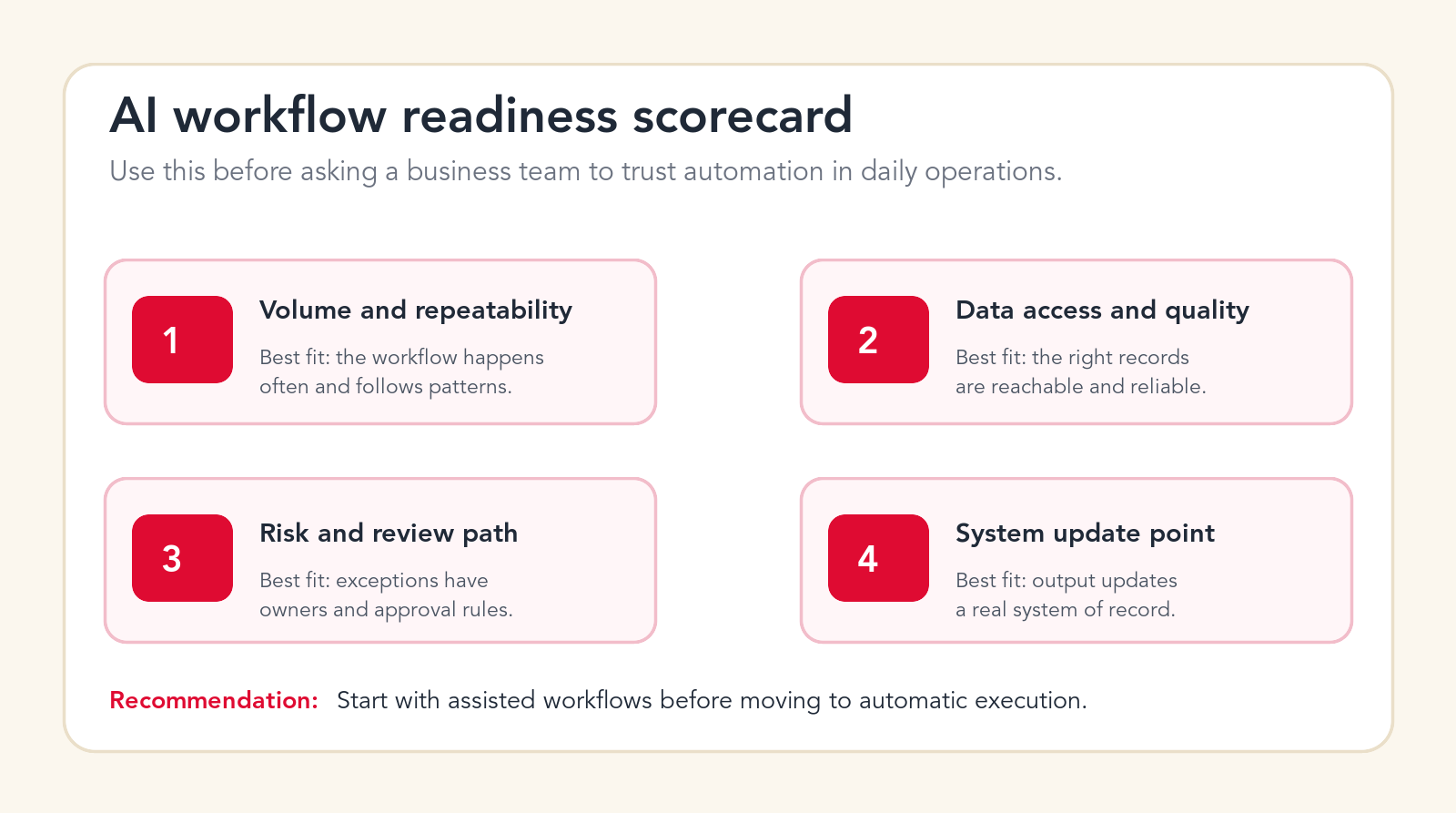
AI Workflow Readiness Scorecard
Before building, score the workflow against four practical criteria. First, volume and repeatability. Does the workflow happen often, and does it follow a recognizable pattern? Second, data access and quality. Are the right records available, and are they reliable enough for AI to use? Third, risk and review path. Does the team know which outputs can move quickly and which need approval? Fourth, system update point. Does the workflow update a real system of record?
If a workflow scores well on all four, it is a strong candidate. If it scores poorly, the team may still automate part of it, but the first step may be cleanup. For example, if the data is poor, start with data quality and visibility. If ownership is unclear, define the process before building. If the system update is missing, decide where the work should live.
This scorecard prevents teams from choosing workflows based only on hype. It puts attention on the conditions that make automation work in practice.
A 90-Day AI Workflow Rollout Plan
A practical rollout does not need to take a year. It also should not be rushed into production without review. A 90-day plan gives enough time to map the workflow, build a controlled pilot, test with real work, train the team, and measure results.
Days 1-15: Workflow selection and process mapping
Select one workflow with a clear owner. Map the current process, trigger, data sources, systems, decision points, handoffs, exceptions, and desired endpoint. Define success metrics and failure risks. Decide what the AI will do and what humans will continue to own.
Days 16-45: Build the assisted workflow
Build the first version with controlled data access, narrow AI tasks, visible evidence, review rules, and logging. Connect only the systems required for the pilot. Use historical examples to test accuracy and exception routing before live use.
Days 46-75: Run supervised production
Launch with a small group. Let users accept, edit, reject, and escalate AI outputs. Track review outcomes, time saved, quality issues, and adoption. Adjust prompts, rules, thresholds, and handoffs based on real work.
Days 76-90: Decide whether to expand
Review metrics with the workflow owner. Expand only the parts that are working. Expansion might mean more users, more workflow categories, more system updates, or a higher automation level. Do not expand what the team cannot measure or maintain.
When to Use an AI Automation Agency for AI Workflows
Some teams can build simple AI workflows with internal tools. That is often enough for basic summarization, personal productivity, or low-risk task drafting. An AI automation agency becomes useful when the workflow crosses multiple systems, needs custom integration, affects customers, requires human review logic, touches sensitive data, or must be measured as part of an operating process.
The right partner should ask about the current workflow before talking about tools. They should understand the trigger, owner, systems, data, approvals, exceptions, risk, and metric. They should also help the business start with the safest high-value pilot instead of trying to automate everything at once.
A good agency does not just build an AI demo. It helps design the operating model around the workflow. That includes data access, review, training, measurement, maintenance, and rollout. Those details determine whether the workflow survives after the first presentation.
AI Workflow Checklist for Business Teams
Before you build, confirm the following. The workflow has a named owner. The trigger is clear. The business outcome is measurable. The current process is mapped. The required data sources are approved. The AI task is narrow. The review rule is documented. Exceptions have owners. The system of record is defined. Permissions are scoped. Logs are retained. Users know how to correct outputs. The pilot uses real work. The owner reviews results. Expansion depends on proof.
If several items are missing, do not stop the project. Use the checklist to decide what to clarify first. Many AI workflow projects become easier once the team writes down the work that people were already doing informally.
Free workflow recommendation
Get a first-pass AI workflow pilot idea.
Send your email and we will reply with a practical starting point for your first AI workflow, including what to automate and what to keep reviewed.
No spam. We use this to reply with the recommendation.
FAQ: AI Workflows
What are AI workflows?
AI workflows are repeatable business processes where AI performs specific steps such as classification, summarization, drafting, extraction, matching, routing, scoring, or reporting inside a controlled workflow.
What is the best first AI workflow for a business team?
The best first workflow is high-volume, repeated, easy to review, connected to a real business system, and tied to a measurable outcome such as faster response time, cleaner records, or reduced manual preparation.
How are AI workflows different from AI agents?
An AI agent may perform tasks inside a workflow, but the workflow defines the trigger, data sources, review rules, system updates, ownership, and measurement around the agent's work.
Should AI workflows be fully automatic?
Not at first for most business teams. Start with assisted workflows where AI prepares the work and humans approve outputs, then increase automation only after quality, risk, and adoption are proven.
Can Go Expandia build AI workflows?
Yes. Go Expandia can map business workflows, design AI tasks and review rules, build custom AI workflow automation, connect systems, and support rollout across business teams.
About Bailey Roque
Bailey Roque writes for Go Expandia on AI automation, AI agent development, workflow design, AI consulting, and practical rollout models for business teams.
Related posts
Keep planning practical AI automation
Workflow guide
AI Workflow Automation
See business processes to automate first with AI workflow automation.
Agentic guide
Agentic Workflows
Review business examples where AI agents can help move work forward.
Service
AI Automation Agency
Build controlled AI workflows for sales, support, finance, operations, and reporting.
Ready to Turn Repeated Work Into AI Workflows?
Go Expandia helps business teams choose the right workflow, design safe AI behavior, connect systems, and launch automation with practical human review.