AI Project Manager: What to Automate in Project Workflows First
An AI project manager should not replace ownership or judgment. It should remove repeated coordination work, expose blockers faster, prepare cleaner status updates, and help teams keep project workflows moving.
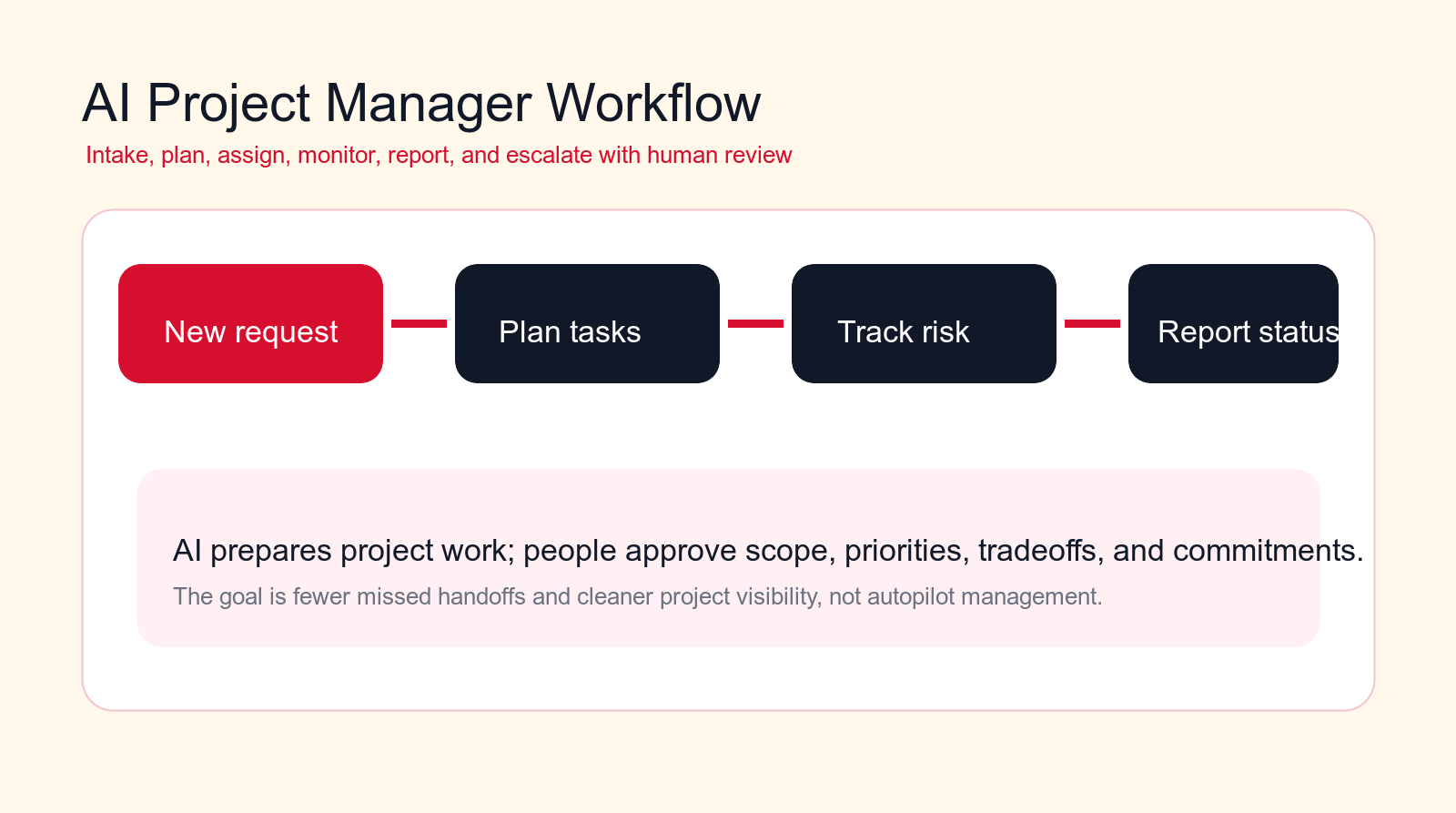
Best first pilot
Start with status reporting, meeting action items, blocker detection, or request intake before automating scope decisions.
Focus
AI project manager
Best for
Project teams improving delivery
Best first workflow
Status reporting
Main service
AI Automation Agency
TL;DR
An AI project manager is most useful when it automates repeated coordination work: request intake, meeting action items, task creation, status reporting, blocker detection, dependency tracking, risk summaries, document organization, stakeholder updates, follow-up reminders, project reporting, and handoff checklists. Do not start by automating scope approval, priority tradeoffs, budget decisions, or sensitive stakeholder communication. Let AI prepare the project work; keep humans responsible for decisions.
Project management often breaks down in small ways before it breaks down in big ways. A request comes in without enough context. A meeting ends without clear owners. A task is assigned but not updated. A blocker sits in chat for three days. A stakeholder asks for status, and the project manager has to search through tickets, emails, documents, calls, and messages to rebuild the truth.
An AI project manager can reduce this coordination burden when it is designed carefully. It can collect inputs, summarize updates, draft status reports, detect blockers, create tasks, remind owners, and make project information easier to see. It should not pretend to own the project. Real ownership still belongs to the person accountable for scope, priorities, budget, risk, and stakeholder commitments.
This guide explains what to automate in project workflows first. It is written for operations leaders, delivery teams, agencies, software teams, service businesses, founders, and project managers who want AI automation without losing control of the work.
Quick Answer: Automate Project Coordination Before Project Judgment
The strongest first AI project manager workflows prepare the work around project decisions. They capture requests, summarize meetings, create draft tasks, detect blockers, prepare status reports, and surface risks. They do not approve scope changes, choose tradeoffs, promise delivery dates, change budgets, or send sensitive stakeholder updates without review.
A useful AI project manager makes the next human action easier. A delivery lead should see what changed, who owns the next step, what is blocked, which deadline is at risk, and what decision needs attention. That is practical. A black-box "project health score" with no evidence is not.
If your project workflows are messy, start with visibility. Automate status reporting, action item capture, and blocker detection before trying to automate complex planning. Better visibility creates the foundation for safer automation later.
| Project workflow | Good automation | Bad automation | Best control |
|---|---|---|---|
| Status reporting | Summarizes real updates with links and evidence. | Creates polished reports from stale data. | Show sources and owner review. |
| Task creation | Drafts tasks from meetings and requests. | Creates vague tasks nobody owns. | Require owner, due date, and source. |
| Blockers | Flags stalled work and dependency issues. | Marks every delay as critical. | Use confidence and escalation rules. |
| Scope changes | Prepares impact summary for review. | Approves changes automatically. | Human approval required. |
What an AI Project Manager Actually Does
An AI project manager is an AI-assisted workflow layer that helps teams plan, coordinate, monitor, and report on project work. It may summarize updates, convert conversations into tasks, identify missing owners, detect blockers, prepare status reports, organize documents, and remind teams about next steps.
The useful part is not a chatbot with a project management title. The useful part is the workflow around the AI: triggers, source systems, task rules, review paths, escalation criteria, and integrations with tools like project boards, calendars, email, documents, chat, CRM, and reporting dashboards.
A strong AI project manager should make project reality easier to see. It should not hide uncertainty. If a task is late because nobody updated it, the assistant should say that. If a report is based on incomplete data, it should show the gap. Project teams need clarity more than confident-sounding summaries.
Where AI Fits in the Project Stack
AI should sit between project inputs and project systems. Inputs may come from meetings, chat, tickets, emails, documents, forms, customer requests, product requirements, sales handoffs, and support escalations. Systems may include a task board, project management platform, document repository, calendar, CRM, and reporting tool.
A practical architecture has four parts. First, a trigger starts the workflow: a new request, meeting transcript, updated task, missed deadline, or stakeholder question. Second, the AI reads the available context and prepares a structured output. Third, a human reviews exceptions, sensitive updates, or decisions. Fourth, the approved result updates the project system.
This prevents the common mistake of adding a project bot that people have to feed manually. The AI project manager should reduce coordination work inside existing workflows, not create another place where project information gets trapped.
How to Choose the First Project Workflow to Automate
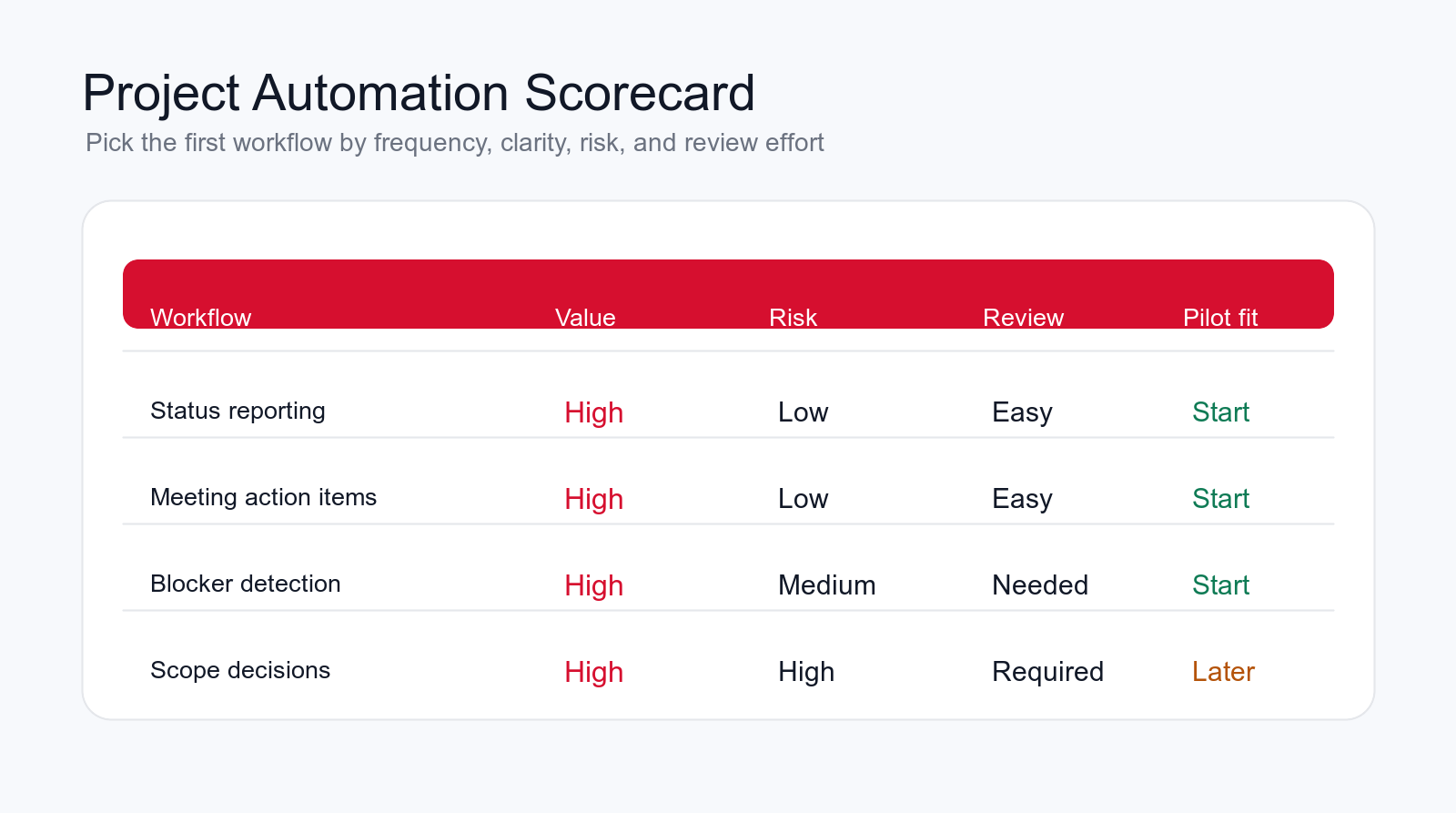
Choose the first workflow by frequency, clarity, review effort, risk, and business value. A good first workflow happens often, follows a repeatable pattern, has clear source data, and can be reviewed quickly. Status reports, meeting action items, intake summaries, and blocker detection usually fit this profile.
Avoid starting with the workflow that has the most political sensitivity. Priority changes, budget approvals, executive stakeholder messages, and scope tradeoffs may eventually use AI support, but they are usually poor first pilots. They require careful context and human judgment.
Ask where project managers waste the most time today. Are they rebuilding status reports manually? Chasing owners after every meeting? Copying requests from email into tasks? Searching for blockers across chat and tickets? The answer usually points to the first useful automation pilot.
Tools and Integrations an AI Project Manager Usually Needs
An AI project manager is only useful if it can see enough project context to prepare reliable work. For many teams, that means connecting the project management tool, calendar, meeting notes, chat, email, document storage, CRM, support desk, and reporting system. Not every workflow needs every tool. The first pilot should connect only the systems required for the first use case.
A status reporting pilot may need the project board, recent meeting notes, and stakeholder update template. A meeting action item pilot may need transcripts, calendar context, and the task board. A sales-to-delivery handoff pilot may need CRM notes, project intake forms, scope documents, and delivery task templates.
The integration design should be conservative. Reading data is lower risk than writing data. Drafting tasks is lower risk than creating tasks automatically. Preparing a stakeholder update is lower risk than sending it. Start with read access and reviewed outputs, then add write permissions only after the workflow proves accuracy.
Tool ownership matters as much as tool access. Project management may own the board. Sales may own the handoff context. Delivery may own scope and estimates. Support may own escalation tickets. Leadership may own portfolio reporting. If those ownership lines are unclear, the AI workflow will expose confusion. Clarify the process before giving the assistant more responsibility.
Free project workflow check
Find your first AI project manager workflow.
Drop your email and we will send a first-pass recommendation for the safest project workflow to automate first.
No spam. We use this to reply with the recommendation.
1. Project Request Intake
Project request intake is a strong first workflow because many project problems start with unclear requests. A stakeholder asks for a change, a customer requests a feature, sales hands over a new implementation, or an internal team asks for help. If the request enters the system with missing context, the project starts with friction.
An AI project manager can normalize requests into a standard intake packet. It can summarize the request, identify the requester, capture business reason, affected system, deadline, dependencies, required approval, and missing information. It can also suggest whether the request is new work, a bug, a change request, a support issue, or a clarification.
The guardrail is approval. The AI can prepare the intake and flag missing details, but it should not accept the work into scope by itself. A human owner should approve whether the request becomes a project task, backlog item, or follow-up question.
2. Meeting Action Items
Meeting action items are one of the safest and highest-value project workflows to automate. Meetings create decisions, open questions, owners, deadlines, and follow-ups, but those details often remain in notes or memory. The AI project manager can turn meeting notes or transcripts into draft tasks.
A useful action item includes the task, owner, due date, source meeting, related project, dependency, and any uncertainty. A weak action item says "follow up" with no context. The assistant should prepare structured tasks that a project manager can approve quickly.
This saves time because the project manager no longer has to rewrite every note manually. It also reduces missed handoffs. After the meeting, the team sees what was decided and who owns the next step.
3. Task Drafting and Backlog Cleanup
Project boards often become messy. Some tasks are too vague, some are duplicates, some have no owner, some have no acceptance criteria, and some no longer match the project goal. An AI project manager can draft cleaner tasks and identify backlog cleanup opportunities.
The assistant can rewrite messy requests into a task title, description, owner suggestion, dependency, acceptance criteria, and open questions. It can also flag duplicates or stale tasks. The final decision should still be reviewed by the project owner or team lead.
This workflow improves project quality because teams stop working from unclear tickets. It also makes reporting more reliable because tasks have consistent fields and clearer status.
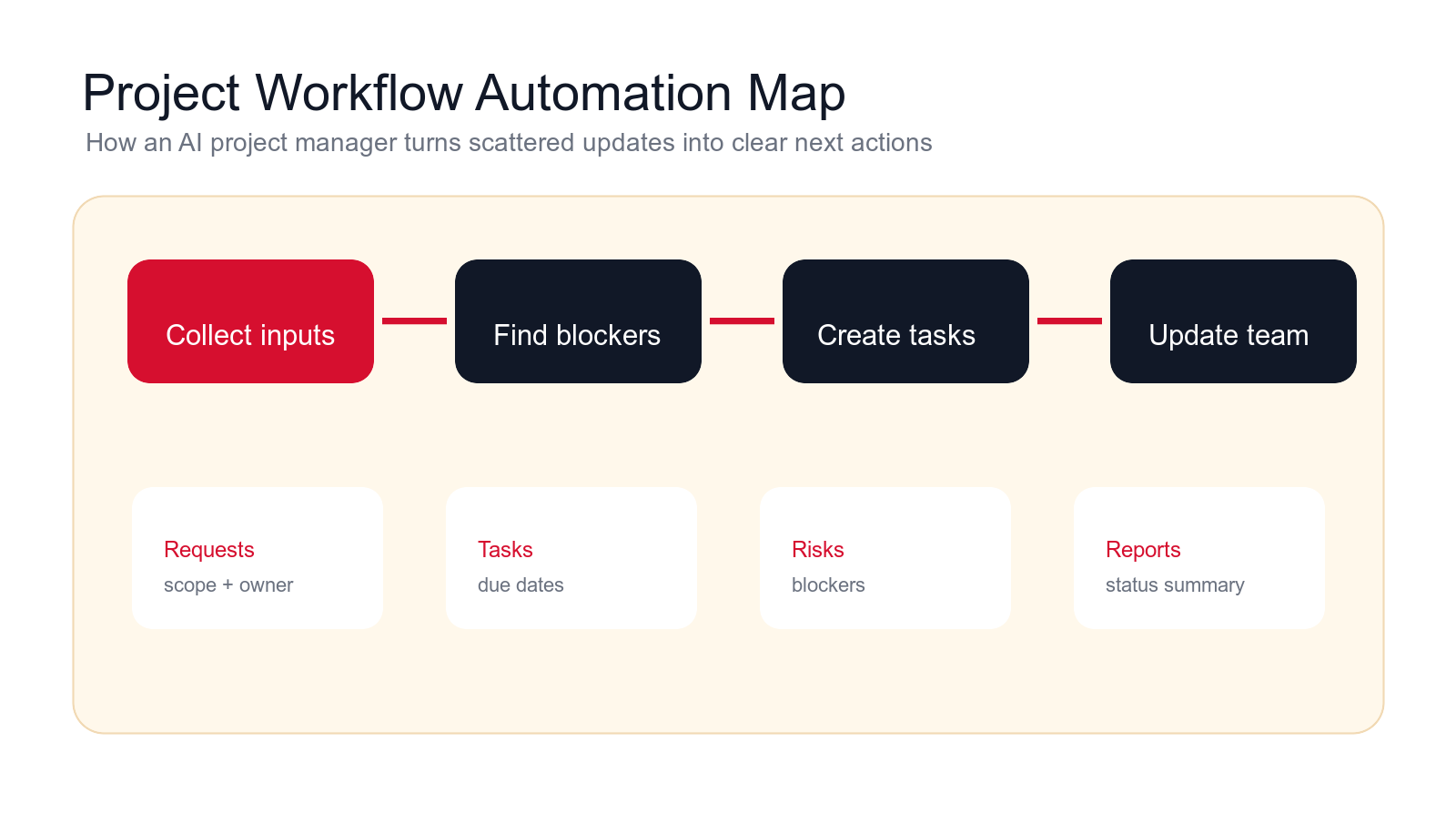
4. Status Reporting
Status reporting is usually the best first AI project manager workflow. Project managers spend time collecting updates, checking boards, reading messages, asking owners, and formatting reports. AI can prepare a draft status report from project data, recent updates, blockers, decisions, and timeline changes.
A good status report should show what changed, what is on track, what is blocked, what decisions are needed, which deadlines are at risk, and where the source information came from. It should not hide old or incomplete data behind polished language.
Keep human review in place. The AI can draft the report, but the project owner should approve the message before it goes to clients, executives, or stakeholders. Status reports create expectations, so they need accountability.
5. Blocker and Dependency Detection
Blockers are often visible before they are formally reported. A developer mentions waiting on design. A vendor has not replied. A ticket is stale. A task depends on a decision that never happened. AI can scan updates and flag possible blockers earlier.
The workflow can look for missed due dates, repeated waiting language, blocked statuses, dependency mentions, unanswered questions, and tasks with no recent activity. It can create a blocker summary and suggest who should act next.
The guardrail is noise. If the assistant flags every delay as a crisis, people will ignore it. Start with reviewed blocker alerts and tune the rules so the system surfaces issues that actually need attention.
6. Risk and Issue Summaries
Projects need risk visibility, but risk logs often fall behind. An AI project manager can summarize emerging risks from meeting notes, tickets, stakeholder comments, budget changes, timeline slips, unresolved dependencies, and repeated issues.
The assistant should separate confirmed issues from possible risks. A confirmed issue is already affecting the project. A risk may affect the project if it continues. This distinction matters because teams need different responses.
A strong risk summary includes the risk, evidence, potential impact, owner, recommended next step, and review date. It should not assign severity without explanation. Human leads should approve risk level and mitigation plans.
Build a controlled project pilot
Want project automation without losing control?
We can map your project workflow, choose the first automation, define review rules, and build an AI project management pilot with human approval.
We will reply with a practical first-workflow recommendation.
7. Stakeholder Update Drafts
Stakeholder updates take time because different audiences need different levels of detail. Executives may need risk, timeline, and decisions. A delivery team may need tasks and blockers. A client may need progress, next steps, and open questions. AI can draft versions for each audience.
The draft should use approved facts from the project system. It should not soften real risks or invent progress. If a deadline is uncertain, the update should say what is known and what decision is needed.
Human review is essential. Stakeholder communication affects trust. Let AI prepare the update, but let the accountable owner approve the message before it is sent.
8. Follow-Up Reminders and Owner Nudges
Project managers often spend time chasing updates. AI can monitor due dates, missing responses, stale tasks, and unanswered questions, then prepare reminders for owners. This keeps projects moving without requiring the manager to manually scan every thread.
Reminders should be specific. "Please update the implementation task by today" is better than "any update?" The reminder should include the project, task, due date, blocker, and why the update matters.
Keep the tone practical. Too many automated nudges create fatigue. Start with high-impact reminders: blocked tasks, due dates, customer-facing milestones, and decisions needed for the next phase.
9. Project Document Organization
Project documents often spread across folders, chats, email attachments, shared drives, and notes. An AI project manager can identify important documents, summarize them, tag them by project phase, and create a cleaner reference index.
This is useful for requirements, scopes, meeting notes, change requests, decision logs, test plans, launch checklists, and handoff documents. The assistant can show which document is latest, which one is missing, and which project task it supports.
The guardrail is source control. The AI should not silently overwrite or rename important documents. It can suggest organization and create summaries, but humans should approve changes to official files.
10. Handoff Checklists
Handoffs are common failure points. Sales hands to delivery. Strategy hands to build. Build hands to support. A team member goes on leave. A project moves from discovery into implementation. AI can prepare handoff checklists so the next owner receives the right context.
A good handoff checklist includes project goal, current status, decisions made, open risks, owners, access needs, documents, stakeholder expectations, timeline, and next actions. It should also flag missing information.
This workflow saves time because it prevents the next owner from rebuilding context. It also reduces customer-facing mistakes when projects move between teams.
11. Scope Change Impact Summaries
Scope changes are risky because they affect timeline, budget, team capacity, and stakeholder expectations. An AI project manager can help by preparing an impact summary when a change request appears.
The assistant can summarize the requested change, affected deliverables, related tasks, possible timeline impact, missing information, decision owner, and questions to resolve. It can also compare the request against the original scope if the scope document is available.
The AI should not approve the change. Scope is a business decision. The assistant should prepare the decision packet so the project owner can respond faster and with better evidence.
12. Project Portfolio Reporting
When a company runs many projects, leaders need portfolio visibility. Which projects are on track? Which are blocked? Which teams are overloaded? Which clients or departments need decisions? AI can summarize portfolio status from project data and updates.
A useful portfolio report should show project health, major blockers, decision needs, timeline risk, capacity signals, and stale projects. It should also show evidence and source links so leaders can trust the report.
This workflow is best after lower-level project data is cleaner. If individual project tasks are inaccurate, portfolio reporting will be unreliable. Start with task quality, status reports, and blocker detection before automating executive dashboards.
Guardrails That Keep Project Automation Useful
Project automation needs guardrails because project work is full of judgment. A bad workflow can create vague tasks, hide risks, send misleading updates, or make decisions without authority. The first guardrail is scope clarity. Define what the AI can prepare and what a person must approve.
The second guardrail is source visibility. Status reports, risk summaries, and blocker alerts should link back to the tasks, notes, meetings, or messages they came from. If people cannot inspect the source, they will struggle to trust the assistant.
The third guardrail is escalation. If the assistant detects scope change, budget risk, stakeholder conflict, legal or contractual issues, missing ownership, or unclear priority, it should route the issue to a project owner rather than acting independently.
The fourth guardrail is permission design. The AI should only read and update the systems required for the workflow. Start with draft outputs before giving it permission to create tasks, update records, or message stakeholders automatically.
What Not to Automate First
Some project management work should stay human-led until the team has strong controls. Do not start with automatic priority changes, budget approvals, final delivery commitments, vendor negotiations, client conflict messages, performance feedback, or executive escalation notes. AI can prepare context for those moments, but a human should own the decision and communication.
Also avoid automating a workflow where the team has not agreed on the process. If nobody knows who owns intake, what counts as a blocker, how scope changes are approved, or what "on track" means, the AI will not solve the disagreement. It will make inconsistent decisions faster.
Be careful with automatic task creation at scale. Too many AI-generated tasks can make a project board less usable. Start with draft tasks or a review queue. Let a project manager approve, merge, edit, or reject tasks before they become official work.
Data Quality and Permission Controls
Project automation depends on the quality of the information it reads. If tasks are stale, owners are missing, documents are outdated, and meetings are not captured, the AI project manager will produce weak summaries. Before launch, decide which sources are authoritative for status, scope, risks, and decisions.
Permissions should match the workflow. A meeting action item assistant may need meeting notes and the task board. It does not need access to finance records. A portfolio reporting assistant may need project status and risk data. It does not need private HR conversations. Narrow access reduces risk and makes the workflow easier to audit.
Keep an audit trail. Store the source, AI output, human edits, approval, and final update where possible. This helps the team review mistakes, improve instructions, and understand why a task, report, or risk summary changed.
Treat project data as a current-state system, not a perfect truth source. A project board may say a task is on track while the latest meeting notes say the owner is blocked. A budget sheet may be current while the delivery timeline is stale. A useful AI project manager should show where signals agree, where they conflict, and which source was used for the summary.
This matters more in 2026 because many project teams now use several systems at once: task boards, chat, video transcripts, CRM handoff notes, client emails, document folders, and spreadsheets. The AI workflow should not flatten those sources into one confident answer. It should separate facts, assumptions, missing inputs, and recommended follow-up so the project owner can review quickly.
The safest reporting pattern is evidence-first. For each risk, blocker, scope change, or overdue item, the assistant should include the source, date, owner, and recommended next action. That makes the output easier to inspect and reduces the chance that a polished summary hides stale information. Project automation is useful when it makes uncertainty visible, not when it pretends every project signal is clean.
Also decide how long project summaries, transcripts, and AI-generated status drafts should be retained. Some teams need records for client accountability. Others should avoid storing sensitive meeting content longer than necessary. The retention rule should match the normal project governance policy instead of becoming a new hidden archive created by the AI tool.
Finally, define who can correct the assistant. If every team member can change labels, templates, or source rules, the workflow becomes unstable. If nobody can correct it, mistakes repeat. A good setup gives project owners a simple feedback path and gives administrators control over the rules that affect reporting, priorities, and stakeholder communication.
Use the same rule for expansion. A second project workflow should reuse the proven permission model, review owner, reporting format, and correction process unless there is a clear reason to change them.
Consistency is what lets teams scale project automation without losing trust.
A Practical 90-Day AI Project Manager Implementation Plan
In the first thirty days, map the project workflow. List project inputs, systems, meeting types, status reporting process, task fields, owners, review paths, handoffs, blockers, and reporting needs. Choose one workflow that happens often and can be reviewed quickly.
In days thirty to sixty, build a controlled pilot. Connect only the systems required for the workflow. Test normal tasks, vague requests, missing owners, stale updates, scope changes, blocked work, and stakeholder questions. Compare the AI output against what an experienced project manager would prepare.
In days sixty to ninety, launch with one team or project type. Track time saved, report accuracy, task quality, blocker detection, owner adoption, and corrections. Expand only after the team trusts the summaries and review path.
The Minimum Useful AI Project Manager
The minimum useful AI project manager has one project source, one output, one review owner, and one success metric. For example, it can summarize weekly project updates, flag blockers, and draft a status report for the project owner to approve. That is enough to prove value without rebuilding the entire project management system.
What to Avoid in the First Build
Avoid automatic scope approval, automatic stakeholder messages, broad tool access, hidden health scores, vague task creation, and workflows that require perfect data from day one. Start with preparation and review, then expand permissions after quality is proven.
Questions to Answer Before Launch
- Which project workflow is the pilot responsible for?
- Which systems can the AI read and update?
- Which outputs require human approval?
- How will the team report bad summaries or wrong tasks?
- Which metric proves the workflow saved time or improved visibility?
How to Measure AI Project Manager Results
Measure project automation by useful outputs, not by how many messages the AI reads. Practical metrics include report preparation time, task completeness, blocker detection accuracy, stale-task reduction, meeting follow-up speed, owner adoption, fewer missed handoffs, and fewer repeated status requests.
Accuracy matters too. Review whether the AI summary matches project reality, whether it misses important risks, whether it invents progress, and whether team members trust the task drafts. If project owners rewrite everything, the workflow is not ready to expand.
Track corrections. Every correction should improve prompts, source data, templates, or routing rules. A good AI automation agency will build that feedback loop into the pilot so the system improves from real project examples.
When to Hire an AI Automation Agency
Simple project summaries can be handled with basic AI tools. An AI automation agency becomes useful when the workflow crosses project management software, email, chat, meetings, documents, CRM, support, reporting, and approval paths.
A good agency should map the current workflow, choose the first pilot, define review rules, connect the right systems, test real scenarios, and measure whether the project workflow improved. It should not force a generic project bot into a team that has unclear ownership.
The agency should also be willing to say when the first step is cleanup. If tasks have no owners, updates are not written anywhere, scope is undocumented, or leadership changes priorities without a process, AI will expose those issues. Fixing the workflow makes the automation safer.
Final Checklist: Automate Project Workflows Without Losing Control
- Start with repeated coordination work, such as status reports, action items, or blocker summaries.
- Use AI to prepare tasks, summaries, reports, reminders, and handoff checklists.
- Keep humans responsible for scope, budget, priority, stakeholder commitments, and delivery tradeoffs.
- Show source links and confidence so project owners can verify the output.
- Send outputs into the project system where the team already works.
- Measure report preparation time, task quality, blocker detection, and team adoption.
An AI project manager should make project work clearer and easier to coordinate. It should help teams see what changed, what is blocked, who owns the next step, and what decision needs attention. If it creates more noise, vague tasks, or false confidence, the workflow needs tightening.
Start narrow. Choose one project workflow, define what a good output looks like, keep human review in place, measure the result, and expand only when the team trusts the assistant.
Free AI project workflow review
Get a first-pass recommendation for your project workflow.
Send your email and we will reply with a practical view of which project workflow should become your first AI automation pilot.
No spam. We use this to reply with the recommendation.
FAQ: AI Project Manager
What is an AI project manager?
An AI project manager is an AI-assisted workflow that helps teams summarize updates, draft tasks, detect blockers, prepare status reports, organize project context, and route work while humans remain accountable for project decisions.
What project workflow should I automate first?
Start with a frequent, low-risk workflow such as status reporting, meeting action item capture, project request intake, blocker detection, or handoff checklist preparation.
Can AI manage a project by itself?
For business projects, AI should support project management rather than own it. It can prepare summaries, tasks, alerts, and reports, but humans should approve scope, priority, budget, risk response, and stakeholder commitments.
How do I keep AI project management accurate?
Use source links, human review, clear task fields, escalation rules, limited permissions, and correction feedback. The assistant should show uncertainty when project data is missing or stale.
Can Go Expandia build AI project manager workflows?
Yes. Go Expandia can map project workflows, choose the first automation pilot, connect project tools, design review rules, and build controlled AI project management workflows.
About Bailey Roque
Bailey Roque writes for Go Expandia on AI automation, AI agent development, workflow design, AI consulting, and practical rollout models for business teams.
Related posts and services
Keep planning your AI workflow automation roadmap
Workflow guide
AI Workflow Automation
Compare business processes that can become AI automation pilots.
Email guide
AI Email Assistant
See email workflows that reduce manual coordination and inbox drag.
Main service
AI Automation Agency
Build practical workflow automation with AI agents, integrations, and human review.
Ready to Automate Project Workflows With AI?
Go Expandia helps companies choose the right project workflow, design review controls, and launch AI automation that teams can trust.