AI Email Assistant for Business: 12 Use Cases That Save Time
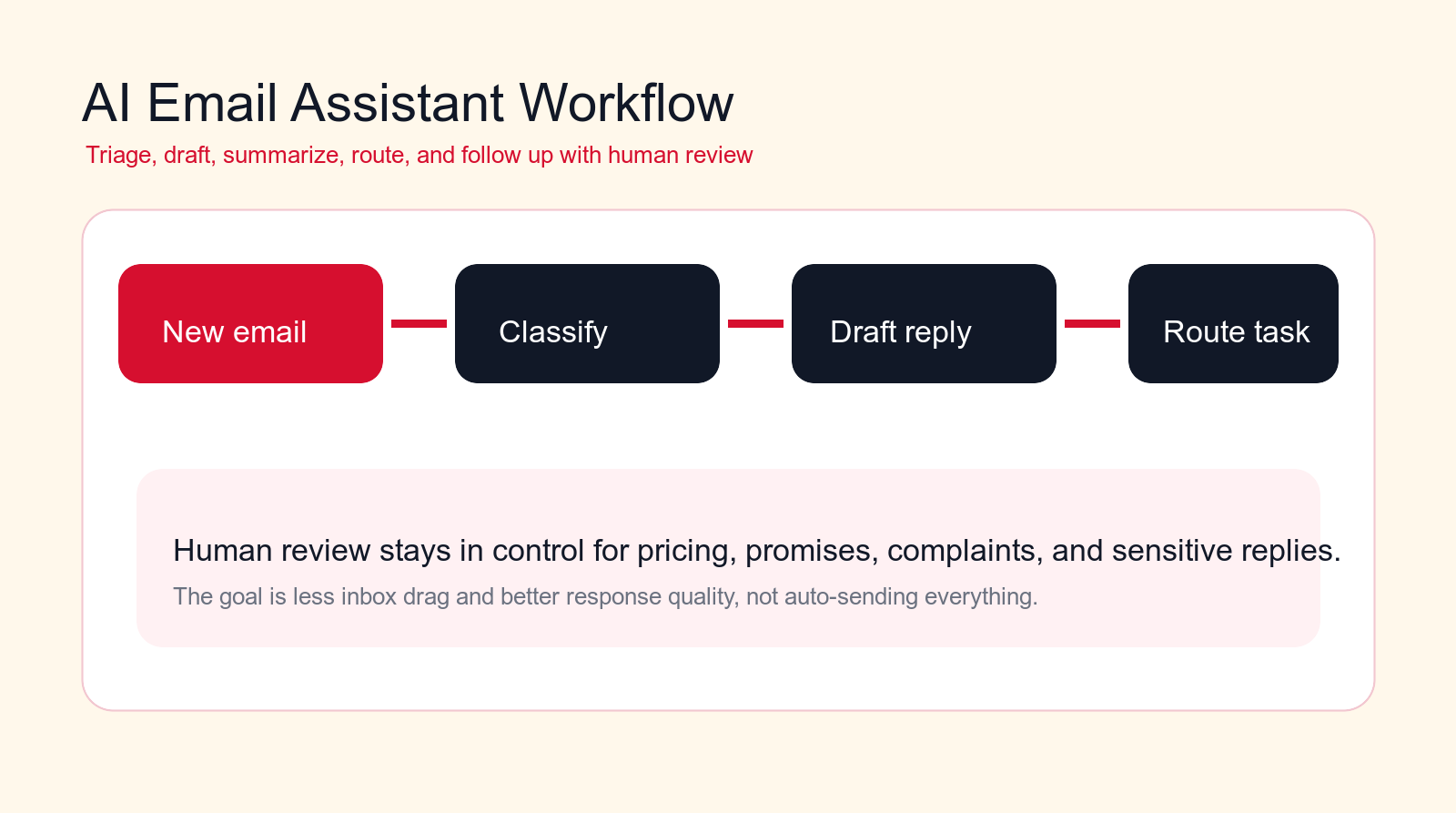
An AI email assistant for business should reduce inbox drag, prepare better replies, route work faster, and keep teams focused without auto-sending weak messages or hiding important context.
Best first pilot
Start with inbox triage, reply drafts, meeting follow-up, or routing before automating sensitive replies.
Focus
AI email assistant for business
Best for
Shared inbox and operations teams
Best first workflow
Inbox triage
Main service
AI Automation Agency
TL;DR
An AI email assistant for business is most useful when it handles repeated inbox work around triage, summaries, reply drafts, routing, meeting follow-up, CRM updates, support intake, invoice requests, recruiting replies, vendor coordination, internal approvals, and reporting. The safest first workflows prepare work for humans instead of sending everything automatically. Keep human review for pricing, complaints, legal or financial commitments, sensitive customer replies, hiring decisions, and any email where tone or context matters.
Business email is where important work gets mixed with routine noise. Customer questions, sales leads, invoices, meeting requests, approvals, vendor updates, support issues, contracts, follow-ups, and internal tasks all compete for attention in the same inbox. The result is slow response, missed context, repeated typing, and decisions that live inside scattered threads.
An AI email assistant for business can help when it is designed as workflow automation, not just a writing shortcut. The best system reads the email context, classifies the request, prepares the next step, drafts a response, routes work to the right owner, and updates the systems where the team actually works. It saves time because it reduces the repeated work around email, not because it blindly answers every message.
This guide covers 12 practical use cases that save time while keeping quality under control. It is written for business owners, operations leaders, sales teams, support managers, finance teams, and department heads who want email automation without creating awkward replies, missed obligations, or messy records.
Quick Answer: Automate Email Preparation, Not Judgment
The best first AI email assistant workflows prepare email work for people. They summarize long threads, identify priority, draft replies, route requests, extract tasks, and update systems. They should not make final business commitments, negotiate pricing, handle complaints without escalation, or send sensitive replies without review.
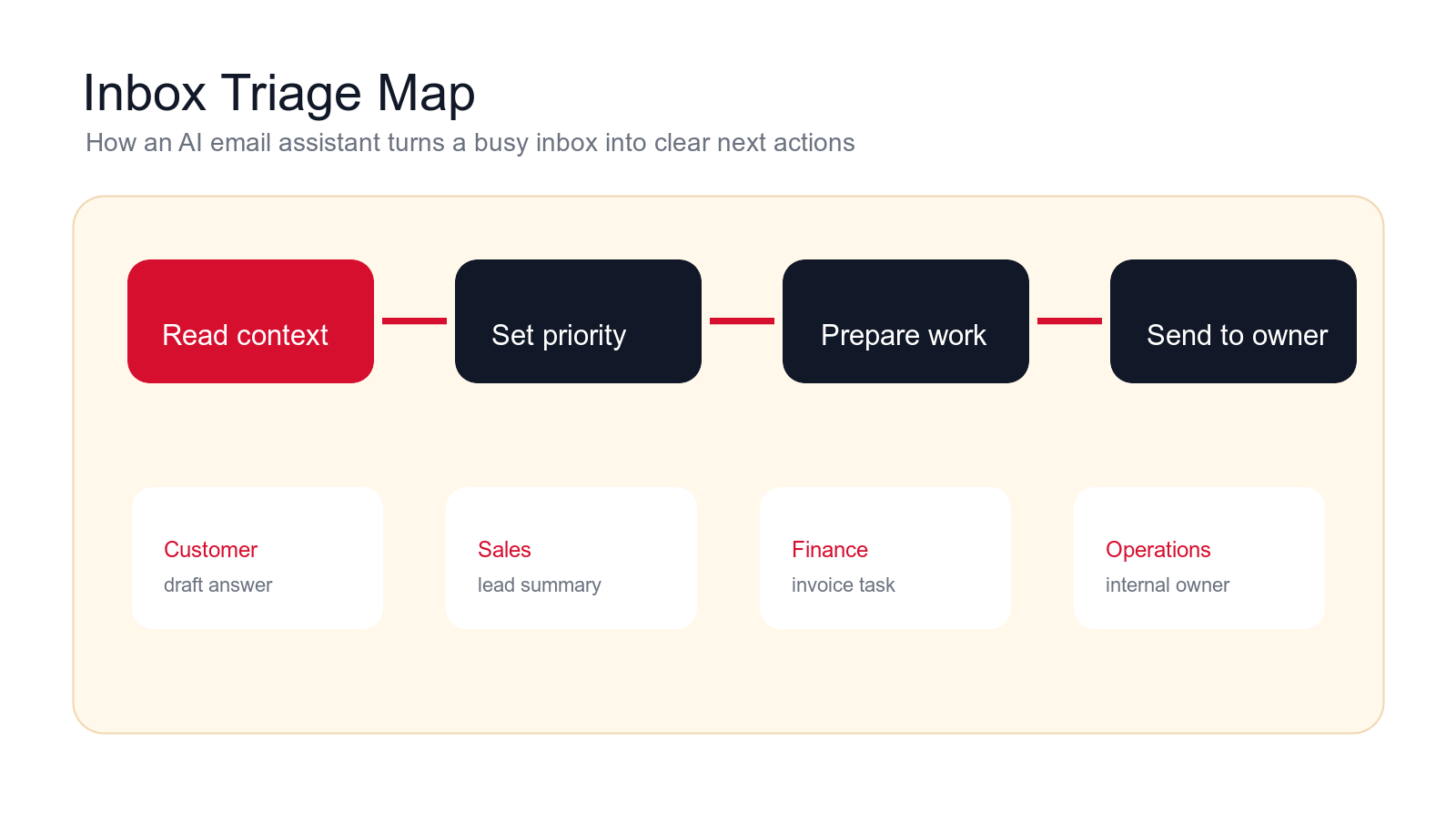
A useful assistant makes the next human action faster and clearer. A salesperson should see the lead summary, source, need, urgency, and draft response. A support manager should see the customer issue, account details, priority, and recommended ticket category. A finance team should see the invoice details, missing information, vendor, due date, and approval path.
If your inbox is chaotic, start with triage and summarization. These workflows create immediate visibility and lower risk. After that, add drafts, routing, and system updates where the rules are clear.
| Email workflow | Good automation | Bad automation | Best control |
|---|---|---|---|
| Inbox triage | Classifies priority and owner with reasons. | Moves emails with unclear rules. | Show confidence and exceptions. |
| Reply drafts | Prepares a contextual response for review. | Sends generic replies automatically. | Human approval for customer-facing mail. |
| Task extraction | Turns email requests into owned next steps. | Creates tasks without context. | Include source thread and deadline. |
| Reporting | Shows volume, themes, owners, and response gaps. | Counts emails without business meaning. | Connect email to outcomes. |
What an AI Email Assistant Actually Does
An AI email assistant is a workflow that helps a business manage email with AI. It can read new messages, summarize threads, classify intent, draft replies, extract tasks, identify deadlines, route requests, update CRM records, create support tickets, prepare meeting follow-up, and report on recurring inbox patterns.
The useful part is not only the model. The useful part is the workflow design around the model. An email assistant needs approved knowledge, sender rules, data access, routing logic, review steps, and integrations with the systems where the team works. Without those pieces, the assistant becomes a writing toy instead of a business tool.
A good email assistant is also transparent. It should show why it classified a message as urgent, why it selected an owner, what information it used in a draft, and what it could not verify. That transparency is what lets people trust automation without giving up control.
Where an AI Email Assistant Fits in the Business Stack
An AI email assistant should not become a separate inbox that nobody checks. It should connect the inbox to the CRM, support desk, calendar, task manager, document storage, finance system, and internal communication tools. Email is often the trigger, but the result should land in the right system.
A practical architecture has four parts. First, the incoming email triggers the workflow. Second, the AI reads the message, thread, sender, attachments, and approved knowledge. Third, it prepares the output: summary, draft, task, route, field update, or escalation. Fourth, the human owner reviews the result or receives the task in the system they already use.
This prevents the common mistake of adding another app on top of a messy inbox. The point is not to make people check more places. The point is to turn email into cleaner work items with context attached.
How to Choose the First Email Workflow to Automate
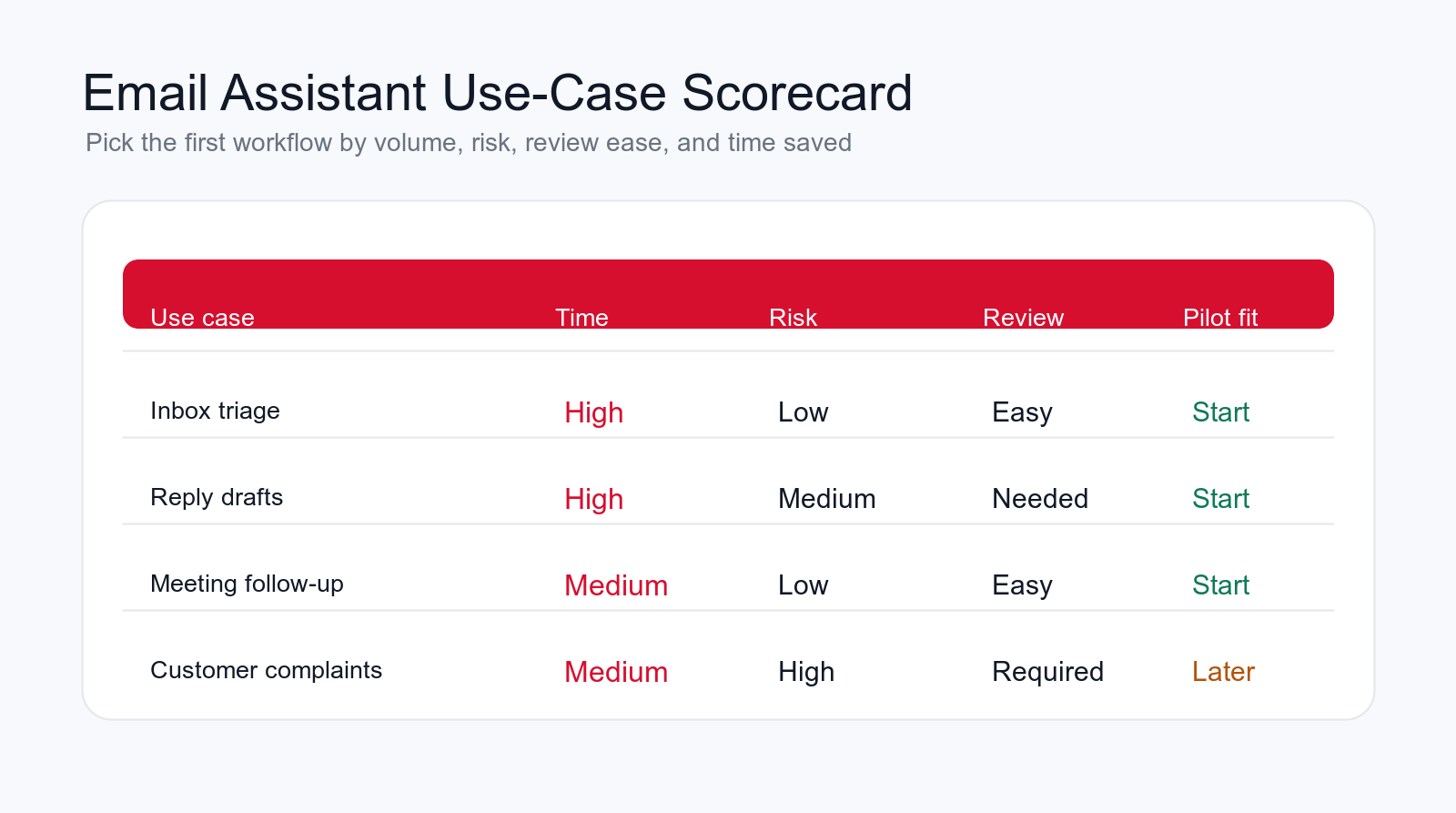
Choose the first workflow by volume, clarity, risk, review ease, and business value. A good first workflow happens often, follows a repeatable pattern, has a clear owner, and can be reviewed quickly. Inbox triage, thread summaries, meeting follow-up, and lead intake usually fit this profile because they prepare work without making final decisions.
Avoid starting with the most politically sensitive inbox. Executive inboxes, legal threads, HR complaints, finance disputes, and strategic customer negotiations may eventually benefit from AI support, but they are rarely the best first pilot. They require more context, stricter access, and stronger review.
Ask the team where email creates delay today. Are leads sitting unanswered? Are support requests being forwarded to the wrong person? Are invoices stuck because approval details are missing? Are managers wasting time reading long threads just to find the decision? The answer usually points to a better first workflow than a generic "AI writes emails" project.
The first pilot should also have a measurable result. You should be able to track response time, draft acceptance, routing accuracy, edit time, task completion, duplicate reduction, or fewer missed follow-ups. If the team cannot measure the workflow, it will be harder to prove that the AI email assistant saved time.
Free email workflow check
Find your first AI email assistant workflow.
Drop your email and we will send a first-pass recommendation for the safest email workflow to automate first.
No spam. We use this to reply with the recommendation.
1. Inbox Triage and Priority Classification
Inbox triage is the strongest first use case for many businesses. The AI email assistant reviews incoming messages and labels them by intent, urgency, owner, and next action. It can separate sales leads, customer issues, invoices, meeting requests, internal approvals, vendor updates, low-priority newsletters, and unclear messages.
The assistant should explain the label. "High priority because the customer asks for a response today and mentions a blocked launch" is useful. "High priority" without reasoning is weak. The team needs to understand why a message moved to the top.
This workflow saves time because people stop scanning every message from scratch. It also protects important email from disappearing under routine traffic. Start with suggested labels before letting the assistant move or archive anything automatically.
2. Long Thread Summaries
Long email threads are expensive. People join late, miss decisions, repeat questions, or spend ten minutes reconstructing what happened. An AI email assistant can summarize the thread into decisions, open questions, owners, dates, risks, and the latest requested action.
The summary should be structured rather than clever. A useful format is: background, current status, decisions made, open items, next owner, deadline, and unresolved risk. This helps managers and operators understand the thread without reading every reply.
Keep the source thread attached. The assistant can summarize, but people should be able to inspect the original message when the decision matters. This is especially important for contracts, complaints, finance, hiring, and customer commitments.
3. Customer Reply Drafts for Review
Reply drafting is the use case most people imagine first, but it needs guardrails. The AI assistant can prepare customer replies using the original message, approved service information, CRM context, and the company's tone. A human should approve sensitive or customer-facing replies until quality is proven.
A strong draft answers the actual question, mentions the relevant context, avoids unsupported claims, and proposes a clear next step. It should not invent pricing, promise timelines, claim a result, or apologize for something the company has not confirmed.
Track edit rate. If the team rewrites every draft, the workflow is not saving time yet. It may need better examples, tighter instructions, narrower use cases, or a stronger knowledge base.
4. Sales Lead Intake and CRM Updates
Sales leads often arrive by email with missing context. A prospect asks for help, replies to a campaign, forwards a referral, or sends a vague request to a shared inbox. The AI email assistant can summarize the lead, extract company details, identify the service interest, detect urgency, and prepare a CRM update.
The workflow should check for existing contacts or accounts before creating a new record. It can flag possible duplicates and suggest the owner. It can also draft the first response for a salesperson to review.
This saves time because sales receives a prepared lead packet instead of a raw email. It also improves CRM hygiene because fields are filled consistently and the source thread stays attached.
5. Meeting Follow-Up and Action Items
After meetings, teams often send follow-up emails late or forget action items. An AI email assistant can use meeting notes, calendar context, and the email thread to draft a follow-up with decisions, tasks, deadlines, and next steps.
The assistant can also create internal tasks from the follow-up. If the customer needs a proposal, the sales owner gets a task. If finance needs to confirm pricing, finance gets a task. If operations needs to review scope, operations gets a task.
Keep review in place. A meeting follow-up can create obligations. The AI should prepare the message, but the meeting owner should confirm that decisions and deadlines are accurate before sending.
6. Support Email Triage and Ticket Creation
Support inboxes receive bug reports, account questions, complaints, feature requests, status checks, and routine how-to questions. An AI email assistant can classify the issue, summarize the customer problem, identify product or service area, detect urgency, and create a support ticket.
The ticket should include the original email, customer details, account status, summary, severity, recommended category, and missing information. If the customer is upset or the issue sounds urgent, the assistant should escalate rather than bury the message in a normal queue.
This workflow saves support time by reducing manual intake. It also improves customer experience because the support team starts with context instead of asking the customer to repeat everything.
Build a controlled email pilot
Want email automation without weak auto-replies?
We can map your inbox workflow, choose the first use case, define review rules, and build an AI automation pilot that prepares work for your team.
We will reply with a practical first-workflow recommendation.
7. Invoice and Vendor Email Handling
Finance teams spend time opening vendor emails, reading invoice details, checking attachments, identifying missing data, and routing approvals. An AI email assistant can extract invoice number, vendor, amount, due date, purchase order references, payment terms, and missing fields.
The workflow can create an approval task, route the invoice to the correct owner, flag duplicates, and prepare a reply when information is missing. It should not approve payment by itself unless the business has a separate control process.
This use case saves time because finance teams stop manually retyping details from email into spreadsheets or accounting tools. It also lowers risk by making missing information visible before the invoice moves forward.
8. Internal Approval Requests
Approval requests often arrive as unclear emails. Someone asks for budget, access, a discount, a hiring step, a purchase, or an exception. The AI email assistant can identify the request, summarize the business reason, extract deadline and amount, route it to the right approver, and prepare the approval record.
The assistant should not approve the request. It should make approval easier by putting the right information in front of the right person. It can also ask for missing details when the request is incomplete.
This workflow reduces back-and-forth because approvers see a consistent summary instead of hunting through the thread. It also creates a cleaner audit trail when decisions need to be reviewed later.
9. Recruiting and Candidate Email Management
Recruiting creates repeated email work: screening questions, scheduling, candidate updates, interview feedback requests, document collection, and rejection drafts. An AI email assistant can summarize candidate emails, identify stage, draft scheduling replies, and route next steps to recruiters or hiring managers.
The guardrail is fairness and sensitivity. The AI should not make hiring decisions or reject candidates based on vague inference. It can prepare messages and organize information, but the human hiring process should control evaluation and decision-making.
This use case saves time when the workflow is narrow. For example, scheduling interviews and collecting missing documents is safer than asking AI to score candidates. Start with coordination before decision support.
10. Vendor, Partner, and Project Coordination
Vendor and partner threads can become long and hard to follow. The AI email assistant can summarize status, track promised deliverables, identify blockers, pull out deadlines, and draft coordination replies. This helps project owners stay current without rereading every message.
The assistant can also create tasks from vendor commitments. If a supplier promises a document by Friday, the task can be tracked. If a partner asks for assets, the owner can receive a clear request.
Use review for anything that changes scope, price, timeline, or contract terms. Coordination drafts are useful, but business commitments should stay controlled.
11. Knowledge-Based FAQ Replies
Many business inboxes receive repeated questions about services, pricing ranges, onboarding, documents, timelines, locations, features, policies, or support steps. An AI email assistant can draft answers using approved knowledge sources rather than leaving each employee to rewrite the same response.
The knowledge base matters. The assistant should answer only from approved service pages, help docs, policy documents, or internal playbooks. If the answer is missing or uncertain, it should ask a person rather than inventing a response.
This workflow saves time and improves consistency. Customers get clearer answers, and staff avoid repeating the same explanation. Review is still important when the answer involves pricing, account-specific details, or legal terms.
12. Email Reporting and Workflow Improvement
Email reporting is often ignored, but it can reveal where the business loses time. An AI assistant can categorize emails by intent, department, urgency, response status, owner, repeated question, and outcome. It can show which inboxes create the most manual work.
The reports should answer practical questions. What email types are increasing? Which customers wait too long? Which topics create repeated back-and-forth? Which approvals are stuck? Which lead sources create real opportunities? Which replies require the most editing?
This closes the loop. The business learns which templates, web pages, processes, or automations should be improved next. A good AI automation agency will design this reporting early because it keeps the system focused on real time savings.
Guardrails That Protect Email Quality
Email automation needs guardrails because email creates records, commitments, and customer impressions. A bad reply can promise the wrong thing, share sensitive information, escalate conflict, or make the business sound careless. Guardrails keep speed from damaging trust.
The first guardrail is human review for customer-facing replies. Let the assistant draft, summarize, and suggest, but keep a person in control for sensitive messages. The second is approved knowledge. The assistant should use approved service information, policies, templates, and account data rather than guessing.
The third guardrail is permission design. The AI should only read the inboxes, documents, and systems needed for the workflow. It should update low-risk fields first and require approval for anything that changes a record, sends a message, or creates an obligation.
The fourth guardrail is exception handling. If the assistant is uncertain, the sender is upset, the topic is sensitive, the thread contains conflicting instructions, or the email includes legal, medical, financial, HR, or pricing issues, the workflow should route to a human.
What Not to Automate First
Some email workflows should stay human-led until the business has stronger controls. Do not start with legal negotiations, contract redlines, formal complaints, employee relations, hiring decisions, medical or financial advice, security incidents, refund disputes, or strategic customer escalations. AI can help summarize or prepare context, but it should not own the response.
Also avoid automatic sending when the business has no approved templates or knowledge base. If different team members answer the same question in different ways, the workflow needs alignment before automation. Otherwise the AI assistant will copy the inconsistency and make it faster.
Be careful with broad archive, delete, or label automation. Moving email can save time, but a wrong rule can hide important messages. Start with suggested labels and reviewed routing. Automate movement only after the system has proven accuracy on real examples.
Security, Access, and Data Privacy Controls
Email contains sensitive business information, so access design matters. The AI email assistant should only read the inboxes and folders required for the workflow. A sales lead workflow does not need access to payroll. A finance invoice workflow does not need access to recruiting threads. Narrow access reduces risk.
The workflow should also define what the assistant can do. Reading and summarizing is lower risk than sending messages, deleting emails, forwarding attachments, or updating customer records. Start with low-risk outputs and require approval for actions that change the business record or communicate externally.
Keep audit trails. Store the original email reference, AI summary, suggested action, human edit, final response, and owner decision where possible. This helps the team investigate mistakes, improve prompts, and prove that sensitive decisions were reviewed by a person.
Data retention should match the business's normal policies. If the company has rules for customer information, HR records, finance documents, or contracts, the AI email workflow should respect those rules. A practical implementation plan includes permissions, logging, retention, and escalation before launch.
The vendor and model settings matter here. Before connecting a shared inbox, confirm whether email content, attachments, summaries, and corrections can be used to train models, improve vendor systems, or appear in diagnostics. Business email often contains customer data, negotiation context, financial documents, HR issues, and confidential strategy. The workflow should use settings and contracts that match how sensitive the inbox is.
Also define attachment rules. An assistant that can read PDF invoices may not need to read every contract attachment. A support triage assistant may need screenshots but not payment files. A sales assistant may need the latest thread but not years of account history. Narrow attachment access reduces exposure and keeps review easier.
Keep external replies visibly accountable. If the assistant drafts an email, the sender should know what source it used and what it is uncertain about before sending. For sensitive accounts, the final message should come from a responsible person, not from an automatic sender that nobody owns.
Finally, include a kill switch. If replies start creating confusion, if routing breaks, or if the assistant begins classifying too many messages incorrectly, the team should be able to pause automation without disconnecting the entire email system. That operational control is part of a serious business implementation, not an optional extra.
Review permissions after the pilot too. An email workflow that starts with one shared inbox can quietly expand into multiple teams, more folders, more attachments, and more customer records. Schedule a short access review before expansion so the assistant does not accumulate more visibility than the use case justifies.
That review keeps useful automation from becoming quiet overreach.
Keep it scheduled.
A Practical 90-Day AI Email Assistant Implementation Plan
In the first thirty days, map the inboxes that create the most work. List common email types, owners, current response paths, required systems, repeated templates, sensitive topics, and bottlenecks. Choose one workflow with high volume, clear rules, and easy review.
In days thirty to sixty, build a controlled pilot. Connect only the inbox and systems needed for the first workflow. Create the classification rules, prompt examples, approved knowledge sources, review path, and escalation rules. Test normal emails, vague emails, complaints, duplicates, missing information, attachments, and long threads.
In days sixty to ninety, launch with a small team. Track time saved, draft acceptance, routing accuracy, reply quality, task completion, and exceptions. Expand only after the team trusts the assistant's summaries, drafts, and routing decisions.
The Minimum Useful Email Assistant
The minimum useful AI email assistant has one inbox, one email type, one output, and one owner. For example, it can classify inbound sales emails, summarize the request, check for an existing CRM contact, draft a reply, and create a task for sales review. That is enough to prove value without automating every email process at once.
What to Avoid in the First Build
Avoid automatic sending for sensitive replies, broad inbox access without a reason, hidden routing rules, unsupported pricing answers, complaint handling without escalation, and vague success metrics. Also avoid automating a workflow where the team has not agreed on who owns the next step.
Questions to Answer Before Launch
- Which inbox and email type is the pilot responsible for?
- Which messages should always be escalated to a person?
- Which knowledge sources are approved for replies?
- Which systems can the assistant read or update?
- How will the team report bad drafts, wrong routing, or missing context?
How to Measure Time Saved Without Fooling Yourself
Measure the AI email assistant by accepted outputs and reduced manual work, not by how many messages it touches. Useful metrics include triage accuracy, draft acceptance rate, edit time, response time, task completion, owner routing accuracy, duplicate reduction, escalations, and customer complaints.
Time saved should be measured against a baseline. How long does it take today to summarize a thread, draft a reply, process an invoice email, route a lead, or create a support ticket? Compare that to the workflow after automation. If people still reread everything and rewrite every draft, the system is not saving enough time.
Adoption is also a quality signal. If staff trust the summaries, use the drafts, and correct the assistant only occasionally, the workflow is working. If they ignore it, the scope, knowledge, instructions, or review design needs improvement.
When to Hire an AI Automation Agency
A simple personal email assistant can help an individual write faster. A business email assistant usually needs more structure. An AI automation agency becomes useful when the workflow crosses shared inboxes, CRM, support desk, finance tools, calendars, document storage, internal tasks, and human approval.
A good agency should not start by selling a generic AI writing tool. It should map the current email workflow, choose the first use case, define the review path, connect the necessary systems, build guardrails, test real emails, train the team, and measure whether the workflow saves time.
The agency should also be willing to say when not to automate yet. If inbox ownership is unclear, approved knowledge is missing, or the team does not know which emails are sensitive, the first step may be process cleanup. That makes the AI assistant safer and more useful.
Final Checklist: Use an AI Email Assistant Without Losing Quality
- Start with one high-volume inbox workflow, not the whole company inbox.
- Use AI to classify, summarize, draft, extract tasks, route, and update records.
- Keep human review for sensitive replies, pricing, complaints, HR, legal, finance, and customer commitments.
- Use approved knowledge sources and show uncertainty when the assistant cannot verify an answer.
- Send outputs into the CRM, ticketing system, calendar, task tool, or inbox where the team works.
- Measure draft acceptance, routing accuracy, response time, edit time, and staff trust.
An AI email assistant for business should make the inbox calmer and more useful. It should help people understand messages faster, respond with better context, and move work into the right system. If it creates more corrections, more confusion, or weaker replies, the workflow needs tightening.
Start narrow. Pick one email type, define what a good output looks like, keep review in place, measure the result, and expand only when the assistant proves it can save time without lowering quality.
Free AI email workflow review
Get a first-pass recommendation for your inbox workflow.
Send your email and we will reply with a practical view of which email assistant workflow should become your first AI automation pilot.
No spam. We use this to reply with the recommendation.
FAQ: AI Email Assistant for Business
What is an AI email assistant for business?
An AI email assistant for business is a workflow that helps teams classify emails, summarize threads, draft replies, extract tasks, route requests, update systems, and report on inbox patterns while keeping human review for sensitive decisions.
What AI email assistant use case should I automate first?
Start with a frequent, low-risk workflow such as inbox triage, long thread summaries, reply drafts for review, meeting follow-up, sales lead intake, or support ticket creation.
Can an AI email assistant send replies automatically?
It can for low-risk, approved messages after testing, but most business pilots should start with draft-for-review. Sensitive customer replies, pricing, complaints, HR, legal, and finance messages should stay reviewed.
How does an AI email assistant save time?
It saves time by reducing manual scanning, summarizing long threads, preparing drafts, extracting tasks, routing requests, updating records, and showing which email patterns create repeated work.
Can Go Expandia build an AI email assistant?
Yes. Go Expandia can map the email workflow, choose the first automation pilot, design review and escalation rules, connect CRM or support systems, and build a controlled rollout.
About Bailey Roque
Bailey Roque writes for Go Expandia on AI automation, AI agent development, workflow design, AI consulting, and practical rollout models for business teams.
Related posts and services
Keep planning your AI workflow automation roadmap
Workflow guide
AI Workflow Automation
Compare 15 business processes that can become AI automation pilots.
Lead guide
AI Lead Generation
See lead generation workflows that protect sales quality and human review.
Main service
AI Automation Agency
Build practical workflow automation with AI agents, integrations, and human review.
Ready to Save Time With an AI Email Assistant?
Go Expandia helps companies choose the right inbox workflow, design review controls, and launch AI automation that teams can actually use.