AI Customer Service Automation: What to Automate Without Hurting Support Quality
AI can reduce support workload, but only if the automation protects answer quality, escalation, empathy, and customer trust. This guide shows which workflows to automate first and which decisions should stay human-owned.
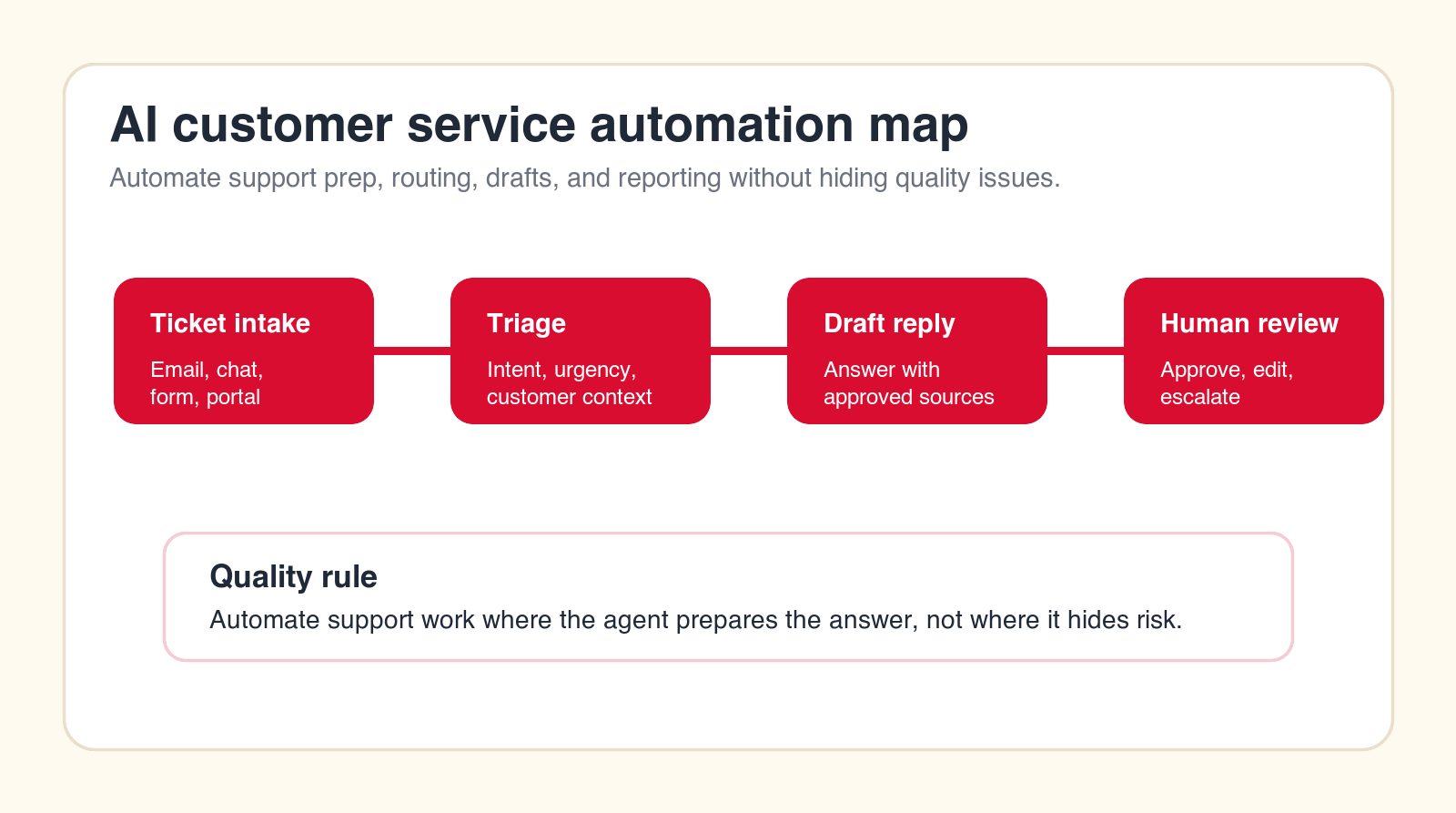
Best first rule
Automate the support work around the answer before you automate the final customer-facing decision.
Focus
AI customer service automation
Best for
Support teams improving quality
What it covers
Support workflows and guardrails
Main service
AI Automation Agency
TL;DR
The safest AI customer service automation workflows are ticket triage, intent classification, response drafting, knowledge retrieval, order lookup, escalation routing, agent-assist summaries, duplicate detection, internal handoff notes, quality review, customer feedback tagging, and support reporting. Do not start by fully automating sensitive complaints, refunds, cancellations, legal issues, account security, or emotional conversations. Start with workflows where AI prepares the answer and a support owner reviews or approves the result.
AI customer service automation can improve support speed, consistency, and workload, but it can also damage customer trust if it is applied to the wrong workflows. The danger is not automation itself. The danger is hiding judgment, empathy, exceptions, and accountability behind an AI answer that looks confident but misses the real customer issue.
Support quality is built from several parts: accurate answers, clear ownership, fast escalation, context awareness, empathy, source-backed policy, and honest limits. AI can help with many of those parts. It can classify tickets, retrieve knowledge, summarize conversations, draft replies, suggest next steps, flag risk, and create cleaner reporting. But it should not blindly own every customer-facing interaction.
This guide shows what to automate first without hurting support quality. It is written for support leaders, operations teams, founders, and service businesses that want practical AI automation rather than a chatbot that frustrates customers.
Quick Answer: Automate Preparation, Routing, and Drafts Before Final Answers
The best first support automations are the workflows around the customer response. Let AI classify the ticket, pull the right policy, summarize history, draft a reply, recommend escalation, and prepare internal notes. Keep humans responsible for final judgment when the issue is emotional, high-value, ambiguous, sensitive, or tied to refunds, cancellations, legal language, security, or customer trust.
A good support agent workflow has a clear trigger, clear data sources, clear allowed actions, and a clear escalation path. A bad workflow gives AI a vague instruction like "handle support" and then lets it improvise. That approach may reduce visible tickets in the short term, but it can create hidden quality problems, repeated contacts, bad sentiment, and customer churn.
The goal is not to make support feel less human. The goal is to remove repetitive preparation work so the human parts of support get more attention. AI should help support teams answer faster, see context sooner, route edge cases earlier, and maintain a cleaner record of what happened.
| Workflow | What AI can automate | What humans should own | Quality risk |
|---|---|---|---|
| Ticket triage | Classify intent, urgency, sentiment, and route. | Escalation policy and edge-case review. | Wrong priority or missed risk signal. |
| Reply drafting | Prepare answers from approved knowledge. | Final tone, judgment, promises, and exceptions. | Confident but inaccurate response. |
| Order lookup | Retrieve status, history, and next action. | Refund, replacement, cancellation decisions. | Wrong account or policy mismatch. |
| Quality review | Tag issues, detect missing steps, summarize trends. | Coaching, policy decisions, customer recovery. | Overlooking empathy and nuance. |
What AI Customer Service Automation Should Mean
AI customer service automation is the use of AI agents and workflow automation to support customer service tasks. It may include ticket classification, knowledge retrieval, draft replies, customer history summaries, escalation routing, internal notes, quality assurance, reporting, and customer feedback analysis.
The strongest version is not a generic chatbot bolted onto the website. It is a controlled support workflow that connects AI to the right systems, limits what it can do, gives it approved knowledge, and makes human review clear. The AI agent should know when it is preparing a draft, when it is suggesting a route, and when it must escalate.
This distinction matters because customer support is emotional. A technically correct answer can still be a bad support experience if it ignores frustration, repeats what the customer already tried, misses account context, or blocks a human from stepping in. Quality-first automation respects that.
How to Choose the First Support Workflow to Automate
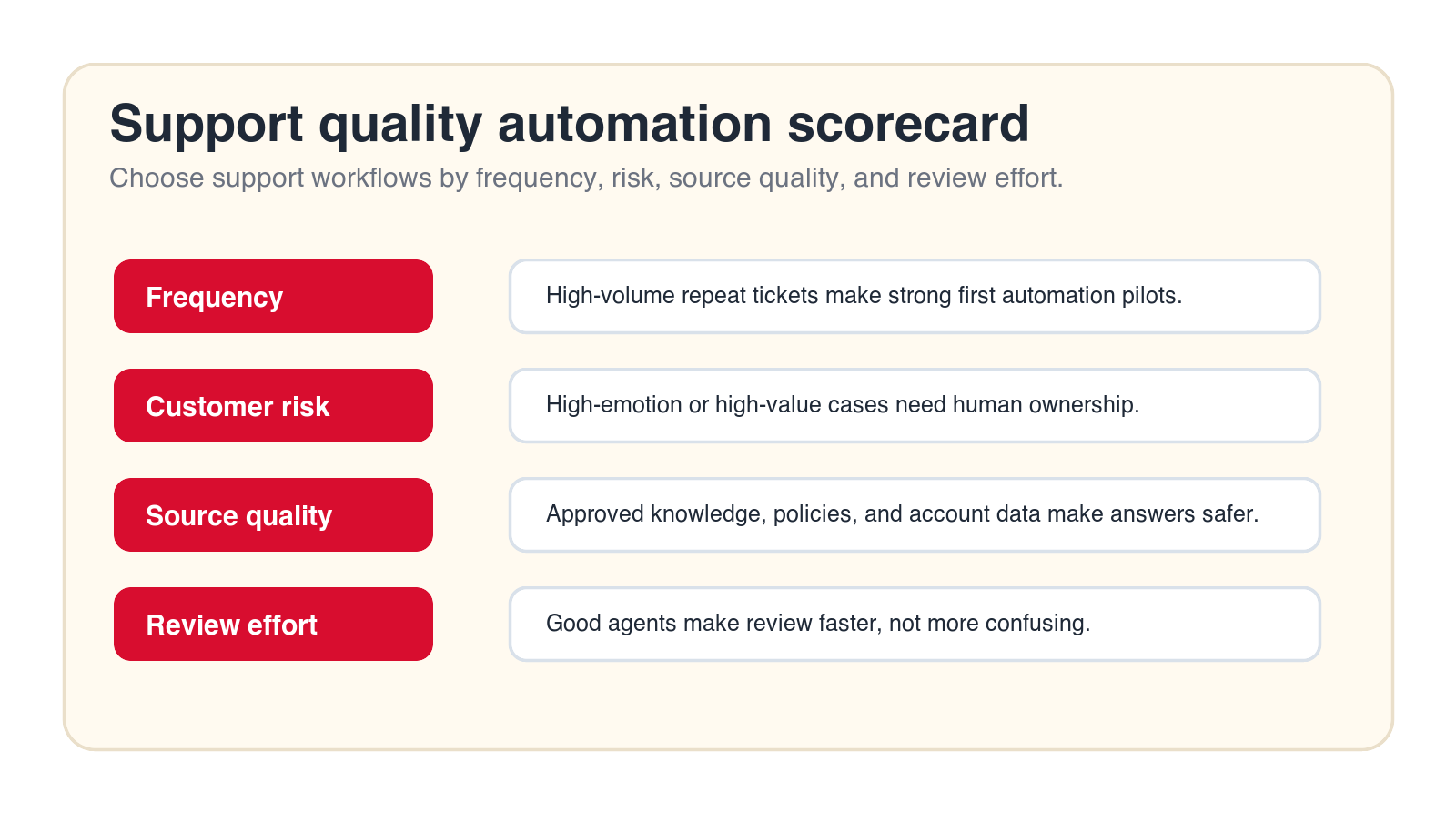
Choose the first workflow by frequency, risk, source quality, and review effort. A strong first workflow happens often, has clear patterns, uses reliable data, and can be reviewed quickly. A weak first workflow is rare, emotionally intense, policy-heavy, unclear, or tied to account security and refunds.
Start with the support queue, not the technology. What tickets repeat every week? Which requests take time to route? Which answers require support agents to search the same knowledge base again and again? Where do tickets stall because nobody knows who owns them? Those are better first candidates than broad "AI support" ambitions.
An AI automation agency can help map this before build. The useful work is identifying the first use case, documenting the current support process, defining data access, designing human review, connecting the help desk, and testing the agent with real tickets before launch.
Free support automation check
Find the safest support workflow to automate first.
Drop your email and we will send a first-pass recommendation for the support workflow that can save time without damaging support quality.
No spam. We use this to reply with the recommendation.
1. Ticket Triage and Intent Classification
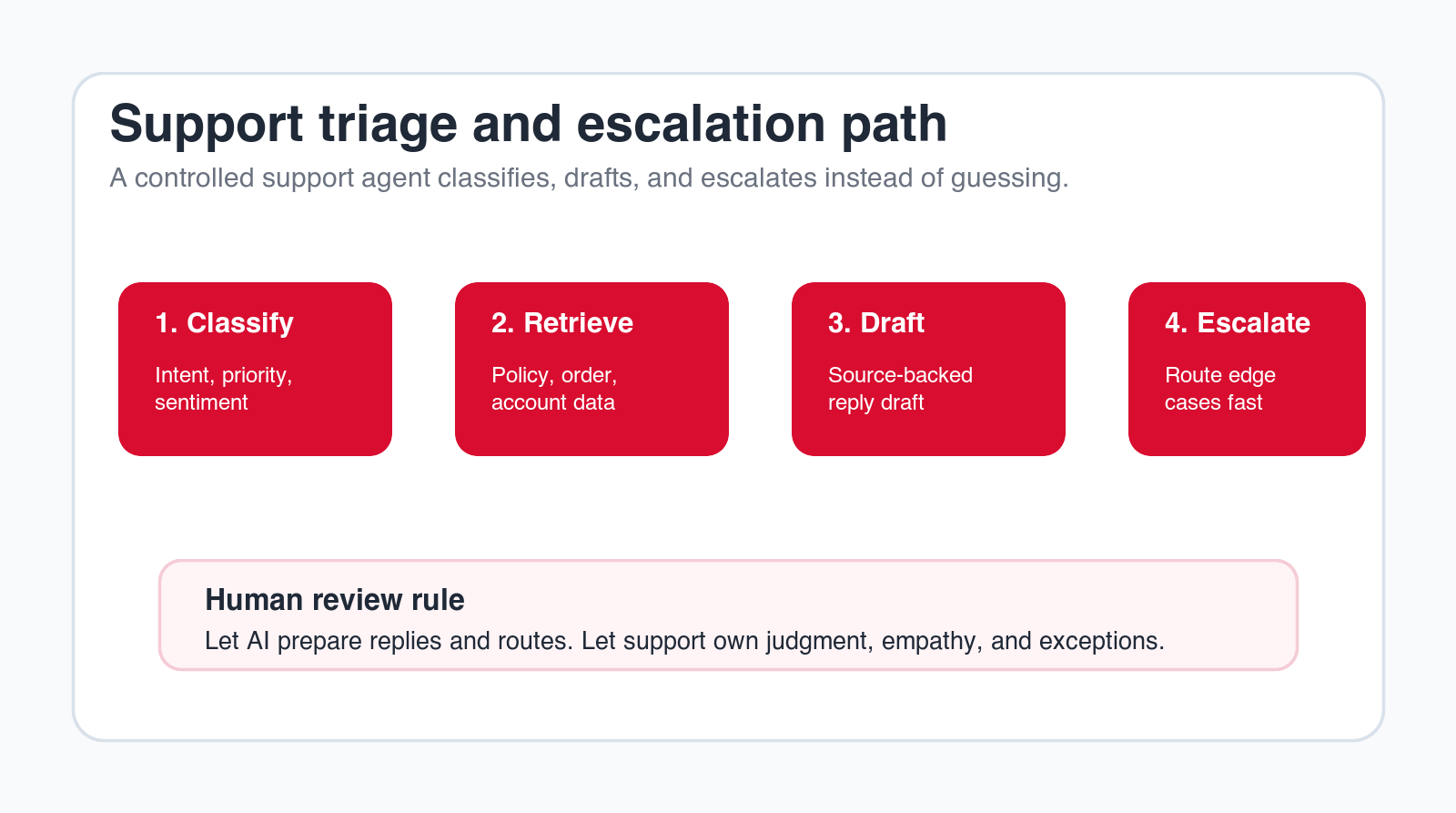
Ticket triage is one of the safest places to start because the AI agent is not deciding the final customer outcome. It reads a new ticket, classifies the intent, estimates urgency, identifies sentiment, checks customer type, and recommends a queue or owner. This reduces manual sorting and helps urgent issues surface earlier.
A good triage agent should identify categories such as billing question, product issue, order status, cancellation request, technical bug, account access, complaint, onboarding help, or feature request. It should also flag risk signals: angry language, high-value customer, repeated contact, refund mention, security issue, legal threat, or an unresolved prior ticket.
The quality guardrail is escalation. The agent should not bury emotional or sensitive tickets in a low-priority queue because the category looks simple. Let AI recommend routing, but define which signals must always go to a human or senior support owner.
2. Knowledge Retrieval for Support Agents
Support teams often know the answer exists somewhere, but they spend time searching help articles, policy docs, product notes, internal wikis, release notes, or old tickets. AI can retrieve likely sources and summarize the relevant answer for the support agent.
This is safer than letting AI answer customers directly because the human still evaluates the result. The agent can show the source, suggest the policy, and explain why it selected that answer. If the knowledge base is outdated or incomplete, the support agent can spot the gap before the customer receives a wrong answer.
The guardrail is source discipline. The AI should cite approved knowledge and avoid improvising. If the agent cannot find a source, it should say so and escalate rather than generating a confident response from weak context.
3. Draft Replies for Common Questions
Reply drafting is useful when support agents answer the same types of questions many times. The AI customer service agent can draft a response using the ticket text, customer history, approved policy, product status, and tone guidelines. The human support agent reviews, edits, and sends the answer.
This can improve consistency and speed, especially for questions about order status, setup instructions, billing explanation, account changes, product behavior, or next-step guidance. The agent should not only generate text. It should include the source it used and any uncertainty it found.
Do not start by letting AI send all replies automatically. A support answer can be technically correct and still feel wrong if the tone ignores frustration or if the customer already tried the suggested step. Human review protects empathy and context while still saving time.
4. Order Status, Account Lookup, and Case Summaries
Many support requests require the same context lookup. The support agent checks account details, subscription status, order history, shipment status, payment state, previous tickets, or internal notes before answering. AI can gather that context and create a short case summary.
This workflow saves time without taking over the decision. The AI agent can say: here is the customer, here is the order, here is the current status, here are the recent contacts, here is the likely issue, and here is the recommended next step. The support agent can then make the judgment call.
The guardrail is account accuracy. The AI should never mix customers, expose private data, or assume identity. Access controls, account matching, and audit logs matter. If account lookup is unreliable, fix that before using AI to draft customer-facing responses.
5. Escalation Routing and Edge-Case Detection
Escalation is where support quality often breaks. A customer has already contacted support twice, the issue is emotional, a refund is requested, a bug is affecting work, or the problem touches security. AI can help detect those signals earlier and route the ticket to the right person.
The agent can flag repeat contact, negative sentiment, account importance, legal terms, cancellation intent, billing disputes, data access concerns, and product outage language. It can also prepare an escalation note so the next owner does not have to reread the whole thread.
This is one of the best quality-protection automations because it does not hide difficult issues. It surfaces them. The business should define escalation rules clearly and review them regularly. Missed escalation is one of the fastest ways automation can damage trust.
6. Agent-Assist Summaries During Live Support
In chat or live support, AI can assist the human agent in real time. It can summarize the conversation so far, suggest a next step, retrieve a knowledge article, identify missing information, or warn that the customer is becoming frustrated. The human agent stays in control.
Agent assist is useful because live support creates cognitive load. The support person is reading, thinking, checking systems, and responding quickly. AI can reduce the search burden and keep the conversation organized. It can also help new support agents follow the right steps without memorizing every policy.
The guardrail is interruption. Too many suggestions can slow the agent down or create noise. The AI should provide concise, relevant help only when it improves the workflow. Measure whether agents accept the suggestions and whether review time goes down.
7. Duplicate Ticket Detection and Thread Linking
Customers often contact support through more than one channel. They might send an email, open a chat, reply to an old thread, and submit a form. Duplicate tickets create confusion, repeated work, and inconsistent answers. AI can detect likely duplicates and recommend thread linking.
This workflow is practical because the agent is not deciding the customer outcome. It is cleaning the support workspace. It can compare customer identity, issue text, order number, timing, previous tickets, and channel source. Then it can suggest which records belong together.
The guardrail is privacy and certainty. The agent should not merge accounts or expose unrelated customer history based on weak similarity. Let it recommend duplicate handling and require human review for anything that changes customer records.
8. Internal Handoff Notes for Product, Engineering, Billing, and Success
Support often has to hand issues to other teams. Product needs bug context. Engineering needs reproduction steps. Billing needs payment details. Customer success needs account risk. Those handoffs are often slow because the support thread is long and messy.
AI can create internal handoff notes with the relevant facts: customer, issue, timeline, steps tried, screenshots or logs referenced, account value, urgency, requested outcome, and open questions. This helps the receiving team act without rereading the whole support history.
The guardrail is factual separation. The AI should distinguish what the customer said, what support confirmed, what is inferred, and what still needs investigation. Internal teams should not receive AI guesses as facts.
Build a quality-first support pilot
Want support automation that does not frustrate customers?
We can map your support workflow, choose the safest first automation, define guardrails, and launch an AI support agent pilot with human review.
We will reply with a practical first-workflow recommendation.
9. Support Quality Review and Coaching Signals
Quality assurance is often limited because managers cannot review every ticket. AI can help by scanning support conversations for missing steps, unresolved issues, policy gaps, tone concerns, escalation misses, repeated contact, and cases where the answer did not match the knowledge source.
This does not replace human coaching. It gives managers a better starting point. The agent can surface tickets worth reviewing and summarize why they matter. A manager can then decide whether the issue is a training gap, policy problem, knowledge gap, product problem, or one-off mistake.
The guardrail is fairness. AI should not be used as a silent performance judge without context. Support quality is nuanced. A difficult customer, broken policy, missing product feature, or unclear documentation can make an agent look worse than they performed. Use AI to find review candidates, not to replace management judgment.
10. Customer Feedback Tagging and Root-Cause Themes
Support tickets contain product and operations intelligence. Customers explain where they get stuck, what confuses them, which policies feel unfair, where onboarding fails, and which issues repeat. AI can tag feedback themes and summarize root causes across support conversations.
The output can help product, operations, marketing, and customer success teams. Instead of only counting ticket volume, the business can see which problems are driving contacts, which help articles are missing, and which workflows create avoidable support load.
The guardrail is aggregation. Do not use AI summaries to expose private customer details broadly. Keep sensitive data out of cross-team reports unless there is a clear business need and permission model. The goal is pattern detection, not uncontrolled data sharing.
11. Support Reporting and Queue Health Summaries
Support reporting often focuses on counts: open tickets, response time, resolution time, backlog, and satisfaction scores. Those metrics matter, but they do not always explain why the queue is unhealthy. AI can prepare queue summaries that combine metrics with issue themes and risk signals.
A useful support report might summarize ticket drivers, repeated issues, high-risk accounts, delayed escalations, emerging product bugs, policy confusion, sentiment shifts, and knowledge gaps. It can also separate problems that support can fix from problems that need product, billing, operations, or leadership decisions.
The guardrail is evidence. AI-generated reports should link back to source data or show examples. Leaders should not make policy decisions from vague summaries. The report should make support more transparent, not turn the queue into a black box.
12. Safe Self-Service Answers for Low-Risk Questions
Self-service automation can work when the question is low risk, the answer is clearly documented, and the customer can easily reach a human. Examples include basic setup steps, shipping status, password reset guidance, plan feature explanation, office hours, document location, or simple how-to instructions.
The self-service agent should be honest about limits. If the customer asks for a refund, legal commitment, security change, angry complaint, account-specific exception, or complex troubleshooting, it should escalate. A good self-service experience is not one that traps the customer. It is one that helps when it can and moves aside when it should.
Start with a narrow self-service scope and measure customer behavior. If customers re-contact support after using the AI answer, the automation may be incomplete or wrong. Repeated contact is a quality signal, not just a ticket metric.
What Not to Automate First
Do not start with workflows where a bad answer creates a serious trust problem. Refund disputes, cancellation saves, account security, legal threats, serious complaints, billing exceptions, high-value customer escalations, data privacy requests, and emotional customer conversations need human ownership.
AI can still assist those workflows. It can summarize the case, retrieve policy, prepare internal notes, identify missing information, and draft a careful response. But the final judgment should stay with a trained support owner. The more sensitive the issue, the more important human review becomes.
Also avoid automating around broken policy. If customers are frustrated because the process is confusing or the policy is unfair, AI will not fix the root cause. It may simply deliver the bad experience faster. Use support automation to reveal those patterns, then improve the process.
Quality Guardrails Every AI Support Agent Needs
A support automation system needs clear guardrails before launch. Define what the agent can read, which sources it can use, which fields it can update, which replies are draft-only, which tickets require human review, and which cases must always escalate.
The knowledge source matters. The agent should rely on approved help articles, policy documents, account data, product status, and internal notes. If the knowledge base is outdated, the AI will scale outdated answers. Before launch, identify the minimum approved source set and create a process for keeping it current.
Logging also matters. The business should know what the AI read, what it recommended, what the human changed, and where errors happened. Without logs, the team cannot improve the workflow. With clear logs, support automation becomes easier to tune and safer to expand.
How to Measure Support Quality After Automation
Measure more than response time. Faster replies are not useful if customers re-open tickets, escalate more often, or feel ignored. Track first-contact resolution, repeat contact, escalation accuracy, draft acceptance, edit rate, customer sentiment, knowledge gaps, missed escalation, and agent feedback.
Draft acceptance is especially useful. If support agents accept most AI drafts with light edits, the workflow is probably helping. If they rewrite everything, the agent may be using weak sources, missing context, or producing the wrong tone. That feedback should improve the workflow.
Customer outcomes matter most. Watch for complaints that mention bots, repeated instructions, inability to reach a person, wrong answers, or irrelevant replies. Those are not just support issues. They are automation quality signals.
Design the Review Queue Before You Automate Replies
The review queue is where AI customer service automation becomes usable or frustrating. If the AI creates drafts but support agents do not know where to approve them, the workflow fails. If the queue is full of low-quality suggestions, agents stop trusting it. If the approval path is slower than writing the reply manually, the automation is not ready.
A practical review queue should show the ticket, customer context, AI draft, source links, risk flags, and recommended next action in one place. The support agent should be able to approve, edit, reject, escalate, or mark the suggestion as wrong. Those actions should feed back into the improvement process so the workflow gets better over time.
Review design should also separate normal cases from sensitive cases. A password reset question, setup guidance request, or shipping status question may need light review. A refund dispute, angry customer, account security issue, or repeated complaint needs stronger human ownership. The queue should make that difference obvious instead of forcing agents to inspect every ticket from scratch.
Set Data Access and Permissions Carefully
Support automation usually needs context from several systems: help desk, CRM, order data, subscription status, product logs, knowledge base, policy documents, and customer history. Giving the AI agent broad access to everything is rarely the right starting point. The safer approach is to define the minimum data required for one workflow.
For ticket triage, the agent may only need ticket text, customer tier, language, prior ticket count, and basic category history. For order status support, it may need order number, shipping state, fulfillment status, and approved policy. For quality review, it may need ticket content and resolution metadata, but not payment details. Keep access narrow until the workflow proves it needs more.
Permissions should also control actions. Reading a support ticket is different from updating an account. Drafting a reply is different from sending it. Flagging a refund request is different from approving the refund. Each permission should match the workflow, and every higher-risk action should have a clear audit trail.
Assign Ownership for Rollout and Maintenance
AI support automation needs an owner after launch. Someone must review performance, inspect failures, update knowledge sources, adjust escalation rules, train support agents, and decide when the workflow is ready to expand. If ownership is unclear, the automation will drift as products, policies, and customer issues change.
The owner does not need to be a developer. It can be a support operations lead, customer success manager, service manager, or founder. What matters is that the owner understands support quality and has enough authority to change the process. They should know which tickets the AI helps with, where review happens, what metrics matter, and when the system should be paused.
Maintenance should be expected, not treated as a failure. New help articles are added. Product behavior changes. Policies shift. Customers ask new questions. Support agents discover edge cases. A healthy AI automation workflow has a path for those updates, so the system stays aligned with the real support operation.
A Practical 90-Day Implementation Plan
In the first thirty days, map the support workflow and choose one pilot. List common ticket types, volume, risk, source quality, current handling time, escalation rules, and support owner. Pick a workflow that is frequent, low to medium risk, and easy to review.
In days thirty to sixty, build and test. Connect the help desk, knowledge source, and minimal account context needed for the pilot. Test real tickets, including messy cases, repeated contacts, missing data, angry language, refunds, and edge cases. The goal is not only to see whether AI answers. The goal is to see whether it knows when not to answer.
In days sixty to ninety, launch to a small support group. Measure draft acceptance, edit effort, missed escalation, customer re-contact, response time, and support agent feedback. Expand only after the workflow improves quality and workload at the same time.
The Minimum Useful Support Agent
The minimum useful support agent should have one trigger, one queue, one approved knowledge source, one primary output, and one review path. For example, it might classify new tickets and draft replies for common billing questions while escalating refund requests. Narrow is better than broad for the first pilot.
What to Avoid in the First Build
Avoid fully automated responses for sensitive cases, broad bots that answer anything, hidden escalation rules, unapproved knowledge sources, and account updates without review. Also avoid measuring only ticket deflection. Deflection can look good while support quality declines.
Questions to Answer Before Launch
- Which ticket types can the AI handle or assist?
- Which sources are approved for answers?
- Which cases require mandatory human review?
- How will customers reach a human when needed?
- What metrics prove support quality stayed strong?
When to Hire an AI Automation Agency for Support
Simple support automations can be built with existing help desk tools when the workflow is clear and low risk. Agency support becomes useful when the workflow crosses systems, uses account data, requires AI agent development, needs escalation design, or must protect support quality across several teams.
A practical AI automation agency should help choose the first workflow, map the current process, define quality guardrails, connect the help desk and knowledge sources, test real tickets, train support users, and measure the pilot. It should not push full automation before the support team trusts the workflow.
The best outcome is a repeatable support automation model: one workflow launched safely, clear rules for human review, measurable quality signals, and a roadmap for the next workflows. That is more valuable than a broad chatbot that looks impressive but creates support risk.
Final Checklist: What to Automate Without Hurting Support Quality
- Automate ticket triage, knowledge retrieval, response drafts, summaries, routing, duplicate detection, handoff notes, QA signals, feedback tagging, reporting, and low-risk self-service first.
- Keep refunds, cancellations, account security, legal issues, emotional complaints, and high-value customer exceptions human-owned.
- Use approved knowledge sources and show the support agent where the answer came from.
- Measure repeat contact, escalation accuracy, draft acceptance, customer sentiment, and missed edge cases, not only response speed.
- Give customers a clear path to a human when the issue is sensitive or unresolved.
- Start with one workflow, prove it, then expand.
AI customer service automation should make support more reliable, not less personal. It should help teams see the right context, find the right source, draft the right answer, and route the right case to the right person.
If the first workflow is narrow, source-backed, and human-reviewed, AI can reduce support load without weakening quality. If the workflow is broad, hidden, and customer-facing before it is ready, the automation can make support feel worse. Start carefully, measure honestly, and expand only after the first pilot earns trust.
Free AI support automation review
Get a first-pass recommendation for your support workflow.
Send your email and we will reply with a practical view of which support workflow should become your first AI automation pilot.
No spam. We use this to reply with the recommendation.
FAQ: AI Customer Service Automation
What is AI customer service automation?
AI customer service automation uses AI agents and workflow automation to support tasks such as ticket triage, knowledge retrieval, response drafting, account lookup, escalation routing, quality review, and reporting.
What should customer service teams automate first?
Start with low-risk, high-volume workflows such as ticket classification, knowledge retrieval, draft replies, duplicate detection, internal handoff notes, and support reporting with human review.
Will AI support automation hurt customer experience?
It can if it hides humans, uses weak knowledge, ignores emotion, or automates sensitive decisions too early. It is safer when AI prepares answers and routes cases while humans own judgment and exceptions.
Should AI send customer replies automatically?
For most first pilots, no. Let AI draft replies from approved sources and let a support agent approve the final answer. Automatic replies should be limited to low-risk questions after testing.
Can Go Expandia build AI support agents?
Yes. Go Expandia can map the support workflow, choose the first automation pilot, build AI support agents, connect help desk systems, design human review, and support rollout.
About Bailey Roque
Bailey Roque writes for Go Expandia on AI automation, AI agent development, workflow design, AI consulting, and practical rollout models for business teams.
Related posts
Keep planning quality-first AI automation
Workflow guide
AI Workflow Automation
See business processes to automate first with AI workflow automation.
Agentic guide
Agentic Workflows
See examples of controlled AI agents across business operations.
Service
AI Agent Development
Build controlled AI agents for support workflows, tools, and approvals.
Ready to Automate Support Without Hurting Quality?
Go Expandia helps companies choose the right support workflow, design safe AI agent behavior, and launch customer service automation with practical human review.